

bVNC: Secure VNC Viewer
امتیاز
Aug 01, 2024آخرین به روزرسانی
v5.0.4نسخه
چگونگی نصب فایل XAPK / APK
اشتراک گذاری
درباره bVNC: Secure VNC Viewer
Need bVNC on iOS or Mac OS X? Now available at
https://apps.apple.com/ca/app/bvnc-pro/id1506461202
Please support my work and GPL open-source software by buying the donation version of this program called bVNC Pro!
Release notes:
https://github.com/iiordanov/remote-desktop-clients/blob/master/bVNC/CHANGELOG-bVNC
Older versions:
https://github.com/iiordanov/remote-desktop-clients/releases
Report bugs:
https://github.com/iiordanov/remote-desktop-clients/issues
If you have questions, please don't post a negative review, rather ask your question on the forum so everybody benefits
https://groups.google.com/forum/#!forum/bvnc-ardp-aspice-opaque-remote-desktop-clients
Check out my RDP Client, aRDP
https://play.google.com/store/apps/details?id=com.iiordanov.freeaRDP
For Proxmox and oVirt, get Opaque
https://play.google.com/store/apps/details?id=com.undatech.opaque
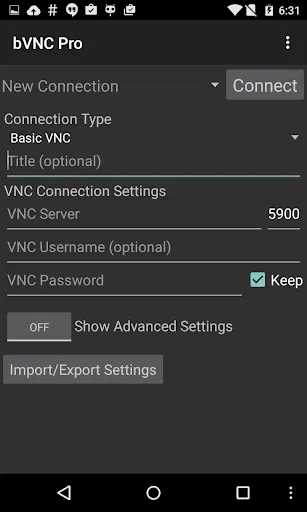
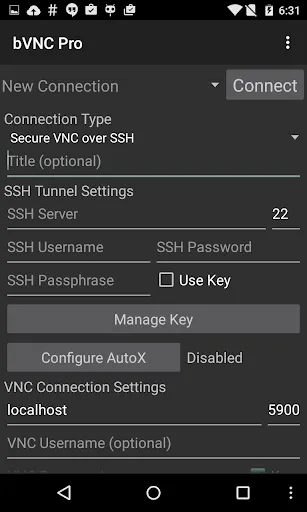
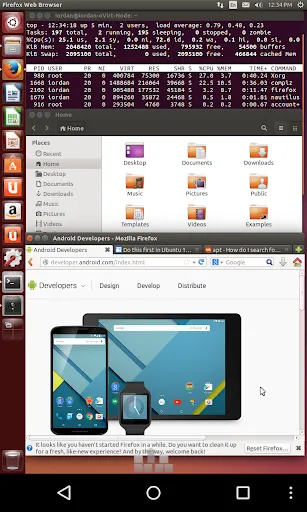
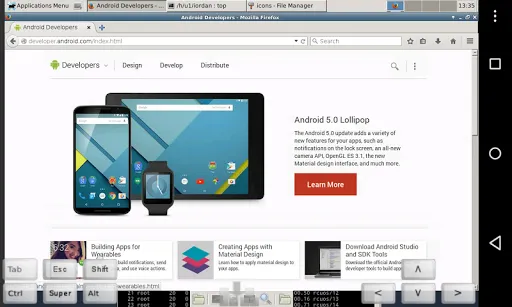
bVNC is a secure, open source VNC client. Its features include:
- Windows, Mac, Linux, BSD, or any other OS with a VNC server installed
- Master password support in the Pro version
- Multi-factor (two-factor) SSH authentication in the Pro version
- Multi-touch control over the remote mouse. One finger tap left-clicks, two-finger tap right-clicks, and three-finger tap middle-clicks
- Left, right and middle button drag/drop if you don't lift the first finger that tapped
- Scrolling with a two-finger drag
- Pinch-zoom
- Force Landscape, Immersive Mode, Keep Screen Awake
- Dynamic resolution changes, allowing you to reconfigure your desktop while connected, and control over virtual machines from BIOS to OS
- Full rotation
- Multi-language
- Full mouse support
- Full desktop visibility even with soft keyboard extended
- SSH tunneling, AnonTLS and VeNCrypt for secure connections (does not support RealVNC encryption).
- High-grade encryption superior to RDP using SSH and VeNCrypt (x509 certificates and SSL), preventing man-in-the-middle attacks
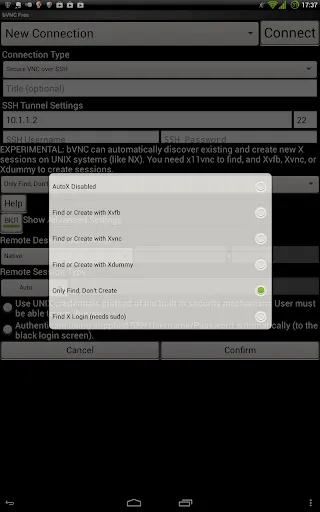
- AutoX session discovery/creation like NX client
- Tight and CopyRect encodings for quick updates
- Ability to reduce the color depth over slow links
- Copy/paste integration
- Samsung DEX, Alt-Tab, Start Button capture
- Ctrl+Space capture
- SSH public/private (pubkey)
- Importing encrypted/unencrypted RSA keys in PEM format
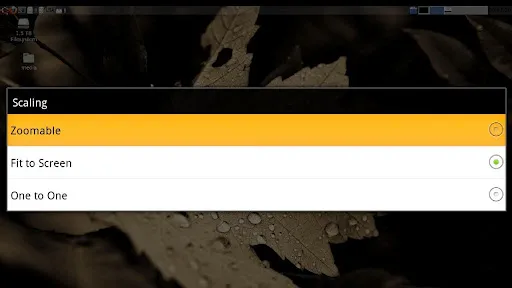
- Zoomable, Fit to Screen, and One to One scaling modes
- Two Direct, one Simulated Touchpad, and one Single-handed input modes
- In single-handed input mode, long-tap to get a choice of clicks, drag modes, scroll, and zoom
- Supports most VNC servers including TightVNC, UltraVNC, TigerVNC, and RealVNC
- Supports Mac OS X built-in remote desktop server (ARD) and Mac OS X authentication
- Does NOT support RealVNC encryption (use VNC over SSH or VeNCrypt instead)
- Stowable on-screen keys
- Right-click with Back button
- D-pad for arrows, rotate D-pad
- Hardware/FlexT9 keyboard support
- View-only mode
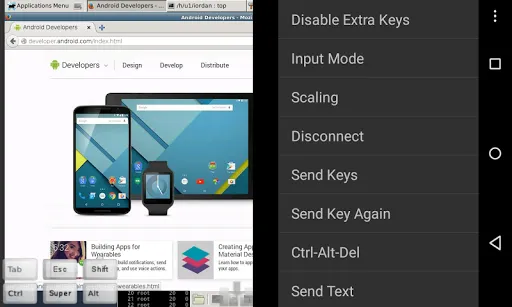
- In-app help on usage, connection setup and input modes (see in-app Menu)
- Hacker's Keyboard recommended
- Instructions for Windows:
Plain VNC:
http://iiordanov.blogspot.ca/2012/04/how-to-install-and-connect-to-tightvnc.html
Secure VNC over VeNCrypt:
https://groups.google.com/d/msg/bvnc-ardp-aspice-opaque-remote-desktop-clients/c9ptU7UekE4/rOzNlkiaEgAJ
Secure VNC over SSH:
http://iiordanov.blogspot.ca/2012/04/tunneling-vnc-over-ssh-to-windows.html
- Instructions for Linux:
Plain VNC (Remote Desktop on Ubuntu):
NOTE: To use Vino (default Ubuntu VNC Server), first run:
gsettings set org.gnome.Vino require-encryption false
http://www.howtoforge.com/configure-remote-access-to-your-ubuntu-desktop
AutoX Secure VNC over SSH:
http://iiordanov.blogspot.ca/2012/10/looking-for-nx-client-for-android-or.html
- Instructions for Mac OS X Remote Desktop:
http://iiordanov.blogspot.ca/2012/04/how-to-connect-to-mac-os-x-using-bvnc.html
Secure VNC over SSH:
http://iiordanov.blogspot.ca/2012/04/tunneling-vnc-over-ssh-to-mac-os-x.html
Code
https://github.com/iiordanov/remote-desktop-clients
https://apps.apple.com/ca/app/bvnc-pro/id1506461202
Please support my work and GPL open-source software by buying the donation version of this program called bVNC Pro!
Release notes:
https://github.com/iiordanov/remote-desktop-clients/blob/master/bVNC/CHANGELOG-bVNC
Older versions:
https://github.com/iiordanov/remote-desktop-clients/releases
Report bugs:
https://github.com/iiordanov/remote-desktop-clients/issues
If you have questions, please don't post a negative review, rather ask your question on the forum so everybody benefits
https://groups.google.com/forum/#!forum/bvnc-ardp-aspice-opaque-remote-desktop-clients
Check out my RDP Client, aRDP
https://play.google.com/store/apps/details?id=com.iiordanov.freeaRDP
For Proxmox and oVirt, get Opaque
https://play.google.com/store/apps/details?id=com.undatech.opaque
bVNC is a secure, open source VNC client. Its features include:
- Windows, Mac, Linux, BSD, or any other OS with a VNC server installed
- Master password support in the Pro version
- Multi-factor (two-factor) SSH authentication in the Pro version
- Multi-touch control over the remote mouse. One finger tap left-clicks, two-finger tap right-clicks, and three-finger tap middle-clicks
- Left, right and middle button drag/drop if you don't lift the first finger that tapped
- Scrolling with a two-finger drag
- Pinch-zoom
- Force Landscape, Immersive Mode, Keep Screen Awake
- Dynamic resolution changes, allowing you to reconfigure your desktop while connected, and control over virtual machines from BIOS to OS
- Full rotation
- Multi-language
- Full mouse support
- Full desktop visibility even with soft keyboard extended
- SSH tunneling, AnonTLS and VeNCrypt for secure connections (does not support RealVNC encryption).
- High-grade encryption superior to RDP using SSH and VeNCrypt (x509 certificates and SSL), preventing man-in-the-middle attacks
- AutoX session discovery/creation like NX client
- Tight and CopyRect encodings for quick updates
- Ability to reduce the color depth over slow links
- Copy/paste integration
- Samsung DEX, Alt-Tab, Start Button capture
- Ctrl+Space capture
- SSH public/private (pubkey)
- Importing encrypted/unencrypted RSA keys in PEM format
- Zoomable, Fit to Screen, and One to One scaling modes
- Two Direct, one Simulated Touchpad, and one Single-handed input modes
- In single-handed input mode, long-tap to get a choice of clicks, drag modes, scroll, and zoom
- Supports most VNC servers including TightVNC, UltraVNC, TigerVNC, and RealVNC
- Supports Mac OS X built-in remote desktop server (ARD) and Mac OS X authentication
- Does NOT support RealVNC encryption (use VNC over SSH or VeNCrypt instead)
- Stowable on-screen keys
- Right-click with Back button
- D-pad for arrows, rotate D-pad
- Hardware/FlexT9 keyboard support
- View-only mode
- In-app help on usage, connection setup and input modes (see in-app Menu)
- Hacker's Keyboard recommended
- Instructions for Windows:
Plain VNC:
http://iiordanov.blogspot.ca/2012/04/how-to-install-and-connect-to-tightvnc.html
Secure VNC over VeNCrypt:
https://groups.google.com/d/msg/bvnc-ardp-aspice-opaque-remote-desktop-clients/c9ptU7UekE4/rOzNlkiaEgAJ
Secure VNC over SSH:
http://iiordanov.blogspot.ca/2012/04/tunneling-vnc-over-ssh-to-windows.html
- Instructions for Linux:
Plain VNC (Remote Desktop on Ubuntu):
NOTE: To use Vino (default Ubuntu VNC Server), first run:
gsettings set org.gnome.Vino require-encryption false
http://www.howtoforge.com/configure-remote-access-to-your-ubuntu-desktop
AutoX Secure VNC over SSH:
http://iiordanov.blogspot.ca/2012/10/looking-for-nx-client-for-android-or.html
- Instructions for Mac OS X Remote Desktop:
http://iiordanov.blogspot.ca/2012/04/how-to-connect-to-mac-os-x-using-bvnc.html
Secure VNC over SSH:
http://iiordanov.blogspot.ca/2012/04/tunneling-vnc-over-ssh-to-mac-os-x.html
Code
https://github.com/iiordanov/remote-desktop-clients
تصاویر bVNC: Secure VNC Viewer
نسخههای قدیمی bVNC: Secure VNC Viewer





پیشنهاد ویرایشگر


برنامههای مشابه bVNC: Secure VNC Viewer


برنامههای توسط Iordan Iordanov (Undatech)


bVNC: Secure VNC Viewer FAQ
چگونه می توانم bVNC: Secure VNC Viewer را از PGYER APK HUB دانلود کنم؟
آیا bVNC: Secure VNC Viewer در PGYER APK HUB رایگان برای دانلود است؟
آیا برای دانلود bVNC: Secure VNC Viewer از PGYER APK HUB نیاز به حساب کاربری دارم؟
چگونه می توانم یک مشکل با bVNC: Secure VNC Viewer در PGYER APK HUB گزارش دهم؟
آیا این را مفید یافتید؟
بله
خیر
نظرات کاربران
+ نقد و بررسی
4.6
5
4
3
2
1
T
TechGuru42
2025-01-05
25
0
bVNC: Secure VNC Viewer is incredibly reliable for remote access. The security features give me peace of mind while working with sensitive data.
S
SarahM
2024-12-18
18
0
Best VNC client I've used! bVNC: Secure VNC Viewer maintains stable connections even on slower networks. Highly recommend!
R
RemotePro
2024-11-25
29
0
The encryption in bVNC: Secure VNC Viewer sets it apart. Finally a VNC solution that prioritizes security without sacrificing performance.
پرطرفدارترین

Finger Football
Gamotronix

Talking Pierre the Parrot
Outfit7 Limited

Tips Dream League Soccer 2017
amorphisnguyen

Poppo Live
Poppo Team

StarMaker: Sing Karaoke Songs
SKYWORK AI PTE. LTD.

CookieRun: OvenBreak
Devsisters Corporation

Netflix
Netflix, Inc.

TikTok
TikTok Pte. Ltd.

Legend of Solgard
Snowprint Studios AB

X
X Corp.

Clash Royale
Supercell

Plague Inc.
Ndemic Creations

Relic Bag: Shadow Hunter
Fansipan Limited

PUBG MOBILE
Level Infinite

Red Dead redemption 2 Mobile
Tarik EL hamdi

War Thunder Mobile
GAIJIN NETWORK LTD

Off Road 4x4 Driving Simulator
Azur Interactive Games Limited

Call of Duty: Warzone Mobile
Activision Publishing, Inc.

GunboundM
DargomStudio

Car Parking Multiplayer 2
olzhass

Marvel Spider Man
Welcome to the Marvel Spider-Man APK, your gateway to the exciting world of Spider-Man, now adapted

Pure Sniper: Gun Shooter Games
Miniclip.com

Shadow Fight 2 Special Edition
NEKKI

Miracle City 2
DroidHen