
SMS forwarder auto to PC/phone
Évaluation
Jul 27, 2024Dernière mise à jour
8.3.4Version
À propos de SMS forwarder auto to PC/phone
This is an app that can synchronize SMS or Notification between multiple devices(PC, Phone).
Attention! The application is not designed to intercept other people's SMS, will not allow you to access the SMS of your spouse, lost phone, and so on
Brief instructions on how to get started:
1. Install the app and complete the initial app setup (don't skip the steps)
2. Register an account, confirm your e-mail and log in
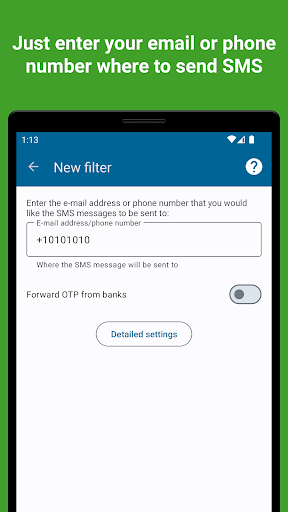
3. In the window that appears, enter the phone number or e-mail where you want to forward your SMS
For more detailed settings, check out our help site (https://sms-forwarder.com/support/) and the application interface
What kinds of messages our application can forward:
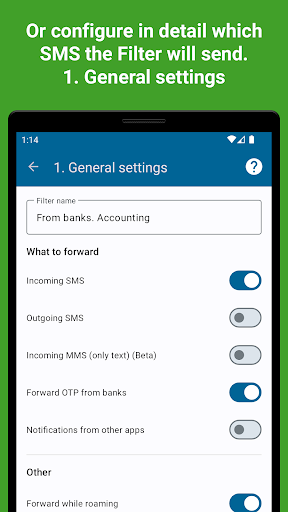
— SMS. Select whether incoming or outgoing SMS messages will be forwarded or both
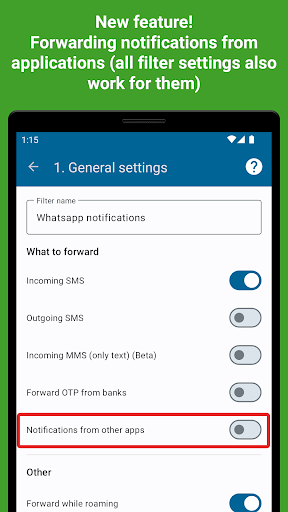
— Notifications. All notifications or just some apps
— MMS (so far only text)
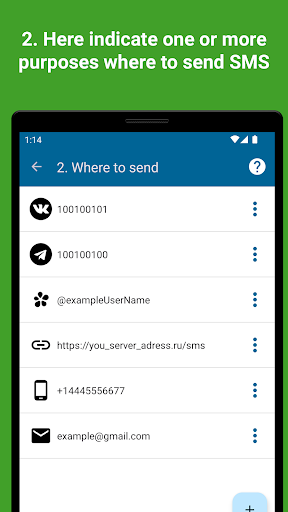
Where you can send messages:
— To another phone number. Forwarding is carried out through your phone, be careful, your mobile operator may charge a fee for sending SMS
— To e-mail. Several options are available for sending SMS to PC mail: via our server, via GMail API, via any SMTP server
— In Telegram. You can send SMS and other messages to private messages or group chats in telegram through our bot or your own (bypassing our server).
— In ICQ. Send messages through our server to private messages or group chats in ICQ
— In Vkontakte. Redirect messages to private messages or group conversations
— To any URL. Send message data to your personal server according to the data format. You can do anything with these messages on your server
— WeChat (Under development)
Application Features:
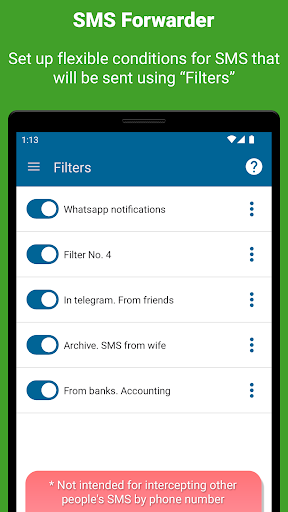
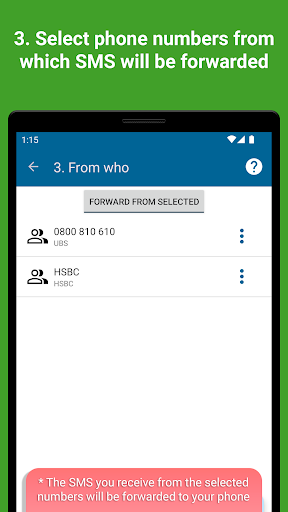
— Forward SMS from specific contacts/applications. You can configure from which of your contacts SMS will be forwarded or from which applications notifications will be redirected.
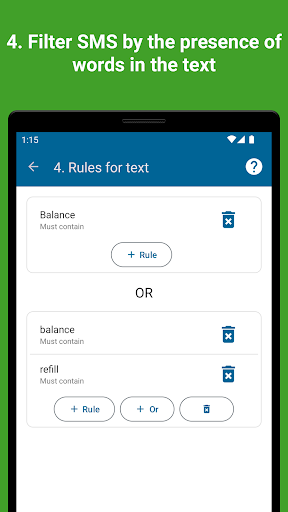
Set text rules. Define messages containing or not containing which words/phrases will be automatically sent
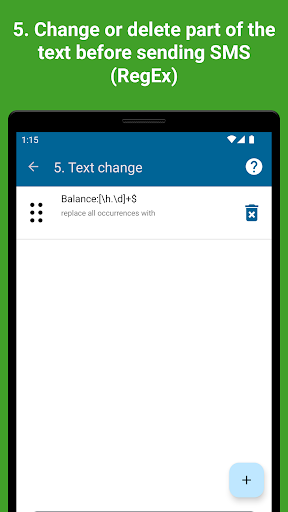
— You can set RegEx (special) rules to change the text of messages before forwarding them to a PC or elsewhere
— Roaming. Specify whether the application should work in roaming to save traffic
— Support for two SIM cards. Choose whether to send SMS from only one SIM card or from both, if they are installed in the phone
— Message templates. You can set the look that suits you how the redirected messages will look. Specify additional data such as sender number, departure time, message type and so on
— OTP. The application provides a separate option to enable/disable OTP forwarding from banks
— Password protection. You can set a password that will not allow other people to enter the application and view its settings
Free version
The application is distributed according to the freemium model. You will have access to a limited free version that allows you to create one simple filter (no advanced settings)
Trial version
All new users get a week's access to the premium version. You will not be charged at the end of this period. You decide whether to purchase a subscription or not.
Premium
By purchasing an in-app subscription, you will have full access to all features. You can see the current prices for your region inside the application.
The most important permissions required by the app
RECEIVE_SMS and READ_SMS - to access SMS/main application function
RECEIVE_WAP_PUSH - to access WAP PUSH messages
SEND_SMS - to send SMS to phone
LISTENER_NOTIFICATION - to access notifications
Attention! The application is not designed to intercept other people's SMS, will not allow you to access the SMS of your spouse, lost phone, and so on
Brief instructions on how to get started:
1. Install the app and complete the initial app setup (don't skip the steps)
2. Register an account, confirm your e-mail and log in
3. In the window that appears, enter the phone number or e-mail where you want to forward your SMS
For more detailed settings, check out our help site (https://sms-forwarder.com/support/) and the application interface
What can an app do?
What kinds of messages our application can forward:
— SMS. Select whether incoming or outgoing SMS messages will be forwarded or both
— Notifications. All notifications or just some apps
— MMS (so far only text)
Where you can send messages:
— To another phone number. Forwarding is carried out through your phone, be careful, your mobile operator may charge a fee for sending SMS
— To e-mail. Several options are available for sending SMS to PC mail: via our server, via GMail API, via any SMTP server
— In Telegram. You can send SMS and other messages to private messages or group chats in telegram through our bot or your own (bypassing our server).
— In ICQ. Send messages through our server to private messages or group chats in ICQ
— In Vkontakte. Redirect messages to private messages or group conversations
— To any URL. Send message data to your personal server according to the data format. You can do anything with these messages on your server
— WeChat (Under development)
Application Features:
— Forward SMS from specific contacts/applications. You can configure from which of your contacts SMS will be forwarded or from which applications notifications will be redirected.
Set text rules. Define messages containing or not containing which words/phrases will be automatically sent
— You can set RegEx (special) rules to change the text of messages before forwarding them to a PC or elsewhere
— Roaming. Specify whether the application should work in roaming to save traffic
— Support for two SIM cards. Choose whether to send SMS from only one SIM card or from both, if they are installed in the phone
— Message templates. You can set the look that suits you how the redirected messages will look. Specify additional data such as sender number, departure time, message type and so on
— OTP. The application provides a separate option to enable/disable OTP forwarding from banks
— Password protection. You can set a password that will not allow other people to enter the application and view its settings
Is the application paid?
Free version
The application is distributed according to the freemium model. You will have access to a limited free version that allows you to create one simple filter (no advanced settings)
Trial version
All new users get a week's access to the premium version. You will not be charged at the end of this period. You decide whether to purchase a subscription or not.
Premium
By purchasing an in-app subscription, you will have full access to all features. You can see the current prices for your region inside the application.
The most important permissions required by the app
RECEIVE_SMS and READ_SMS - to access SMS/main application function
RECEIVE_WAP_PUSH - to access WAP PUSH messages
SEND_SMS - to send SMS to phone
LISTENER_NOTIFICATION - to access notifications
Jouabilité
Captures d'écran de SMS forwarder auto to PC/phone
Anciennes versions de SMS forwarder auto to PC/phone


Recommandation de l'éditeur


Applications similaires à SMS forwarder auto to PC/phone


Applications par gawk

SMS forwarder auto to PC/phone FAQ
Comment télécharger SMS forwarder auto to PC/phone depuis PGYER APK HUB?
Est-ce que le SMS forwarder auto to PC/phone sur PGYER APK HUB est gratuit?
Ai-je besoin d'un compte pour télécharger SMS forwarder auto to PC/phone depuis PGYER APK HUB?
Comment puis-je signaler un problème avec SMS forwarder auto to PC/phone sur PGYER APK HUB?
Avez-vous trouvé cela utile
Oui
Non
Avis des utilisateurs
+ Avis
4.3
5
4
3
2
1
T
TechGuru2020
2019-12-11
0
0
I've been using the SMS Forwarder Auto to PC/Phone app for a while now. It's a decent tool for managing text messages on my phone and PC. The interface is user-friendly, but I wish there were more customization options. Overall, it gets the job done, though I hope future updates add more features to enhance its functionality.
Les plus populaires

Downloader by AFTVnews
AFTVnews.com

Character AI: AI-Powered Chat
Character.AI

Google Chrome
Google LLC

YouTube
Google LLC

X
X Corp.

Telegram
Telegram FZ-LLC

Netflix
Netflix, Inc.

Tubi: Movies & Live TV
Tubi TV

Disney+
Disney

VPN Proton: Fast & Secure VPN
Proton AG

Microsoft 365 (Office)
Microsoft Corporation

Reddit
reddit Inc.

Signal Private Messenger
Signal Foundation

Vinted - Buy and sell clothes
Vinted

Grand Theft Auto: San Andreas
Rockstar Games

Football League 2024
MOBILE SOCCER

Toca Life World: Build a Story
Toca Boca

EA SPORTS FC™ Mobile Soccer
ELECTRONIC ARTS

Roblox
Roblox Corporation

Free Fire MAX
Garena International I

PUBG MOBILE LITE
Level Infinite

Fortnite
Epic Games, Inc

Free Fire: The Chaos
Garena International I

Block Blast!
Hungry Studio