
2FA Hub for Samsung Watches
Évaluation
Jun 16, 2024Dernière mise à jour
3.4.5Version
À propos de 2FA Hub for Samsung Watches
This is an alternative to 2FA stock Authenticator (GA), which is based on Time-based One Time Password (TOTP). It integrated well with Samsung's Gear Authenticator Client (GAC) app, which is available in Samsung's App Store since 2015. It has rich backup/restore capabilities, including local phone storage and Google Drive. The latter is very handy for syncing GA accounts on multiple Android devices.
The application can be started locally on Android or remotely from a Gear or Galaxy Watch device. Having a Gear device is not required though. To start it from your Gear device, select "Connect to Phone" menu in GAC application. After the Gear device is connected, many options are available for transferring data between devices. A new account can be created by scanning a QR bar code or by entering a secret manually.
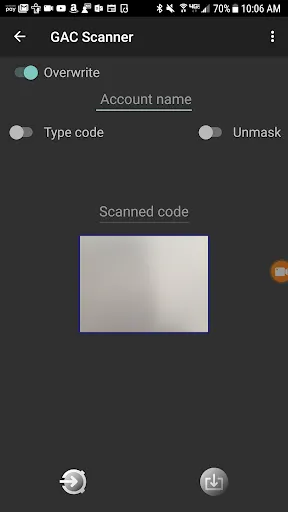
After the QR code scanned or entered manually, you can either send it to Gear by tapping "Send to Gear" button or save it on your phone using "Save" button.
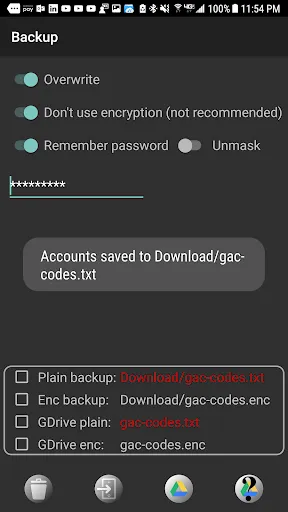
If "Overwrite" checkbox is checked, an existing account will be updated with a new secret or a new one will be created if an account with this name didn't exist.
Gear's GAC application should be in a waiting state to be able to receive any messages from the phone. It means that all communications with the phone are possible only after "Connect to Phone" menu is tapped in your Gear GAC app and while a connection dialog is open.
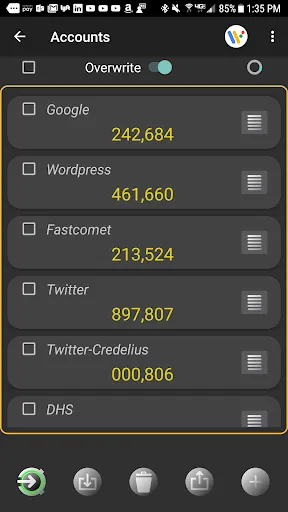
GA Accounts page shows all accounts created by GAC app and stored on the Android phone.
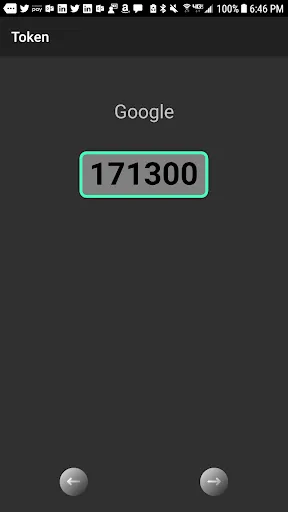
Tapping an account's name or token on the accounts page will open a zoomed view for a single account. A token in the zoomed view will be updated automatically when an old token is expired. Accounts can be scrolled on this page using left and right arrows.
Press an account editing button on the right to change a shared secret or an account name, or both.
By default accounts are sorted in alphabetical order. Long press an account name and drag it to a new place If you want to change the order.
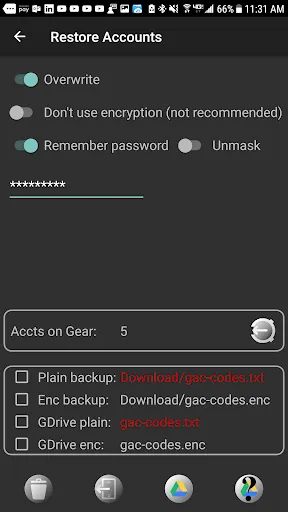
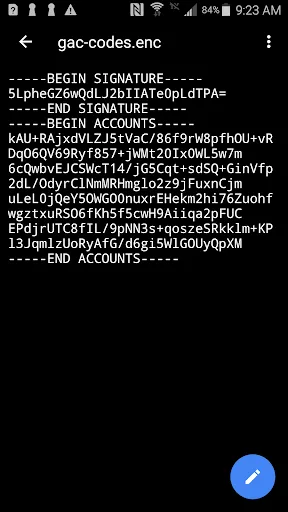
Accounts can be saved to and restored from an unencrypted or encrypted backup file stored in a local phone's storage or on Google Drive. Encryption is based on a password provided by a user. Encrypted backup will be signed with an HMAC signature to make sure that a backup is not corrupted during a restore operation. Unencrypted and password-less backups are available as well, but not recommended.
This application serves ads, but only for those users who use it without a watch. Ads will not be served any more after at least one successful connection has been made from a watch.
Detailed instructions can be found here: https://credelius.com/credelius/?p=241
The application can be started locally on Android or remotely from a Gear or Galaxy Watch device. Having a Gear device is not required though. To start it from your Gear device, select "Connect to Phone" menu in GAC application. After the Gear device is connected, many options are available for transferring data between devices. A new account can be created by scanning a QR bar code or by entering a secret manually.
After the QR code scanned or entered manually, you can either send it to Gear by tapping "Send to Gear" button or save it on your phone using "Save" button.
If "Overwrite" checkbox is checked, an existing account will be updated with a new secret or a new one will be created if an account with this name didn't exist.
Gear's GAC application should be in a waiting state to be able to receive any messages from the phone. It means that all communications with the phone are possible only after "Connect to Phone" menu is tapped in your Gear GAC app and while a connection dialog is open.
GA Accounts page shows all accounts created by GAC app and stored on the Android phone.
Tapping an account's name or token on the accounts page will open a zoomed view for a single account. A token in the zoomed view will be updated automatically when an old token is expired. Accounts can be scrolled on this page using left and right arrows.
Press an account editing button on the right to change a shared secret or an account name, or both.
By default accounts are sorted in alphabetical order. Long press an account name and drag it to a new place If you want to change the order.
Accounts can be saved to and restored from an unencrypted or encrypted backup file stored in a local phone's storage or on Google Drive. Encryption is based on a password provided by a user. Encrypted backup will be signed with an HMAC signature to make sure that a backup is not corrupted during a restore operation. Unencrypted and password-less backups are available as well, but not recommended.
This application serves ads, but only for those users who use it without a watch. Ads will not be served any more after at least one successful connection has been made from a watch.
Detailed instructions can be found here: https://credelius.com/credelius/?p=241
Captures d'écran de 2FA Hub for Samsung Watches
Anciennes versions de 2FA Hub for Samsung Watches





Recommandation de l'éditeur


Applications similaires à 2FA Hub for Samsung Watches


Applications par Credelius
2FA Hub for Samsung Watches FAQ
Comment télécharger 2FA Hub for Samsung Watches depuis PGYER APK HUB?
Est-ce que le 2FA Hub for Samsung Watches sur PGYER APK HUB est gratuit?
Ai-je besoin d'un compte pour télécharger 2FA Hub for Samsung Watches depuis PGYER APK HUB?
Comment puis-je signaler un problème avec 2FA Hub for Samsung Watches sur PGYER APK HUB?
Avez-vous trouvé cela utile
Oui
Non
Avis des utilisateurs
+ Avis
4.4
5
4
3
2
1
R
Ronald
2025-03-06
11
0
2FA Hub for Samsung Watches is a game-changer! It makes managing two-factor authentication on my Samsung Watch so easy and convenient.
E
Elaine
2025-02-21
9
0
I love how seamless 2FA Hub for Samsung Watches integrates with my device. It’s a must-have for anyone using a Samsung Watch.
A
Angel
2025-02-02
27
0
2FA Hub for Samsung Watches has simplified my life. No more pulling out my phone every time I need a 2FA code!
Les plus populaires

Disney Speedstorm
Gameloft SE

Royal Match
Dream Games, Ltd.

Angry Birds Journey
Rovio Entertainment Corporation

Bad 2 Bad: Delta
DAWINSTONE GAMES

Super Mario Odyssey
Super Mario Odyssey APK - Explore the World Like Never Before!
Embark on an exhilarating adventure w

Mobile Legends: Bang Bang FT
Công ty cổ phần phát triển công nghệ số Hồng Hà

Crunchyroll: Wolfstride
Crunchyroll, LLC

Car Parking Multiplayer 2
olzhass

Legend of Solgard
Snowprint Studios AB

Soccer Superstar
Real Freestyle Soccer

Clash Royale
Supercell

Hollow Knight: Mobile
ONLİNE GAMES MMMORG

Red Dead redemption 2 Mobile
Tarik EL hamdi

PUBG MOBILE
Level Infinite

Pure Sniper: Gun Shooter Games
Miniclip.com

Hole.io
VOODOO

GunboundM
DargomStudio

Plague Inc.
Ndemic Creations

Relic Bag: Shadow Hunter
Fansipan Limited

Call of Duty: Warzone Mobile
Activision Publishing, Inc.

Delta Force
Level Infinite

War Thunder Mobile
GAIJIN NETWORK LTD

Shadow Fight 2 Special Edition
NEKKI

Once Human
Exptional Global