

Advanced Task Manager
Évaluation
Jun 16, 2024Dernière mise à jour
6.4.5Version
À propos de Advanced Task Manager
Works on Android Nougat 7.0 with latest system update!!
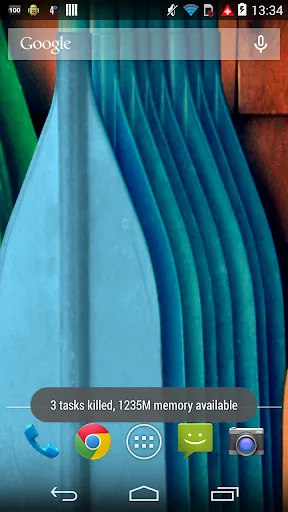
Kill tasks, free memory, speed up phone, save battery life, 1 tap boost your phone.
■ Feature
-----------------------------
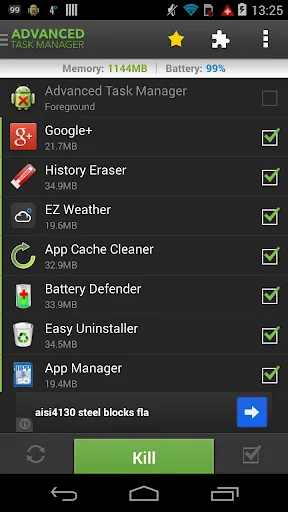
• Kill selected tasks
• RAM Cleaner
• CPU lagging monitor, remind if CPU lagged by some apps
• App or game killer
• Android optimizer
• Ignore apps when kill tasks
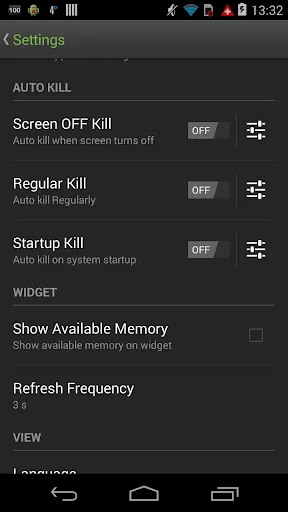
• Auto kill tasks on every screen off
• Regular kill
• Startup Kill
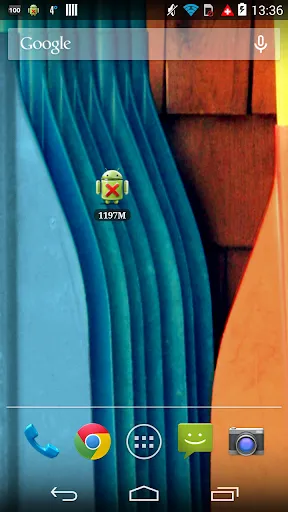
• One click task kill widget
• Quick uninstaller
• Show battery life
• Support most android versions
• Kill GPS: Kill apps to stop GPS
• Memory Booster
■ Description
-----------------------------
The Advanced Task Manager can list all the running tasks on your phone and it can help you stop any of the tasks easily and quickly. It is also a task management tool which can manage all the installed apps on your phone.
The task management mechanism of android system has been changed after the release of the version 2.2 of the android system. Task killers cannot kill the services and notifications on your phone.
By use of the Advanced Task Manager, you can thoroughly stop tasks in the following steps:
1) long press the task that you want to stop
2) chose the “force stop” option
3) press the the “force stop” button on the application info system panel
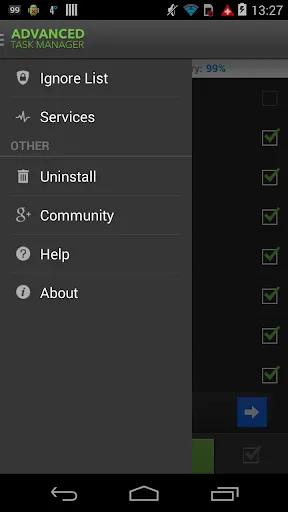
If you want to manage running services, click menu->service, then it will open the system service panel where you can stop running services.
Please note that installing other task manager or task killer tools may make your phone unstable or cause potential conflict.
■ FAQ
-----------------------------
Q: Why do apps restart again after killing?
A: Some apps are restarted by system events. Apps cannot be prevented from restarting because of system limitation. We suggest you to enable auto kill in settings, and it will kill tasks on every screen off. It will help to save battery life and release memory for the phone.
Q: How can I add apps to the ignore list?
A: You can long press the task that you want to ignore, and then you will get a pop up context menu, click "Ignore". The ignored apps will not be shown in the task list, and will never be killed. You can manage the ignored apps in settings.
Q: How can I manage startup apps?
There is "Startup Kill" in settings. It can help you to kill tasks when system starts up.
■ Trademark
-----------------------------
The Android robot is modified from work created and shared by Google and used according to terms described in the Creative Commons 3.0 Attribution License.
Kill tasks, free memory, speed up phone, save battery life, 1 tap boost your phone.
■ Feature
-----------------------------
• Kill selected tasks
• RAM Cleaner
• CPU lagging monitor, remind if CPU lagged by some apps
• App or game killer
• Android optimizer
• Ignore apps when kill tasks
• Auto kill tasks on every screen off
• Regular kill
• Startup Kill
• One click task kill widget
• Quick uninstaller
• Show battery life
• Support most android versions
• Kill GPS: Kill apps to stop GPS
• Memory Booster
■ Description
-----------------------------
The Advanced Task Manager can list all the running tasks on your phone and it can help you stop any of the tasks easily and quickly. It is also a task management tool which can manage all the installed apps on your phone.
The task management mechanism of android system has been changed after the release of the version 2.2 of the android system. Task killers cannot kill the services and notifications on your phone.
By use of the Advanced Task Manager, you can thoroughly stop tasks in the following steps:
1) long press the task that you want to stop
2) chose the “force stop” option
3) press the the “force stop” button on the application info system panel
If you want to manage running services, click menu->service, then it will open the system service panel where you can stop running services.
Please note that installing other task manager or task killer tools may make your phone unstable or cause potential conflict.
■ FAQ
-----------------------------
Q: Why do apps restart again after killing?
A: Some apps are restarted by system events. Apps cannot be prevented from restarting because of system limitation. We suggest you to enable auto kill in settings, and it will kill tasks on every screen off. It will help to save battery life and release memory for the phone.
Q: How can I add apps to the ignore list?
A: You can long press the task that you want to ignore, and then you will get a pop up context menu, click "Ignore". The ignored apps will not be shown in the task list, and will never be killed. You can manage the ignored apps in settings.
Q: How can I manage startup apps?
There is "Startup Kill" in settings. It can help you to kill tasks when system starts up.
■ Trademark
-----------------------------
The Android robot is modified from work created and shared by Google and used according to terms described in the Creative Commons 3.0 Attribution License.
Jouabilité
Captures d'écran de Advanced Task Manager
Anciennes versions de Advanced Task Manager






Recommandation de l'éditeur


Applications similaires à Advanced Task Manager


Applications par INFOLIFE LLC


Advanced Task Manager FAQ
Comment télécharger Advanced Task Manager depuis PGYER APK HUB?
Est-ce que le Advanced Task Manager sur PGYER APK HUB est gratuit?
Ai-je besoin d'un compte pour télécharger Advanced Task Manager depuis PGYER APK HUB?
Comment puis-je signaler un problème avec Advanced Task Manager sur PGYER APK HUB?
Avez-vous trouvé cela utile
Oui
Non
Avis des utilisateurs
+ Avis
4.9
5
4
3
2
1
E
EfficientUser
2018-09-03
0
0
Advanced Task Manager does exactly what its name suggests, making it a reliable tool for managing tasks.
J
JakubTech
2018-08-23
0
0
Advanced Task Manager works well, performing its functions efficiently.
L
LarryLovesApps
2018-03-28
0
0
I am extremely fond of Advanced Task Manager. It has significantly improved my app management experience.
Les plus populaires

eFootball™ 2024
KONAMI

Football - Offline Game
Yahaha Studio

Tips Dream League Soccer 2017
amorphisnguyen

Football Games League 2023
Red Tiger Games

Marvel Spider Man
Welcome to the Marvel Spider-Man APK, your gateway to the exciting world of Spider-Man, now adapted

Football - Dream Cup
MAMTABEN VADU

Finger Football
Gamotronix

Netflix
Netflix, Inc.

Legend of Solgard
Snowprint Studios AB

X
X Corp.

Clash Royale
Supercell

Plague Inc.
Ndemic Creations

Relic Bag: Shadow Hunter
Fansipan Limited

PUBG MOBILE
Level Infinite

Red Dead redemption 2 Mobile
Tarik EL hamdi

War Thunder Mobile
GAIJIN NETWORK LTD

Off Road 4x4 Driving Simulator
Azur Interactive Games Limited

Call of Duty: Warzone Mobile
Activision Publishing, Inc.

GunboundM
DargomStudio

Car Parking Multiplayer 2
olzhass

EA SPORTS FC™ Mobile Soccer
ELECTRONIC ARTS

Pure Sniper: Gun Shooter Games
Miniclip.com

Shadow Fight 2 Special Edition
NEKKI

StarMaker: Sing Karaoke Songs
SKYWORK AI PTE. LTD.