

AIO Launcher
रेटिंग
Jun 17, 2024नवीनतम अपडेट
2.7.6संस्करण
AIO Launcher के बारे में
Enhance your smartphone's functionality with AIO Launcher. Experience a sleek, minimalist interface that efficiently displays crucial information without unnecessary embellishments. AIO Launcher prioritizes privacy and security, offering a sophisticated and streamlined user experience.
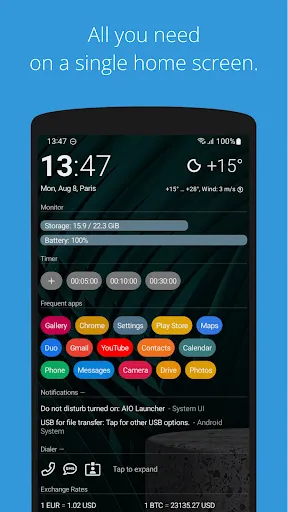
AIO Launcher can display the following information on the screen:
* Weather - current weather and forecast for 10 days;
* Notifications - standard android notifications;
* Dialogs - your messenger conversations;
* Player - when you turn on the music, playback control buttons appear;
* Frequent apps - frequently used applications buttons;
* Your apps - the icons of the selected applications;
* Contacts - quick contacts;
* Dialer - numpad for quick calls;
* Timer - timer start buttons;
* Mail - list of received emails;
* Notes - list of your notes;
* Tasks - list of tasks;
* Telegram - last messages (paid);
* RSS - latest news;
* Calendar - upcoming events in the calendar;
* Exchange rates - currency exchange rates;
* Bitcoin - the bitcoin price;
* Finance - stocks, precious metals, cryptocurrencies etc (paid);
* Calculator - simple calculator;
* Audio Recorder - record, play and share audio;
* System monitor - RAM and NAND usage, percentage of battery power;
* Control panel - toggles for WiFi/BT/GPS etc;
* Traffic - shows current download/upload rates and connection type;
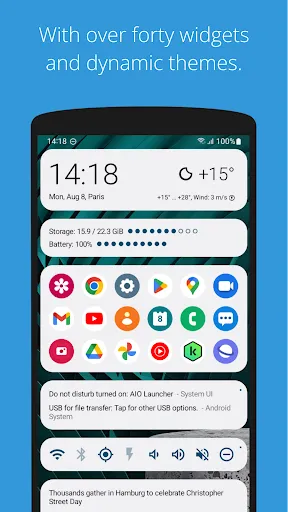
* Android widget - standard app widgets (paid).
Other features:
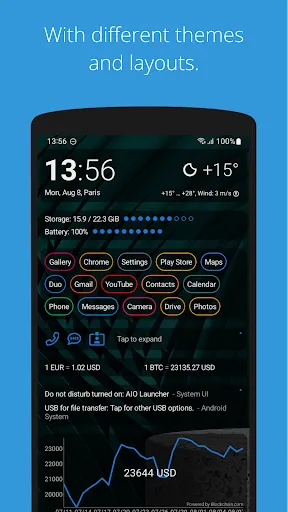
* Several different themes;
* Icon packs support;
* Multiple icon shapes;
* Ability to change font size;
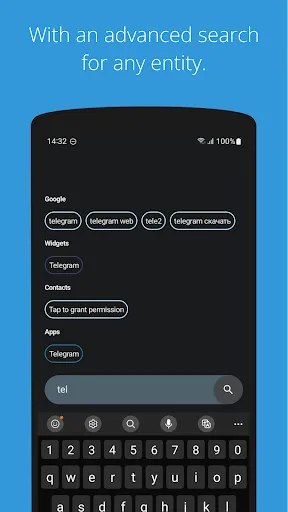
* Advanced search system for applications, contacts, files and information on the Internet;
* Ability to rename applications;
* Widgets and plugins support;
* Tasker integration;
* Gestures;
* Very customizable.
Usage:
* Swipe on search button opens quick menu with phone, camera and market;
* To add the Android widget, long press search button and select the "+" icon;
* To resize the widget, hold the finger on the widget, then use the up and down buttons;
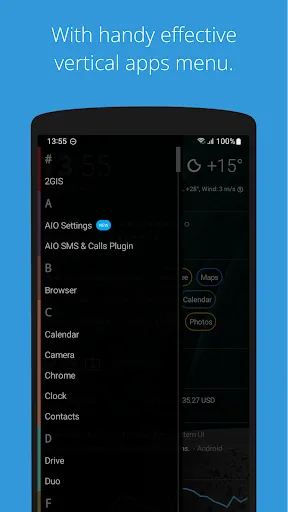
* To access the list of all applications, drag from the left edge of the screen;
* Hold finger on various elements of the screen to open menu;
* To open settings, hold your finger on the search button, and then click the gear icon;
* Hold the title of the widget to move it around;
* You can minimize/maximize the widget by clicking on its name;
* If the title are disabled, the widget can be minimized by clicking in the upper right corner of the widget;
* To remove an application, open the application menu, hold your finger on the desired application, and drag it to the recycle bin icon.
How to set as default launcher on a Huawei smartphone:
Settings - Applications - Settings - Default applications - Settings - Manager - AIO Launcher
If notification widget don't work on MIUI:
Settings - Battery & performance - Manage apps' battery usage - Choose apps - AIO Launcher - No restrictions
If app widgets don't work on MIUI or you can't open notification via built-in Notifications widget:
Go to the application settings on your phone, find the application that owns the widget, click "Other permissions" and enable "Display pop-ups when running in the background" option.
If the application restarts every time you return to the desktop - add the launcher to the power saving mode exceptions (you can read how to do this here: https://dontkillmyapp.com).
This app uses the Device Administrator permission.
AIO Launcher uses the Accessibility Service to perform actions such as turning off the screen, taking a screenshot, and displaying the screen of recent apps.
Email: zobnin@gmail.com
Telegram: @aio_launcher
AIO Launcher can display the following information on the screen:
* Weather - current weather and forecast for 10 days;
* Notifications - standard android notifications;
* Dialogs - your messenger conversations;
* Player - when you turn on the music, playback control buttons appear;
* Frequent apps - frequently used applications buttons;
* Your apps - the icons of the selected applications;
* Contacts - quick contacts;
* Dialer - numpad for quick calls;
* Timer - timer start buttons;
* Mail - list of received emails;
* Notes - list of your notes;
* Tasks - list of tasks;
* Telegram - last messages (paid);
* RSS - latest news;
* Calendar - upcoming events in the calendar;
* Exchange rates - currency exchange rates;
* Bitcoin - the bitcoin price;
* Finance - stocks, precious metals, cryptocurrencies etc (paid);
* Calculator - simple calculator;
* Audio Recorder - record, play and share audio;
* System monitor - RAM and NAND usage, percentage of battery power;
* Control panel - toggles for WiFi/BT/GPS etc;
* Traffic - shows current download/upload rates and connection type;
* Android widget - standard app widgets (paid).
Other features:
* Several different themes;
* Icon packs support;
* Multiple icon shapes;
* Ability to change font size;
* Advanced search system for applications, contacts, files and information on the Internet;
* Ability to rename applications;
* Widgets and plugins support;
* Tasker integration;
* Gestures;
* Very customizable.
Usage:
* Swipe on search button opens quick menu with phone, camera and market;
* To add the Android widget, long press search button and select the "+" icon;
* To resize the widget, hold the finger on the widget, then use the up and down buttons;
* To access the list of all applications, drag from the left edge of the screen;
* Hold finger on various elements of the screen to open menu;
* To open settings, hold your finger on the search button, and then click the gear icon;
* Hold the title of the widget to move it around;
* You can minimize/maximize the widget by clicking on its name;
* If the title are disabled, the widget can be minimized by clicking in the upper right corner of the widget;
* To remove an application, open the application menu, hold your finger on the desired application, and drag it to the recycle bin icon.
How to set as default launcher on a Huawei smartphone:
Settings - Applications - Settings - Default applications - Settings - Manager - AIO Launcher
If notification widget don't work on MIUI:
Settings - Battery & performance - Manage apps' battery usage - Choose apps - AIO Launcher - No restrictions
If app widgets don't work on MIUI or you can't open notification via built-in Notifications widget:
Go to the application settings on your phone, find the application that owns the widget, click "Other permissions" and enable "Display pop-ups when running in the background" option.
If the application restarts every time you return to the desktop - add the launcher to the power saving mode exceptions (you can read how to do this here: https://dontkillmyapp.com).
This app uses the Device Administrator permission.
AIO Launcher uses the Accessibility Service to perform actions such as turning off the screen, taking a screenshot, and displaying the screen of recent apps.
Email: zobnin@gmail.com
Telegram: @aio_launcher
गेमप्ले
AIO Launcher स्क्रीनशॉट
AIO Launcher के पुराने संस्करण






संपादक की सिफारिश


AIO Launcher जैसे ऐप्स
 AIO Launcher
 Launcher apps apk launcher
 APUS Launcher: Theme Launcher
 O Launcher (Op po Launcher)
 Quick Launcher (Q Launcher)
 Cool Mi Launcher - CC Launcher
 X Launcher - Model x launcher
 Newer Launcher 2024 launcher
 MiX Launcher 2 for Mi Launcher
 Launcher XP v2 - The Launcher
 Launcher XP - Android Launcher
 Launcher 2024: Theme Launcher
AIO Mobile Soft द्वारा ऐप्स
AIO Launcher FAQ
मैं PGYER APK HUB से AIO Launcher कैसे डाउनलोड करूं?
PGYER APK HUB पर AIO Launcher मुफ्त डाउनलोड करने के लिए है?
PGYER APK HUB से AIO Launcher डाउनलोड करने के लिए मुझे एक खाता चाहिए?
मैं PGYER APK HUB पर AIO Launcher के साथ समस्या कैसे रिपोर्ट कर सकता हूँ?
क्या आपको यह मददगार पाया
हाँ
नहीं
उपयोगकर्ता समीक्षा
+ समीक्षा
4.5
5
4
3
2
1
T
TechGuruPG
2021-10-01
2
0
AIO Launcher is the ultimate all-in-one solution for your device. It's incredibly user-friendly and efficient, making every aspect of managing your apps and settings a breeze.
D
DesignLoverLea
2018-05-30
1
0
AIO Launcher stands out with its innovative design, setting it apart from other launchers. It's visually stunning and practical, yet it seems like a hidden gem among users.
E
EfficiencyFanBOY
2018-07-31
0
0
AIO Launcher is simply fantastic! It streamlines my phone's interface, making navigation quick and effortless. A must-have for anyone seeking a more efficient smartphone experience.
सबसे लोकप्रिय

Plague Inc.
Ndemic Creations

Super Mario Odyssey
Super Mario Odyssey APK - Explore the World Like Never Before!
Embark on an exhilarating adventure w

Hole.io
VOODOO

StarMaker: Sing Karaoke Songs
SKYWORK AI PTE. LTD.

Poppo Live
Poppo Team

CookieRun: OvenBreak
Devsisters Corporation

Netflix
Netflix, Inc.

TikTok
TikTok Pte. Ltd.

Legend of Solgard
Snowprint Studios AB

X
X Corp.

Clash Royale
Supercell

Tips Dream League Soccer 2017
amorphisnguyen

Relic Bag: Shadow Hunter
Fansipan Limited

PUBG MOBILE
Level Infinite

Pure Sniper: Gun Shooter Games
Miniclip.com

War Thunder Mobile
GAIJIN NETWORK LTD

GunboundM
DargomStudio

Call of Duty: Warzone Mobile
Activision Publishing, Inc.

Off Road 4x4 Driving Simulator
Azur Interactive Games Limited

Car Parking Multiplayer 2
olzhass

Talking Pierre the Parrot
Outfit7 Limited

Red Dead redemption 2 Mobile
Tarik EL hamdi

Shadow Fight 2 Special Edition
NEKKI

Reddit
reddit Inc.