
Access Dots - Android 12/iOS 1
रेटिंग
Jun 26, 2024नवीनतम अपडेट
AD_2.0_Betaसंस्करण
Access Dots - Android 12/iOS 1 के बारे में
Did you know that once you grant access to your phone's camera/microphone/GPS location to any third-party App, they can use it silently in the background?
And do you feel envious about the new iOS 14's privacy feature - shows an indicator whenever camera or microphone is accessed? Or you can't wait for Android 12's implementation of the same feature?
Presenting Access Dots for Android, supporting all the way down to Android 7.0!
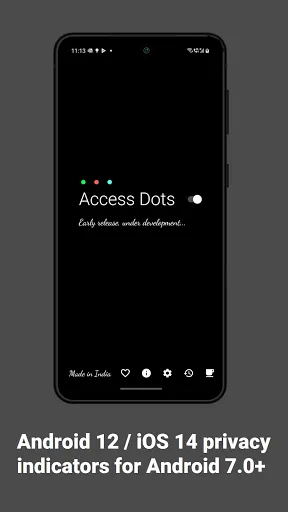
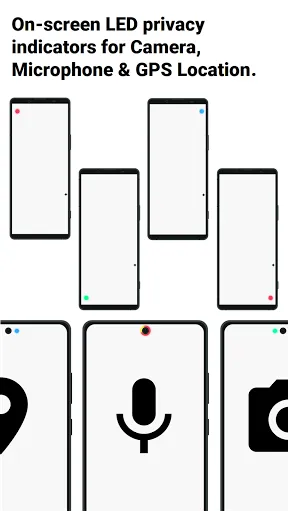
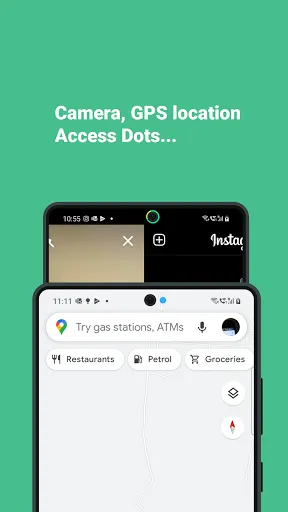
Access Dots, adds the same iOS 14 style indicators (few pixels light up as a dot) to the top right (default) corner of your screen whenever any third-party App uses your phone's camera/microphone/GPS location. Access Dots will be visible even on your lockscreen!
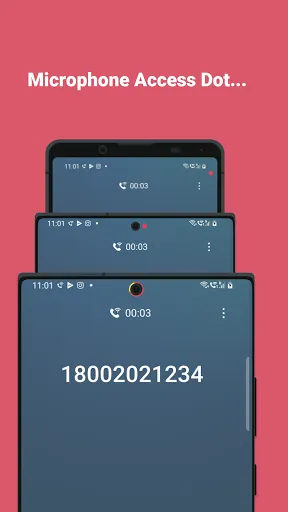
Configuring the App is as simple as enabling the Access Dots Accessibility Service (Toggle switch in the App > (More) Downloaded Services/Installed Services > Access Dots > Enable). By default the App is configured to show iOS 14 style colored access dots - green for camera access, orange for microphone access and blue for GPS location. The App itself does not request for camera or microphone access, however, to be able to monitor GPS access by any App, 'Access Dots' require GPS location permission.
Access Dots is in early BETA, under development, so far it has the following features:
● Display Access Dots whenever phone's camera/microphone/GPS location is engaged by a third-party App.
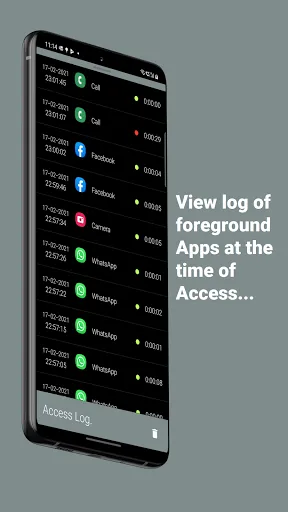
● Maintain an Access Log, which can be accessed from the App's main settings screen. The Access Log shows when the camera/microphone/GPS location was accessed, which App was in foreground at the time of access initiation and how long did the access last.
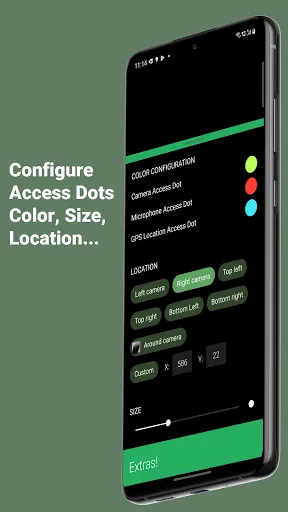
● Assign any color to either of the Access Dots.
● On Android 10+, Access Dots by default sticks beside your camera cutout (if your device has.) You can configure the location of Access Dots to the point of specifying X/Y coordinates.
● If your device supports 'Energy Ring - Universal Edition!' App, then you can wrap Access Dots around the punch hole camera as well.
● The size of Access Dots can be adjusted.
While it's free to change the Access Dots' color to whatever you want, consider making a donation to support the development and have access to few extra configurations like changing the 'size' of the dot or its location on the screen. :)
Note: Please make sure the App is whitelisted under any kind of optimization setting your device has, if the App is killed from background by the System, you may have to restart phone to get the Access Dots active again.
And do you feel envious about the new iOS 14's privacy feature - shows an indicator whenever camera or microphone is accessed? Or you can't wait for Android 12's implementation of the same feature?
Presenting Access Dots for Android, supporting all the way down to Android 7.0!
Access Dots, adds the same iOS 14 style indicators (few pixels light up as a dot) to the top right (default) corner of your screen whenever any third-party App uses your phone's camera/microphone/GPS location. Access Dots will be visible even on your lockscreen!
Configuring the App is as simple as enabling the Access Dots Accessibility Service (Toggle switch in the App > (More) Downloaded Services/Installed Services > Access Dots > Enable). By default the App is configured to show iOS 14 style colored access dots - green for camera access, orange for microphone access and blue for GPS location. The App itself does not request for camera or microphone access, however, to be able to monitor GPS access by any App, 'Access Dots' require GPS location permission.
Access Dots is in early BETA, under development, so far it has the following features:
● Display Access Dots whenever phone's camera/microphone/GPS location is engaged by a third-party App.
● Maintain an Access Log, which can be accessed from the App's main settings screen. The Access Log shows when the camera/microphone/GPS location was accessed, which App was in foreground at the time of access initiation and how long did the access last.
● Assign any color to either of the Access Dots.
● On Android 10+, Access Dots by default sticks beside your camera cutout (if your device has.) You can configure the location of Access Dots to the point of specifying X/Y coordinates.
● If your device supports 'Energy Ring - Universal Edition!' App, then you can wrap Access Dots around the punch hole camera as well.
● The size of Access Dots can be adjusted.
While it's free to change the Access Dots' color to whatever you want, consider making a donation to support the development and have access to few extra configurations like changing the 'size' of the dot or its location on the screen. :)
Note: Please make sure the App is whitelisted under any kind of optimization setting your device has, if the App is killed from background by the System, you may have to restart phone to get the Access Dots active again.
Access Dots - Android 12/iOS 1 स्क्रीनशॉट
Access Dots - Android 12/iOS 1 के पुराने संस्करण





संपादक की सिफारिश


Access Dots - Android 12/iOS 1 जैसे ऐप्स


IJP द्वारा ऐप्स


Access Dots - Android 12/iOS 1 FAQ
मैं PGYER APK HUB से Access Dots - Android 12/iOS 1 कैसे डाउनलोड करूं?
PGYER APK HUB पर Access Dots - Android 12/iOS 1 मुफ्त डाउनलोड करने के लिए है?
PGYER APK HUB से Access Dots - Android 12/iOS 1 डाउनलोड करने के लिए मुझे एक खाता चाहिए?
मैं PGYER APK HUB पर Access Dots - Android 12/iOS 1 के साथ समस्या कैसे रिपोर्ट कर सकता हूँ?
क्या आपको यह मददगार पाया
हाँ
नहीं
उपयोगकर्ता समीक्षा
+ समीक्षा
4.1
5
4
3
2
1
e
elyas20
2024-09-01
0
0
For those interested, you can find Access Dots on Google Play.
T
TechSeeker_6
2020-09-28
0
0
I've been using Access Dots on my Android 6 device. After extensive research, I found it comparable to Camic Viewer. Access Dots offers comprehensive features that suit my needs perfectly.
सबसे लोकप्रिय

Reddit
reddit Inc.

SHEIN-Shopping Online
Roadget Business PTE. LTD.

Poppo Live
Poppo Team

TikTok
TikTok Pte. Ltd.

Super Mario Odyssey
Super Mario Odyssey APK - Explore the World Like Never Before!
Embark on an exhilarating adventure w

Mobile Legends: Bang Bang FT
Công ty cổ phần phát triển công nghệ số Hồng Hà

Netflix
Netflix, Inc.

Car Parking Multiplayer 2
olzhass

Legend of Solgard
Snowprint Studios AB

X
X Corp.

Clash Royale
Supercell

Tips Dream League Soccer 2017
amorphisnguyen

Red Dead redemption 2 Mobile
Tarik EL hamdi

PUBG MOBILE
Level Infinite

Pure Sniper: Gun Shooter Games
Miniclip.com

Hole.io
VOODOO

GunboundM
DargomStudio

Plague Inc.
Ndemic Creations

Relic Bag: Shadow Hunter
Fansipan Limited

Call of Duty: Warzone Mobile
Activision Publishing, Inc.

Talking Pierre the Parrot
Outfit7 Limited

War Thunder Mobile
GAIJIN NETWORK LTD

Shadow Fight 2 Special Edition
NEKKI

Once Human
Exptional Global