

All Backup & Restore
Valutazione
Jun 25, 2024Ultimo aggiornamento
5.4.6Versione
Come installare il file XAPK / APK
Condividi
Informazioni su All Backup & Restore
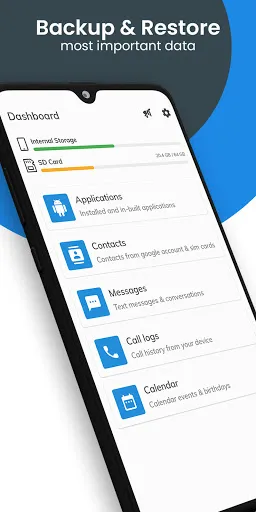
🔒 Securely Backup & Restore: Safeguard your valuable data with our #1 backup and restore application. Easily protect and restore your applications, contacts, text messages, call history, and calendars to your internal storage.
Important Notes:
👉 Before performing a factory reset or changing your phone, ensure the default backup folder is located in your external SD card. If not, copy the entire backup folder ("AllBackup" by default) to your external SD card for a seamless transition.
👉 Please note that our backup and restore functionality does not cover photos, videos, or media files.
👉 Restore only works for data that has been backed up with this application and cannot recover any previously deleted data.
👉 If you are using schedule automatic backup functionality and your phone has task killer or memory cleaner apps, please add our app to the 'white list' or 'ignore list' of your task killer or memory cleaner app. This allows our application to run in the background and perform scheduled backups seamlessly. Refer to your device's settings or the task killer app's preferences to add our app to the 'white list' and enjoy hassle-free backups.
👉 When you completed SMS Restore, but your SMS were not visible in the application, please try restarting the device.
Key Features:
🔸 Simple & Easy: Experience one-tap backup and restore functionality, making it effortless to protect and recover your valuable data.
🔸 Messages: Never lose your important text messages. Back them up with a single tap and restore them whenever needed.
🔸 Call Logs: Preserve your call history even after resetting or formatting your device. Backup your call logs and store them securely using the share option.
🔸 Calendars: Keep track of your important events and birthdays. Backup your calendar events and easily restore them at any time.
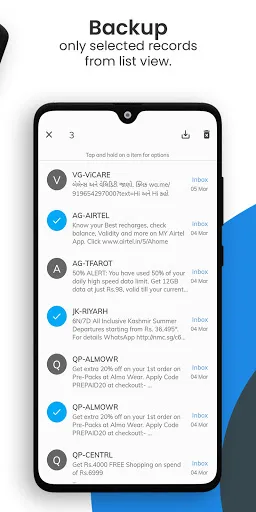
🔸 Selective Backup: Choose selective records from the list for backup, allowing you to customize the backup process according to your needs.
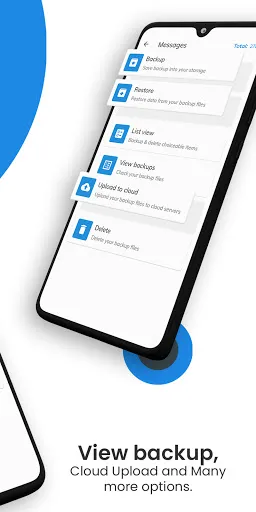
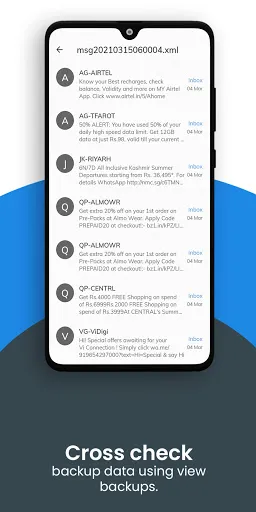
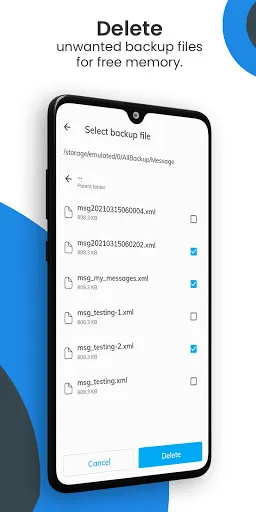
🔸 Preview & Delete: Confirm the contents of backup files and delete selective records using a long press for more control.
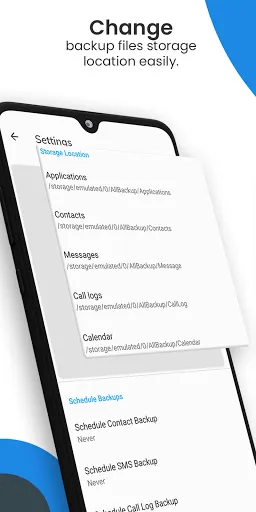
🔸 Flexible Storage: Change the backup folder path from Settings to suit different storage preferences for various categories.
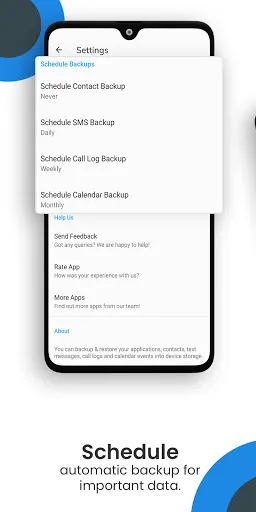
🔸 Automatic Backup: Schedule automatic backups to ensure regular data protection and convenience.
🔸 Cloud Upload: Safely upload your backup files to the cloud for an extra layer of data security.
Permissions:
Read/Modify Text Messages(SMS/MMS): These permissions are used to backup & restore your SMS.
Read/Modify Contacts: These permissions are used to backup & restore your contacts.
Read/Modify Calendar Events: These permissions are used to backup & restore your calendars.
Read/Modify Call Logs: These permissions are used to backup & restore your call logs.
Storage: These permissions are required to store your backup files in internal or external storage.
Download now to experience the convenience and peace of mind that comes with reliable data backup and restore!
Important Notes:
👉 Before performing a factory reset or changing your phone, ensure the default backup folder is located in your external SD card. If not, copy the entire backup folder ("AllBackup" by default) to your external SD card for a seamless transition.
👉 Please note that our backup and restore functionality does not cover photos, videos, or media files.
👉 Restore only works for data that has been backed up with this application and cannot recover any previously deleted data.
👉 If you are using schedule automatic backup functionality and your phone has task killer or memory cleaner apps, please add our app to the 'white list' or 'ignore list' of your task killer or memory cleaner app. This allows our application to run in the background and perform scheduled backups seamlessly. Refer to your device's settings or the task killer app's preferences to add our app to the 'white list' and enjoy hassle-free backups.
👉 When you completed SMS Restore, but your SMS were not visible in the application, please try restarting the device.
Key Features:
🔸 Simple & Easy: Experience one-tap backup and restore functionality, making it effortless to protect and recover your valuable data.
🔸 Messages: Never lose your important text messages. Back them up with a single tap and restore them whenever needed.
🔸 Call Logs: Preserve your call history even after resetting or formatting your device. Backup your call logs and store them securely using the share option.
🔸 Calendars: Keep track of your important events and birthdays. Backup your calendar events and easily restore them at any time.
🔸 Selective Backup: Choose selective records from the list for backup, allowing you to customize the backup process according to your needs.
🔸 Preview & Delete: Confirm the contents of backup files and delete selective records using a long press for more control.
🔸 Flexible Storage: Change the backup folder path from Settings to suit different storage preferences for various categories.
🔸 Automatic Backup: Schedule automatic backups to ensure regular data protection and convenience.
🔸 Cloud Upload: Safely upload your backup files to the cloud for an extra layer of data security.
Permissions:
Read/Modify Text Messages(SMS/MMS): These permissions are used to backup & restore your SMS.
Read/Modify Contacts: These permissions are used to backup & restore your contacts.
Read/Modify Calendar Events: These permissions are used to backup & restore your calendars.
Read/Modify Call Logs: These permissions are used to backup & restore your call logs.
Storage: These permissions are required to store your backup files in internal or external storage.
Download now to experience the convenience and peace of mind that comes with reliable data backup and restore!
Gameplay
Screenshot di All Backup & Restore
Vecchie versioni di All Backup & Restore





Raccomandazione dell'editore


App Simili a All Backup & Restore


App di SuriDevs


All Backup & Restore FAQ
Come faccio a scaricare All Backup & Restore da PGYER APK HUB?
Il All Backup & Restore su PGYER APK HUB è gratuito?
Ho bisogno di un account per scaricare All Backup & Restore da PGYER APK HUB?
Come posso segnalare un problema con All Backup & Restore su PGYER APK HUB?
Hai trovato utile questo suggerimento?
Sì
No
Recensioni degli utenti
+ Recensioni
5.0
5
4
3
2
1
T
Tracy
2025-01-21
21
0
All Backup & Restore is an incredibly useful app for anyone who wants to keep their data safe. It's simple to use and works flawlessly.
O
Opie
2024-12-12
17
0
All Backup & Restore is the best backup app I've ever used. It's reliable, fast, and has a very user-friendly interface.
M
Matthew
2024-12-27
21
0
I highly recommend All Backup & Restore to anyone who needs to back up their data. It's straightforward and gets the job done without any hassle.
Più popolare

Finger Football
Gamotronix

Talking Pierre the Parrot
Outfit7 Limited

Tips Dream League Soccer 2017
amorphisnguyen

Poppo Live
Poppo Team

StarMaker: Sing Karaoke Songs
SKYWORK AI PTE. LTD.

CookieRun: OvenBreak
Devsisters Corporation

Netflix
Netflix, Inc.

TikTok
TikTok Pte. Ltd.

Legend of Solgard
Snowprint Studios AB

X
X Corp.

Clash Royale
Supercell

Plague Inc.
Ndemic Creations

Relic Bag: Shadow Hunter
Fansipan Limited

PUBG MOBILE
Level Infinite

Red Dead redemption 2 Mobile
Tarik EL hamdi

War Thunder Mobile
GAIJIN NETWORK LTD

Off Road 4x4 Driving Simulator
Azur Interactive Games Limited

Call of Duty: Warzone Mobile
Activision Publishing, Inc.

GunboundM
DargomStudio

Car Parking Multiplayer 2
olzhass

Marvel Spider Man
Welcome to the Marvel Spider-Man APK, your gateway to the exciting world of Spider-Man, now adapted

Pure Sniper: Gun Shooter Games
Miniclip.com

Shadow Fight 2 Special Edition
NEKKI

Miracle City 2
DroidHen