
Remote Mouse
Valutazione
Aug 21, 2024Ultimo aggiornamento
5.102Versione
Come installare il file XAPK / APK
Condividi
Informazioni su Remote Mouse
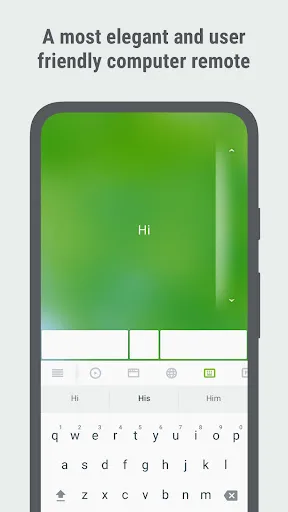
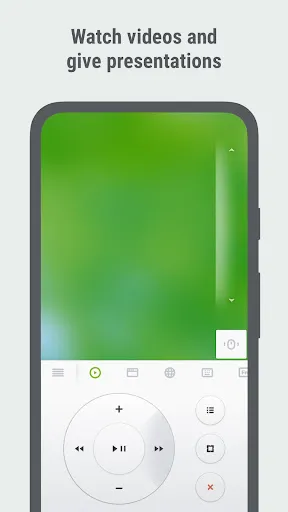
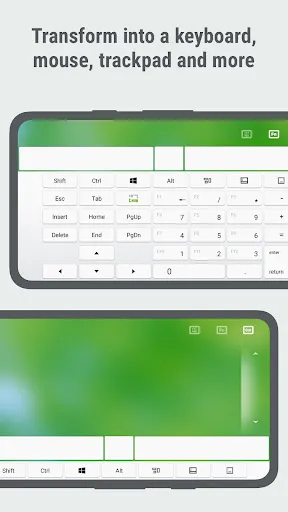
Remote Mouse™ transforms your mobile phone or tablet into an easy-to-use remote control for your computer. It mimics the functions of a wireless mouse, keyboard, and touchpad, and also offers various specialized control panels such as Media Remote, Application Switcher, Cross-device clipboard, and Web Browsing Remote, which enable you to perform specific operations more efficiently. The small features, designed for one-handed use or intuitive operations, will delight you.
As it was featured on CNET, Mashable, and Product Hunt, Remote Mouse is considered one of the most sophisticated and user-friendly computer remote apps. It has been used by over 20 million users worldwide.
Whether you're watching a movie online, giving a presentation, or shutting down your computer with one click, nothing can be more convenient than having a mobile phone remote at your fingertips.
Mouse
• Fully simulated mouse function
• Gyro mouse that allows you to move the mouse cursor with a gyro sensor
• Left-handed mode
Keyboard
• Integrated with system and third-party keyboards, supports typing in various languages
• Remotely typing by voice if the soft keyboard supports voice recognition
• Supports sending various shortcuts
• Displays different keypads for Mac or PC
Touchpad
• Simulates the Apple Magic Trackpad and supports multi-touch gestures
Specialty Control Panels
• Media Remote: Supports iTunes, VLC, Windows Media Player, Keynote, PowerPoint, and Windows Photo Viewer, and will support more
• Web Remote: Supports Chrome, Firefox, and Opera
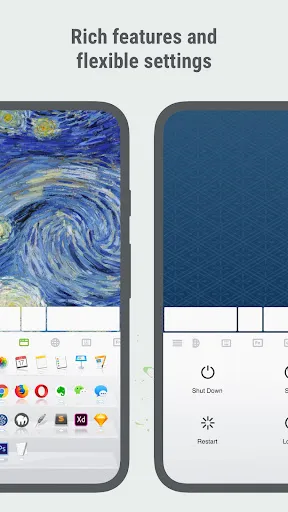
• Application Switcher: quickly launch and switch between programs
• Power Options: Supports remotely shutting down, sleeping, restarting, and logging off
Other Features
• Cross-device clipboard
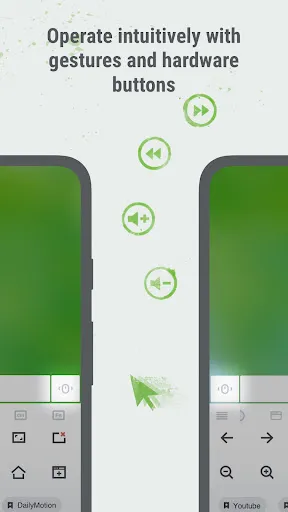
• Use the physical volume buttons on the mobile device for remote control
• Set a password for the connection
• Customizable wallpaper
Connection Method
• Auto connect
• Connect via IP address or QR code
• Connect via history
Operating Environment
• Compatible with Windows, Mac OSX, and Linux
• Works under Wi-Fi or Bluetooth
To Get Started
1. Visit https://www.remotemouse.net on your computer and download the Remote Mouse computer helper.
2. Install and run the computer server.
3. Connect your mobile device to the same Wi-Fi or Bluetooth as your computer.
If you're a macOS user, you may need to grant access to Remote Mouse. You can refer to this video (https://youtu.be/8LJbtv42i44) for guidance.
As it was featured on CNET, Mashable, and Product Hunt, Remote Mouse is considered one of the most sophisticated and user-friendly computer remote apps. It has been used by over 20 million users worldwide.
Whether you're watching a movie online, giving a presentation, or shutting down your computer with one click, nothing can be more convenient than having a mobile phone remote at your fingertips.
Mouse
• Fully simulated mouse function
• Gyro mouse that allows you to move the mouse cursor with a gyro sensor
• Left-handed mode
Keyboard
• Integrated with system and third-party keyboards, supports typing in various languages
• Remotely typing by voice if the soft keyboard supports voice recognition
• Supports sending various shortcuts
• Displays different keypads for Mac or PC
Touchpad
• Simulates the Apple Magic Trackpad and supports multi-touch gestures
Specialty Control Panels
• Media Remote: Supports iTunes, VLC, Windows Media Player, Keynote, PowerPoint, and Windows Photo Viewer, and will support more
• Web Remote: Supports Chrome, Firefox, and Opera
• Application Switcher: quickly launch and switch between programs
• Power Options: Supports remotely shutting down, sleeping, restarting, and logging off
Other Features
• Cross-device clipboard
• Use the physical volume buttons on the mobile device for remote control
• Set a password for the connection
• Customizable wallpaper
Connection Method
• Auto connect
• Connect via IP address or QR code
• Connect via history
Operating Environment
• Compatible with Windows, Mac OSX, and Linux
• Works under Wi-Fi or Bluetooth
To Get Started
1. Visit https://www.remotemouse.net on your computer and download the Remote Mouse computer helper.
2. Install and run the computer server.
3. Connect your mobile device to the same Wi-Fi or Bluetooth as your computer.
If you're a macOS user, you may need to grant access to Remote Mouse. You can refer to this video (https://youtu.be/8LJbtv42i44) for guidance.
Screenshot di Remote Mouse
Vecchie versioni di Remote Mouse






Raccomandazione dell'editore


App Simili a Remote Mouse


App di Remote Mouse
Recensioni degli utenti
+ Recensioni
4.2
5
4
3
2
1
E
ElleTheInnovator
2020-12-14
1
0
Absolutely love how this app allows me to control my computer remotely! Highly recommended for productivity and convenience.
Z
ZackTheAppUser
2019-02-17
1
0
Really cool app that I've been enjoying. Download it and experience the joy of controlling your computer from anywhere!
T
TechGuruBogdan
2022-05-07
0
0
I found this application to be incredibly frustrating. It's a real time-waster and quite disappointing. Not worth the effort.
Più popolare

Reddit
reddit Inc.

SHEIN-Shopping Online
Roadget Business PTE. LTD.

Poppo Live
Poppo Team

TikTok
TikTok Pte. Ltd.

Super Mario Odyssey
Super Mario Odyssey APK - Explore the World Like Never Before!
Embark on an exhilarating adventure w

Mobile Legends: Bang Bang FT
Công ty cổ phần phát triển công nghệ số Hồng Hà

Netflix
Netflix, Inc.

Car Parking Multiplayer 2
olzhass

Legend of Solgard
Snowprint Studios AB

X
X Corp.

Clash Royale
Supercell

Tips Dream League Soccer 2017
amorphisnguyen

Red Dead redemption 2 Mobile
Tarik EL hamdi

PUBG MOBILE
Level Infinite

Pure Sniper: Gun Shooter Games
Miniclip.com

Hole.io
VOODOO

GunboundM
DargomStudio

Plague Inc.
Ndemic Creations

Relic Bag: Shadow Hunter
Fansipan Limited

Call of Duty: Warzone Mobile
Activision Publishing, Inc.

Talking Pierre the Parrot
Outfit7 Limited

War Thunder Mobile
GAIJIN NETWORK LTD

Shadow Fight 2 Special Edition
NEKKI

Once Human
Exptional Global