
My Daily Planner: To-Do List
Valutazione
Jun 25, 2024Ultimo aggiornamento
1.8.27Versione
Come installare il file XAPK / APK
Condividi
Informazioni su My Daily Planner: To-Do List
Plan your days, calendar, tasks, and ToDo's with our easy-to-use but powerful "My Daily Planner" App.
MAIN FEATURES:
- Calendar
- To-Do List
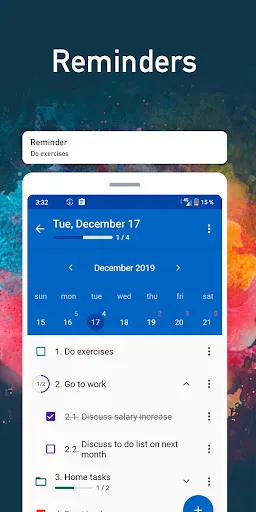
- To-Do Reminders
- To-Do schedule
- Organizer
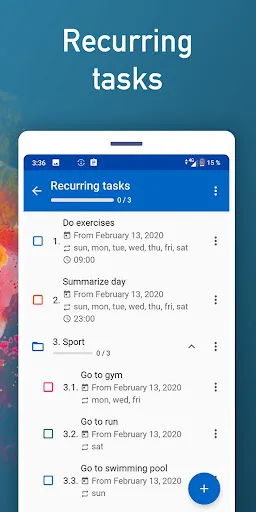
- Usual and repeating tasks
- To-Do tracker
- Home widget
Organize your life with our application to increase your productivity and effectiveness!
DAILY PLANNER
Many people plan their days, weeks, or months with paper to-do lists or paper calendars. Our electronic organizer is simple and easy to learn. Our application has very useful calendar. You can create a task with reminders very quickly. Organize your To-do schedule with our To-Do Manager and Tracker.
SUBTASKS
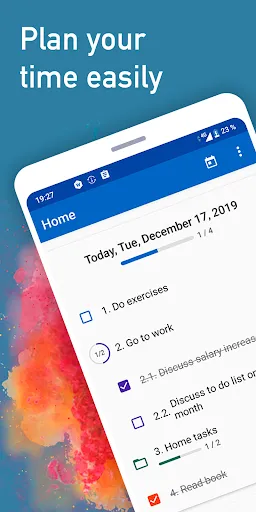
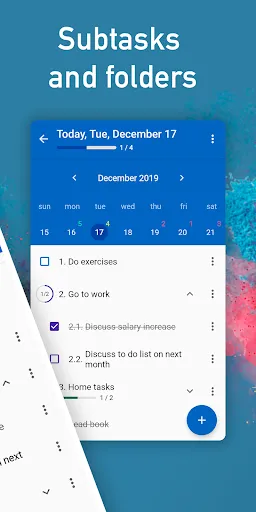
By dividing the task into subtasks with reminders, you remove confusion and can easily keep track. You can use sub-tasks in our daily planner. Manage your day and projects easily and intuitively.
We developed our organizer for maximum effectiveness. So you can create repeating tasks and reminders in our To Do List. View everything in the calendar view. Manage your progress and track statistics. Plan your day easily with the daily planner. Organize your To-Do schedule. Schedule repeating tasks easily-- weekly or monthly.
For example:
If you go somewhere each week on the same day of the week-- like if you go to the gym on every monday, wednesday and friday-- you can easily schedule those reminders. It similarly works with things like monthly payments.
Folders
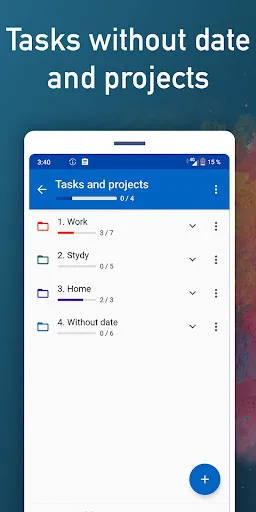
If you have to-do lists from different areas of your life-- for example, school, work, home, etc. you can use folders to organize your to-do lists.
Home Widget
Our To-Do planner has home screen widget to organize your time! Plan your tasks and To-Do reminders from your home screen without opening the app!
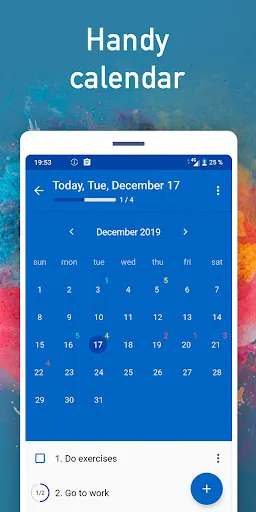
View tasks with calendar in week and month mode. In our To-Do schedule and daily planner we show color coded statuses. Green color - all to-dos are completed. Yellow - has completed and uncompleted tasks. Red color - to-do list items are not completed. It is also simple to create reminders.
Statistics
If you want to check your progress in your To Do Planner and To-Do schedule, it is available in the statistics section. You can view count completed and uncompleted tasks, in summary format.
Auto Backup
Your data on to do planner, calendar and to-do list is always private and is not stored on our servers. You can backup your data to your own private Google Drive account or locally on your phone. You can transfer your tasks on new device or restore data after clearing a phone. You can set automatic backups also so your data is always backed up.
Themes
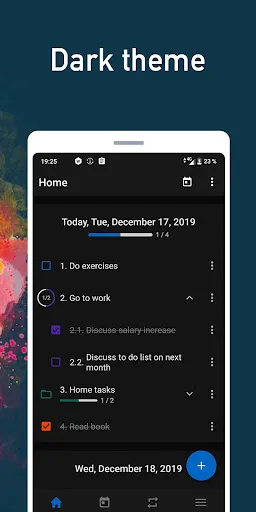
Themes allow you to customize the look and feel of the app. Calendar has beautiful design and a dark theme available. We have another colorful themes.
AutoMove
Rather than repeatedly having to move incomplete tasks to a future date, we added auto move function. All unfinished task from to do list can be automatically moved on next day. You won't spend time on moving to-dos-- to-do Calendar and Organizer will do it automatically.
To-Do Schedule
We automatically sort to do list by time. You can sort high priority tasks with colors. Simple and functional calendar allows you plan time effectively.
MAIN FEATURES:
- Calendar
- To-Do List
- To-Do Reminders
- To-Do schedule
- Organizer
- Usual and repeating tasks
- To-Do tracker
- Home widget
Organize your life with our application to increase your productivity and effectiveness!
DAILY PLANNER
Many people plan their days, weeks, or months with paper to-do lists or paper calendars. Our electronic organizer is simple and easy to learn. Our application has very useful calendar. You can create a task with reminders very quickly. Organize your To-do schedule with our To-Do Manager and Tracker.
SUBTASKS
By dividing the task into subtasks with reminders, you remove confusion and can easily keep track. You can use sub-tasks in our daily planner. Manage your day and projects easily and intuitively.
We developed our organizer for maximum effectiveness. So you can create repeating tasks and reminders in our To Do List. View everything in the calendar view. Manage your progress and track statistics. Plan your day easily with the daily planner. Organize your To-Do schedule. Schedule repeating tasks easily-- weekly or monthly.
For example:
If you go somewhere each week on the same day of the week-- like if you go to the gym on every monday, wednesday and friday-- you can easily schedule those reminders. It similarly works with things like monthly payments.
Folders
If you have to-do lists from different areas of your life-- for example, school, work, home, etc. you can use folders to organize your to-do lists.
Home Widget
Our To-Do planner has home screen widget to organize your time! Plan your tasks and To-Do reminders from your home screen without opening the app!
View tasks with calendar in week and month mode. In our To-Do schedule and daily planner we show color coded statuses. Green color - all to-dos are completed. Yellow - has completed and uncompleted tasks. Red color - to-do list items are not completed. It is also simple to create reminders.
Statistics
If you want to check your progress in your To Do Planner and To-Do schedule, it is available in the statistics section. You can view count completed and uncompleted tasks, in summary format.
Auto Backup
Your data on to do planner, calendar and to-do list is always private and is not stored on our servers. You can backup your data to your own private Google Drive account or locally on your phone. You can transfer your tasks on new device or restore data after clearing a phone. You can set automatic backups also so your data is always backed up.
Themes
Themes allow you to customize the look and feel of the app. Calendar has beautiful design and a dark theme available. We have another colorful themes.
AutoMove
Rather than repeatedly having to move incomplete tasks to a future date, we added auto move function. All unfinished task from to do list can be automatically moved on next day. You won't spend time on moving to-dos-- to-do Calendar and Organizer will do it automatically.
To-Do Schedule
We automatically sort to do list by time. You can sort high priority tasks with colors. Simple and functional calendar allows you plan time effectively.
Screenshot di My Daily Planner: To-Do List
Vecchie versioni di My Daily Planner: To-Do List






Raccomandazione dell'editore


App Simili a My Daily Planner: To-Do List
 GTasks: Todo List & Task List
 My Daily Planner: To-Do List
 Daily Planner, Weekly Planner
 Materialist (Todo List)
 ToDo Task - Simple Task List
 TimePlanner-ToDo List&Calendar
 የኔ የቀን ውሎ | My Time ToDo List
 Fire Todo List
 Rumbly: ToDo, Task List Widget
 Shopping List: My Grocery List
 Notes List-Task, Reminder & To-Do List
 Shopping list - My List
App di ViralMedia-MLM


My Daily Planner: To-Do List FAQ
Come faccio a scaricare My Daily Planner: To-Do List da PGYER APK HUB?
Il My Daily Planner: To-Do List su PGYER APK HUB è gratuito?
Ho bisogno di un account per scaricare My Daily Planner: To-Do List da PGYER APK HUB?
Come posso segnalare un problema con My Daily Planner: To-Do List su PGYER APK HUB?
Hai trovato utile questo suggerimento?
Sì
No
Recensioni degli utenti
+ Recensioni
4.7
5
4
3
2
1
S
SimpleUser123
2022-08-13
0
0
Love the straightforward nature of My Daily Planner: To-Do List! A suggestion for future updates: extend the reminder notification so it doesn't stop until acknowledged. It'd be great if users could select their own notification tones from their device and have a range of aesthetic themes to choose from.
Più popolare

Plague Inc.
Ndemic Creations

Super Mario Odyssey
Super Mario Odyssey APK - Explore the World Like Never Before!
Embark on an exhilarating adventure w

Hole.io
VOODOO

StarMaker: Sing Karaoke Songs
SKYWORK AI PTE. LTD.

Poppo Live
Poppo Team

CookieRun: OvenBreak
Devsisters Corporation

Netflix
Netflix, Inc.

TikTok
TikTok Pte. Ltd.

Legend of Solgard
Snowprint Studios AB

X
X Corp.

Clash Royale
Supercell

Tips Dream League Soccer 2017
amorphisnguyen

Relic Bag: Shadow Hunter
Fansipan Limited

PUBG MOBILE
Level Infinite

Pure Sniper: Gun Shooter Games
Miniclip.com

War Thunder Mobile
GAIJIN NETWORK LTD

GunboundM
DargomStudio

Call of Duty: Warzone Mobile
Activision Publishing, Inc.

Off Road 4x4 Driving Simulator
Azur Interactive Games Limited

Car Parking Multiplayer 2
olzhass

Talking Pierre the Parrot
Outfit7 Limited

Red Dead redemption 2 Mobile
Tarik EL hamdi

Shadow Fight 2 Special Edition
NEKKI

Reddit
reddit Inc.