

Samsung Flow
評価
Jul 23, 2024最新更新
4.0.13バージョン
Samsung Flowについて
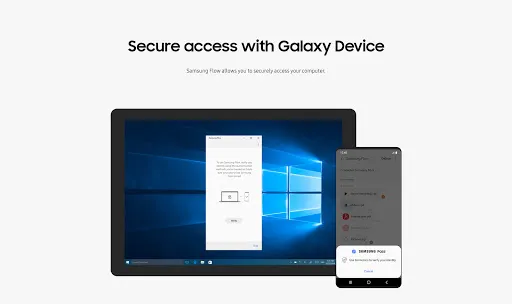
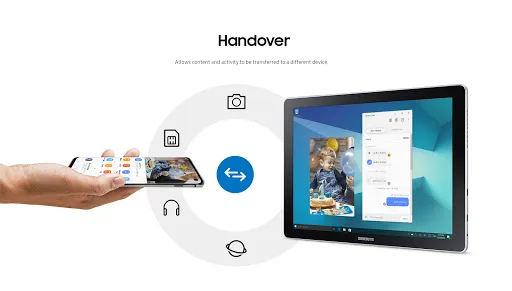
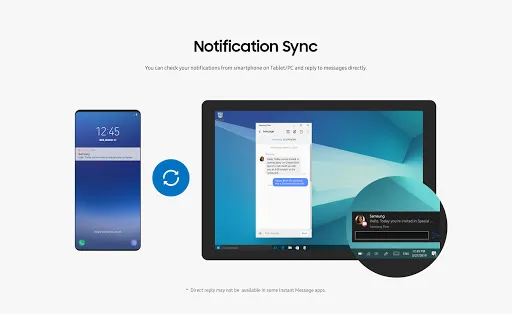
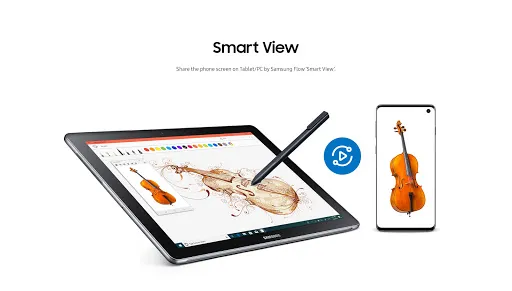
Samsung Flow is a software product that enables a seamless, secure, connected experience across your devices. You can authenticate your Tablet/PC with your smartphone, share content between devices, and sync notifications or view contents from your smartphone on your Tablet/PC. You can turn on the smartphone's Mobile Hotspot to keep your Tablet/PC connected.
You can also log in to your Tablet/PC with your biometric data (Iris, Fingerprints) if you register with Samsung Pass.
The following devices support Samsung Flow:
1. Windows Tablet/PC : Windows 10 OS Creators update (V1703) and June patch build (15063.413)
(Galaxy TabPro S, Galaxy Book, Galaxy Book2. Galaxy Book S, PC)
2. Android Tablet: Android N OS or newer
3. Android Phone : Android N OS or Newer
It may not be supported by some models, depending on the smartphone specifications.
* Samsung Flow will operate only on official software released by Samsung Electronics.
* Windows: Bluetooth (Bluetooth LE optional) or Wi-Fi/LAN, Wi-Fi direct
Windows 10 users can find the Samsung Flow app on the Windows App Store.
Go to the Samsung Flow webpage where you can find the setup guide:
www.samsung.com/samsungflow
If you have not updated the Samsung Flow app to the latest version, please go to Windows Store > Menu > Downloads and Updates to update the app.
* The PC unlock function is no longer provided because the Windows policy has changed.
The following permissions are required for the app service. For optional permissions, the default functionality of the service is turned on, but not allowed.
Required permissions
• Nearby devices: Used to find nearby devices and track registered devices
• Notifications: Used to show the connection status between your devices
• Storage: Used to store content shared among registered devices on an external storage device and view the stored content (~Android 10)
Optional permissions
• Phone: Used to answer and decline calls to your phone on your tablet or computer
• Call logs: Used to read the contact information included in the event of the incoming call when receiving a call
• Contacts: Used to obtain information about callers or senders when you receive calls or text messages on your phone
• SMS: Used to receive and reply to text messages to your phone on your tablet or computer
• Microphone: Used to record and send the audio from your phone to your computer or tablet while using Smart View
• Location: Used to search for your phone using your tablet or computer connected through Bluetooth
You can also log in to your Tablet/PC with your biometric data (Iris, Fingerprints) if you register with Samsung Pass.
The following devices support Samsung Flow:
1. Windows Tablet/PC : Windows 10 OS Creators update (V1703) and June patch build (15063.413)
(Galaxy TabPro S, Galaxy Book, Galaxy Book2. Galaxy Book S, PC)
2. Android Tablet: Android N OS or newer
3. Android Phone : Android N OS or Newer
It may not be supported by some models, depending on the smartphone specifications.
* Samsung Flow will operate only on official software released by Samsung Electronics.
* Windows: Bluetooth (Bluetooth LE optional) or Wi-Fi/LAN, Wi-Fi direct
Windows 10 users can find the Samsung Flow app on the Windows App Store.
Go to the Samsung Flow webpage where you can find the setup guide:
www.samsung.com/samsungflow
If you have not updated the Samsung Flow app to the latest version, please go to Windows Store > Menu > Downloads and Updates to update the app.
* The PC unlock function is no longer provided because the Windows policy has changed.
The following permissions are required for the app service. For optional permissions, the default functionality of the service is turned on, but not allowed.
Required permissions
• Nearby devices: Used to find nearby devices and track registered devices
• Notifications: Used to show the connection status between your devices
• Storage: Used to store content shared among registered devices on an external storage device and view the stored content (~Android 10)
Optional permissions
• Phone: Used to answer and decline calls to your phone on your tablet or computer
• Call logs: Used to read the contact information included in the event of the incoming call when receiving a call
• Contacts: Used to obtain information about callers or senders when you receive calls or text messages on your phone
• SMS: Used to receive and reply to text messages to your phone on your tablet or computer
• Microphone: Used to record and send the audio from your phone to your computer or tablet while using Smart View
• Location: Used to search for your phone using your tablet or computer connected through Bluetooth
ゲームプレイ
Samsung Flow スクリーンショット
Samsung Flowの過去のバージョン





編集者のおすすめ


Samsung Flow と似たアプリ


Samsung Electronics Co., Ltd. によるアプリ


ユーザーレビュー
+ レビュー
4.7
5
4
3
2
1
Z
ZabiullahTechFan
2018-09-26
1
0
Samsung Flow, a great tool! It seamlessly connects your devices and enhances productivity. I especially love the feature that allows me to control my smart home appliances from my phone. Highly recommend it for anyone looking to streamline their tech life.
T
TechNoviceGamer
2020-09-12
0
0
First off, Samsung Flow. What's its purpose? I've got it on my device but I'm not sure how to use it effectively. It feels like a mystery app, one of those that comes pre-installed but you're left wondering why. Any tips?
最も人気のある

Plague Inc.
Ndemic Creations

Super Mario Odyssey
Super Mario Odyssey APK - Explore the World Like Never Before!
Embark on an exhilarating adventure w

Hole.io
VOODOO

StarMaker: Sing Karaoke Songs
SKYWORK AI PTE. LTD.

Poppo Live
Poppo Team

CookieRun: OvenBreak
Devsisters Corporation

Netflix
Netflix, Inc.

TikTok
TikTok Pte. Ltd.

Legend of Solgard
Snowprint Studios AB

X
X Corp.

Clash Royale
Supercell

Tips Dream League Soccer 2017
amorphisnguyen

Relic Bag: Shadow Hunter
Fansipan Limited

PUBG MOBILE
Level Infinite

Pure Sniper: Gun Shooter Games
Miniclip.com

War Thunder Mobile
GAIJIN NETWORK LTD

GunboundM
DargomStudio

Call of Duty: Warzone Mobile
Activision Publishing, Inc.

Off Road 4x4 Driving Simulator
Azur Interactive Games Limited

Car Parking Multiplayer 2
olzhass

Talking Pierre the Parrot
Outfit7 Limited

Red Dead redemption 2 Mobile
Tarik EL hamdi

Shadow Fight 2 Special Edition
NEKKI

Reddit
reddit Inc.