
Gira HomeServer/FacilityServer
評価
Jul 20, 2024最新更新
4.12.0V1477バージョン
Gira HomeServer/FacilityServerについて
Gira HomeServer/FacilityServer
A simple and elegant way of operating complex building technology while away or from any room at home: with the Gira HomeServer app, you have everything under control – with an Android device, via GSM, UMTS or WLAN, from outside or inside the building. The app acts as a client, communicating with the Gira HomeServer or FacilityServer: the Gira Interface displays all functions clearly and concisely and allows quick access to the building. The display is either horizontal or vertical and can be modified by simply rotating the device. Various profiles allow controlling different buildings such as a personal residence or company as well as various views of one building. In this way, different functions can be controlled from outside the building than from inside. Different views can also be created for users.
The most important features:
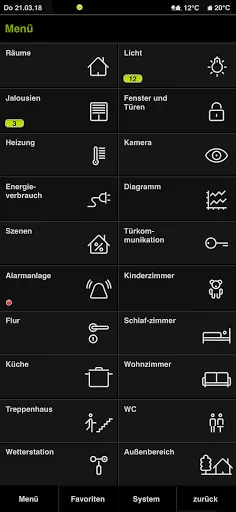
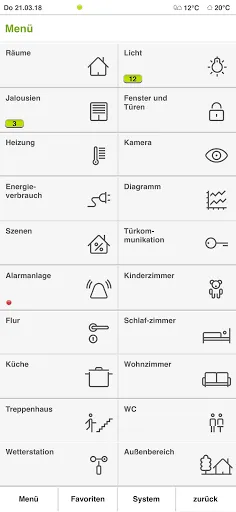
Main menu
The main menu displays all building functions. Date, time, current temperature and active functions can be viewed via the status bar. The jump back to the main menu is via the lower navigation bar.
Room list
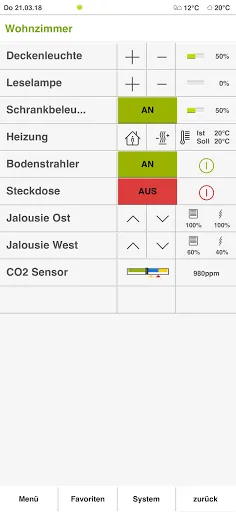
All rooms of a property are assigned by floor. The overview of all applications installed in a room can be opened by touch.
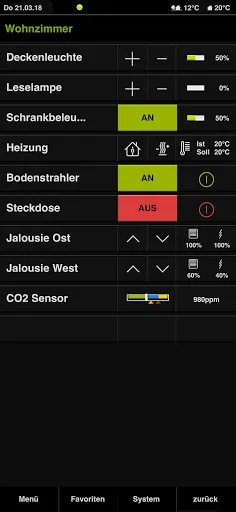
Room functions
The functions within a room and their status are recognizable at a glance and can be operated with a touch. For more complex functions such as the heating control system, a pop-up menu is opened. If the device is rotated by 90°, the horizontal format opens a further view of the time clock functions.
Time clock
A function can be adapted to personal requirements via a range of filter functions; random values are also possible in this way.
Diagrams
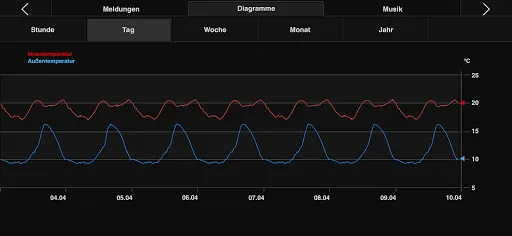
Diagrams enable the clear display of detected and evaluated consumption data by year, month, week, day or hour. If the unit is turned by 90°, the last active diagram appears in the horizontal format. Temperature differences, for example, can be visualised via multi-touch.
Messages
Alarm and fault messages, measured values and states of the various components integrated in the system are clearly displayed.
Weather data
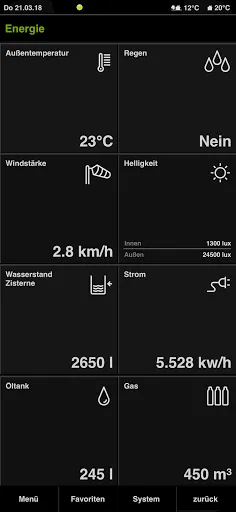
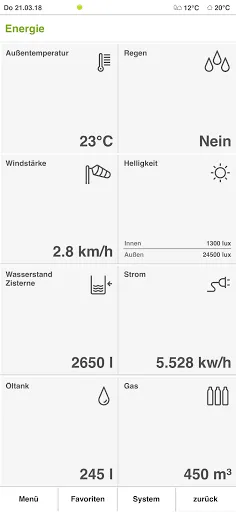
The data from the weather station installed on the building such as wind speed, precipitation and temperatures are available at a glance.
Energy generation and fill levels
The energy generation of a photovoltaic system can be viewed just as easily as the fill level of a cistern for rain water.
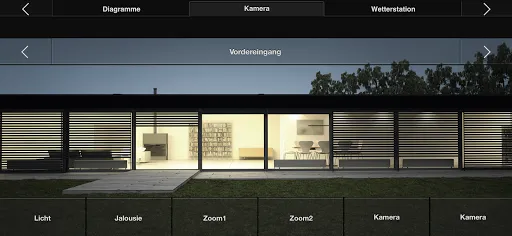
Camera
Cameras on the grounds can be called up with one operational step.
"Design 0" must also be activated in the QuadClient.
A list of specialists for intelligent building technology is available at www.gira.com/en/bezugsquellen
A simple and elegant way of operating complex building technology while away or from any room at home: with the Gira HomeServer app, you have everything under control – with an Android device, via GSM, UMTS or WLAN, from outside or inside the building. The app acts as a client, communicating with the Gira HomeServer or FacilityServer: the Gira Interface displays all functions clearly and concisely and allows quick access to the building. The display is either horizontal or vertical and can be modified by simply rotating the device. Various profiles allow controlling different buildings such as a personal residence or company as well as various views of one building. In this way, different functions can be controlled from outside the building than from inside. Different views can also be created for users.
The most important features:
Main menu
The main menu displays all building functions. Date, time, current temperature and active functions can be viewed via the status bar. The jump back to the main menu is via the lower navigation bar.
Room list
All rooms of a property are assigned by floor. The overview of all applications installed in a room can be opened by touch.
Room functions
The functions within a room and their status are recognizable at a glance and can be operated with a touch. For more complex functions such as the heating control system, a pop-up menu is opened. If the device is rotated by 90°, the horizontal format opens a further view of the time clock functions.
Time clock
A function can be adapted to personal requirements via a range of filter functions; random values are also possible in this way.
Diagrams
Diagrams enable the clear display of detected and evaluated consumption data by year, month, week, day or hour. If the unit is turned by 90°, the last active diagram appears in the horizontal format. Temperature differences, for example, can be visualised via multi-touch.
Messages
Alarm and fault messages, measured values and states of the various components integrated in the system are clearly displayed.
Weather data
The data from the weather station installed on the building such as wind speed, precipitation and temperatures are available at a glance.
Energy generation and fill levels
The energy generation of a photovoltaic system can be viewed just as easily as the fill level of a cistern for rain water.
Camera
Cameras on the grounds can be called up with one operational step.
"Design 0" must also be activated in the QuadClient.
A list of specialists for intelligent building technology is available at www.gira.com/en/bezugsquellen
Gira HomeServer/FacilityServer スクリーンショット
Gira HomeServer/FacilityServerの過去のバージョン





編集者のおすすめ


Gira HomeServer/FacilityServer と似たアプリ


Gira Giersiepen GmbH & Co. KG によるアプリ
ユーザーレビュー
+ レビュー
4.8
5
4
3
2
1
Z
Zack
2024-12-20
15
0
Gira HomeServer/FacilityServer is an exceptional app that has truly revolutionized home automation. Its intuitive interface and robust features make managing my smart devices a breeze!
T
Tony
2024-12-31
9
0
I can't recommend Gira HomeServer/FacilityServer enough. It’s incredibly reliable and has made controlling my home’s lighting, temperature, and security so much simpler.
C
Carina
2024-12-01
28
0
Gira HomeServer/FacilityServer is a game-changer for smart home enthusiasts. The app’s seamless integration with various devices is truly impressive.
最も人気のある

Plague Inc.
Ndemic Creations

Super Mario Odyssey
Super Mario Odyssey APK - Explore the World Like Never Before!
Embark on an exhilarating adventure w

Hole.io
VOODOO

StarMaker: Sing Karaoke Songs
SKYWORK AI PTE. LTD.

Poppo Live
Poppo Team

CookieRun: OvenBreak
Devsisters Corporation

Netflix
Netflix, Inc.

TikTok
TikTok Pte. Ltd.

Legend of Solgard
Snowprint Studios AB

X
X Corp.

Clash Royale
Supercell

Tips Dream League Soccer 2017
amorphisnguyen

Relic Bag: Shadow Hunter
Fansipan Limited

PUBG MOBILE
Level Infinite

Pure Sniper: Gun Shooter Games
Miniclip.com

War Thunder Mobile
GAIJIN NETWORK LTD

GunboundM
DargomStudio

Call of Duty: Warzone Mobile
Activision Publishing, Inc.

Off Road 4x4 Driving Simulator
Azur Interactive Games Limited

Car Parking Multiplayer 2
olzhass

Talking Pierre the Parrot
Outfit7 Limited

Red Dead redemption 2 Mobile
Tarik EL hamdi

Shadow Fight 2 Special Edition
NEKKI

Reddit
reddit Inc.