

Voip By Antisip (+Video)
평점
Jun 24, 2024최신 업데이트
5.2.1-901-2버전
Voip By Antisip (+Video) 정보
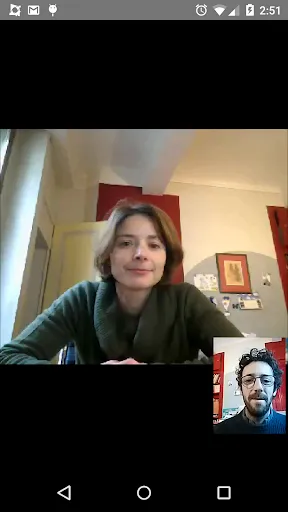
"Voip By Antisip" is a VoIP and **VIDEO** softphone based on SIP protocol.
JOIN BETA TEST PROGRAM:
You can test beta versions a few days before they are available by subscribing to the community:
https://plus.google.com/u/0/communities/110624845404424427843
Once subscription is validated, accept to be a beta tester:
https://play.google.com/apps/testing/com.antisip.vbyantisip
NEW: H264 hardware encoding and decoding!
NEW: A wizard exists for many services. It should also works for other as well!
NEW: The wizard can also help you to create your own VoIP account at sip.antisip.com
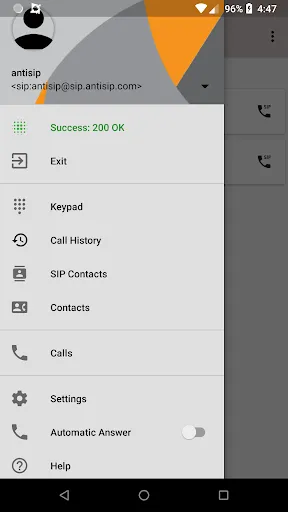
NEW: A new interface lists all the SIP address from your address book. In order to add or edit them, use the native Contact app from the phone.
** FAQ ** (English only)
http://www.antisip.com/faq-vbyantisip
"Voip By Antisip" can be used with any SIP provider and is pretty simple to configure. You only need to enter the domain, login and password of your voip provider.
** Use with sip.antisip.com services ** (NO PSTN SERVICE)
If you wish a Voip account, you AND your freinds can create one on sip.antisip.com.
We made a very simple How-To (english only) to clearly help you to create an account
and configure your application. Check here: https://www.antisip.com/how-to-use-our-sip-services
"Voip by Antisip" offer video using VP8! Using this codec, "Voip by Antisip" will show excellent performance, and will maintain excellent audio and video quality. H263-1998 and MP4V-ES are still provided to keep compatibility with other phones. Please report kindly any problems related to video and include device information.
"Voip by Antisip" also offer video using H264 hardware encoder when available on android device above 4.1. This is still experimental (advanced settings): so be kind to report any bug so I can improve!
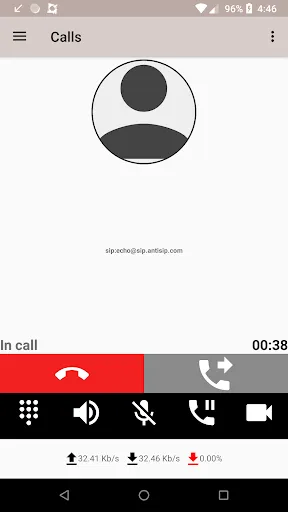
To start video, you only need to press the green button when the call is established! Then video starts. Incoming video will only works for android >= 2.2!
Other features:
* create account at sip.antisip.com
* automatic setup for low bit rate usage in 3G mode.
* large processor support/optimization: v5, v7a and v7a with neon.
* 3G Call possible (if allowed by your 3G operator)
* PLC support
* AGC support
* AEC support (echo canceller)
* echo limiter
* bluetooth, headset automatic detection (and automatic configuration)
* audio codec: SILK, OPUS, ILBC, ISAC, GSM, ...
* video software codec: VP8, H264, MP4V-ES, H263-1998
* video hardware codec: H264 (optional)
* video codec: Optional and experimental hardware H264 (for device above android 4.1)
* dtmf, speaker, hold
* TLS support with and without certificate validation.
* SRTP encryption.
* use system ringer or vibrate.
* RTCP feedback control for a better video bitrate and quality control.
* automatic adaptative video bitrate control (webrtc's goog-remb OR tmmbr/tmmbn)
* webrtc compatibility, DTLS-SRTP, rtp and rtcp muxing, etc...
* ENUM (e164.arpa) and ENUMER (emercoin blockchain) support.
* ...
license AND contact details:
https://www.antisip.com/vbyantisip/license/license.html
JOIN BETA TEST PROGRAM:
You can test beta versions a few days before they are available by subscribing to the community:
https://plus.google.com/u/0/communities/110624845404424427843
Once subscription is validated, accept to be a beta tester:
https://play.google.com/apps/testing/com.antisip.vbyantisip
NEW: H264 hardware encoding and decoding!
NEW: A wizard exists for many services. It should also works for other as well!
NEW: The wizard can also help you to create your own VoIP account at sip.antisip.com
NEW: A new interface lists all the SIP address from your address book. In order to add or edit them, use the native Contact app from the phone.
** FAQ ** (English only)
http://www.antisip.com/faq-vbyantisip
"Voip By Antisip" can be used with any SIP provider and is pretty simple to configure. You only need to enter the domain, login and password of your voip provider.
** Use with sip.antisip.com services ** (NO PSTN SERVICE)
If you wish a Voip account, you AND your freinds can create one on sip.antisip.com.
We made a very simple How-To (english only) to clearly help you to create an account
and configure your application. Check here: https://www.antisip.com/how-to-use-our-sip-services
"Voip by Antisip" offer video using VP8! Using this codec, "Voip by Antisip" will show excellent performance, and will maintain excellent audio and video quality. H263-1998 and MP4V-ES are still provided to keep compatibility with other phones. Please report kindly any problems related to video and include device information.
"Voip by Antisip" also offer video using H264 hardware encoder when available on android device above 4.1. This is still experimental (advanced settings): so be kind to report any bug so I can improve!
To start video, you only need to press the green button when the call is established! Then video starts. Incoming video will only works for android >= 2.2!
Other features:
* create account at sip.antisip.com
* automatic setup for low bit rate usage in 3G mode.
* large processor support/optimization: v5, v7a and v7a with neon.
* 3G Call possible (if allowed by your 3G operator)
* PLC support
* AGC support
* AEC support (echo canceller)
* echo limiter
* bluetooth, headset automatic detection (and automatic configuration)
* audio codec: SILK, OPUS, ILBC, ISAC, GSM, ...
* video software codec: VP8, H264, MP4V-ES, H263-1998
* video hardware codec: H264 (optional)
* video codec: Optional and experimental hardware H264 (for device above android 4.1)
* dtmf, speaker, hold
* TLS support with and without certificate validation.
* SRTP encryption.
* use system ringer or vibrate.
* RTCP feedback control for a better video bitrate and quality control.
* automatic adaptative video bitrate control (webrtc's goog-remb OR tmmbr/tmmbn)
* webrtc compatibility, DTLS-SRTP, rtp and rtcp muxing, etc...
* ENUM (e164.arpa) and ENUMER (emercoin blockchain) support.
* ...
license AND contact details:
https://www.antisip.com/vbyantisip/license/license.html
Voip By Antisip (+Video) 스크린샷
Voip By Antisip (+Video)의 이전 버전





에디터의 추천


Voip By Antisip (+Video)와 비슷한 앱


Aymeric Moizard 제작 앱
사용자 리뷰
+ 리뷰
4.6
5
4
3
2
1
S
Shirley
2025-03-12
12
0
Voip By Antisip (+Video) is an amazing app for seamless video calls. The quality is top-notch!
D
Doris
2025-02-14
10
0
I love using Voip By Antisip (+Video) for my international calls. It's reliable and easy to use.
M
Martha
2025-02-05
28
0
Voip By Antisip (+Video) provides crystal-clear video calls. Highly recommended!
가장 인기 있는

Hole.io
VOODOO

Super Mario Odyssey
Super Mario Odyssey APK - Explore the World Like Never Before!
Embark on an exhilarating adventure w

Plague Inc.
Ndemic Creations

StarMaker: Sing Karaoke Songs
SKYWORK AI PTE. LTD.

Poppo Live
Poppo Team

CookieRun: OvenBreak
Devsisters Corporation

Netflix
Netflix, Inc.

TikTok
TikTok Pte. Ltd.

Legend of Solgard
Snowprint Studios AB

X
X Corp.

Clash Royale
Supercell

Tips Dream League Soccer 2017
amorphisnguyen

Relic Bag: Shadow Hunter
Fansipan Limited

PUBG MOBILE
Level Infinite

Pure Sniper: Gun Shooter Games
Miniclip.com

War Thunder Mobile
GAIJIN NETWORK LTD

Off Road 4x4 Driving Simulator
Azur Interactive Games Limited

Call of Duty: Warzone Mobile
Activision Publishing, Inc.

GunboundM
DargomStudio

Car Parking Multiplayer 2
olzhass

Talking Pierre the Parrot
Outfit7 Limited

Red Dead redemption 2 Mobile
Tarik EL hamdi

Shadow Fight 2 Special Edition
NEKKI

Reddit
reddit Inc.