

Screen Recorder - AZ Recorder
평점
Jun 19, 2024최신 업데이트
6.1.7버전
Screen Recorder - AZ Recorder 정보
🥇 Featured on Google Play Home Page, BusinessInsider, CNET, HuffPost, Yahoo News, and more.
AZ Screen Recorder is a reliable and high-quality screen recorder with audio. With many features including screen record, screen capture, video editor and live streaming, this screen recording app lets you create and share gameplay videos, save video calls or record videos that cannot be downloaded.
ADVANTAGES
★ Easy to use.
★ High-quality videos.
★ NO watermark.
★ NO time limit.
KEY FEATURES
★ Screen recording: this function lets you create beautiful screen record videos.
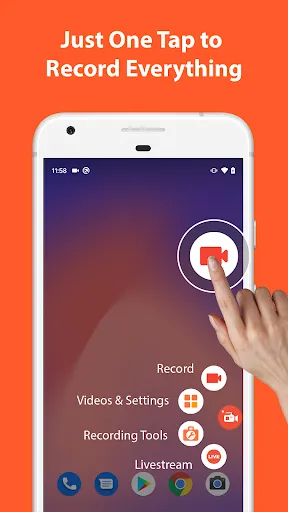
- Easily start/stop screen record with control buttons.
- Pause/resume screen video recording at any time.
- Screen recorder with audio from the mic.
- Screen recorder with internal audio.
- Show your face in a floating window with facecam.
- Record screen video to GIF.
- Draw on screen while screen recording.
- Shake device to stop screen video recording.
- Transfer screenshot video to computers using Wifi.
★ Video Editor: this screen video recording app also lets you edit videos.
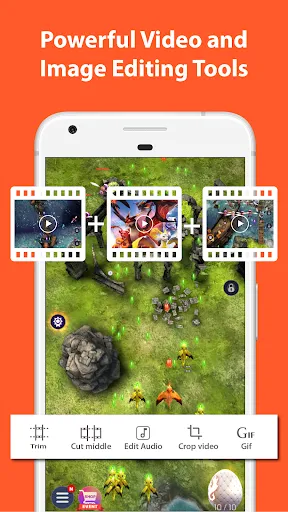
- Trim videos.
- Remove middle parts of videos.
- Merge videos.
- Add background music.
- Add subtitles.
- Extract frames from videos.
- Crop videos.
- Rotate videos.
- Compress videos to save space for new video records.
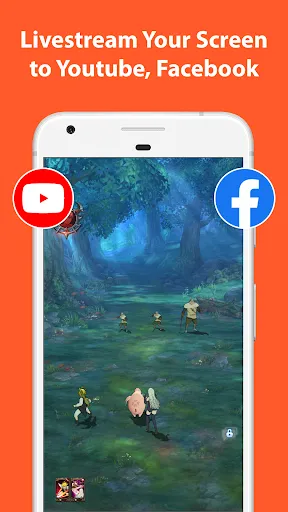
★ Livestream: this screen recording app can also be used as a live streaming app for Youtube or Facebook.
You can broadcast your phone screen to friends, followers, subscribers and other viewers. The following features are provided to help you livestream conveniently:
- Broadcast phone screen together with audio.
- Various video stream resolutions.
- Optionally show your face while live streaming.
★ Screenshots and Image Editing
AZ Recorder is more than just a screen video recorder app. It can also help you take screenshots and edit images. You can capture screen easily with one tap and use in-app image editing tools to:
- Stitch images: auto detect and combine several images into one.
- Crop images: remove unwanted parts.
- Blur image: pixelate areas you don’t want to show.
- Add text, emojis or draw directly on screenshots.
MULTI-PURPOSE
This record screen video app is made to meet your demands.
🎥 Screen recorder with audio
Since you can record screen and audio, this screen recorder app is suitable for many purposes such as to be a video call recording app or a game screen recorder.
🎧 Screen recorder with internal audio
Since Android 10, this screen video recorder also supports internal audio. Specifically, you can record screen with the original sound of any game or app. Because of that, this screen recorder with internal audio can be used as a live recorder or simply as an internal audio recorder.
🏆 Best screen recorder for gaming
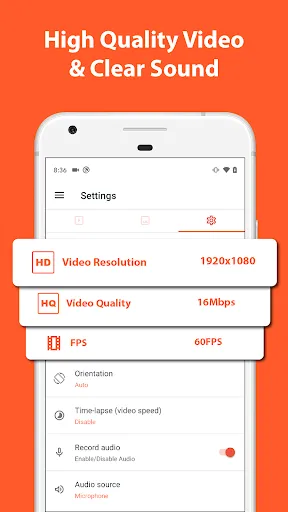
This screen recording app can be used as a game recorder because it supports many resolutions from HD, FullHD, 2K to 4K (4K screen recorder is only available to some users and devices). In addition, this screen video recorder app also supports different frame-rates: 24fps, 30fps, 60fps…
🎉 Video call recorder
This screen video recorder helps you keep important and memorable video calls with family, friends and colleagues.
If you want to use screen recorder no ads or just simply like our free screen record app, please upgrade to support this video software development.
Thanks for downloading this video screen recorder. We are striving to make AZ Screen Recorder app the best screen recorder for Android. If you have any feedback, bug reports or suggestions, please contact us at az.screen.recorder@gmail.com.
AZ Screen Recorder is a reliable and high-quality screen recorder with audio. With many features including screen record, screen capture, video editor and live streaming, this screen recording app lets you create and share gameplay videos, save video calls or record videos that cannot be downloaded.
ADVANTAGES
★ Easy to use.
★ High-quality videos.
★ NO watermark.
★ NO time limit.
KEY FEATURES
★ Screen recording: this function lets you create beautiful screen record videos.
- Easily start/stop screen record with control buttons.
- Pause/resume screen video recording at any time.
- Screen recorder with audio from the mic.
- Screen recorder with internal audio.
- Show your face in a floating window with facecam.
- Record screen video to GIF.
- Draw on screen while screen recording.
- Shake device to stop screen video recording.
- Transfer screenshot video to computers using Wifi.
★ Video Editor: this screen video recording app also lets you edit videos.
- Trim videos.
- Remove middle parts of videos.
- Merge videos.
- Add background music.
- Add subtitles.
- Extract frames from videos.
- Crop videos.
- Rotate videos.
- Compress videos to save space for new video records.
★ Livestream: this screen recording app can also be used as a live streaming app for Youtube or Facebook.
You can broadcast your phone screen to friends, followers, subscribers and other viewers. The following features are provided to help you livestream conveniently:
- Broadcast phone screen together with audio.
- Various video stream resolutions.
- Optionally show your face while live streaming.
★ Screenshots and Image Editing
AZ Recorder is more than just a screen video recorder app. It can also help you take screenshots and edit images. You can capture screen easily with one tap and use in-app image editing tools to:
- Stitch images: auto detect and combine several images into one.
- Crop images: remove unwanted parts.
- Blur image: pixelate areas you don’t want to show.
- Add text, emojis or draw directly on screenshots.
MULTI-PURPOSE
This record screen video app is made to meet your demands.
🎥 Screen recorder with audio
Since you can record screen and audio, this screen recorder app is suitable for many purposes such as to be a video call recording app or a game screen recorder.
🎧 Screen recorder with internal audio
Since Android 10, this screen video recorder also supports internal audio. Specifically, you can record screen with the original sound of any game or app. Because of that, this screen recorder with internal audio can be used as a live recorder or simply as an internal audio recorder.
🏆 Best screen recorder for gaming
This screen recording app can be used as a game recorder because it supports many resolutions from HD, FullHD, 2K to 4K (4K screen recorder is only available to some users and devices). In addition, this screen video recorder app also supports different frame-rates: 24fps, 30fps, 60fps…
🎉 Video call recorder
This screen video recorder helps you keep important and memorable video calls with family, friends and colleagues.
If you want to use screen recorder no ads or just simply like our free screen record app, please upgrade to support this video software development.
Thanks for downloading this video screen recorder. We are striving to make AZ Screen Recorder app the best screen recorder for Android. If you have any feedback, bug reports or suggestions, please contact us at az.screen.recorder@gmail.com.
Screen Recorder - AZ Recorder 스크린샷

Screen Recorder - AZ Recorder의 이전 버전






에디터의 추천


Screen Recorder - AZ Recorder와 비슷한 앱
 Screen Recorder.Best Screen Re
 Screen Recorder Video Recorder
 Screen Recorder - AZ Recorder
 Screen Recorder GU Recorder
 Screen Recorder+Video Recorder
 Screen Recorder Video Recorder
 Screen Recorder+Video Recorder
 Screen Recorder - AX Recorder
 Screen Recorder - AS Recorder
 Lock Screen(Turn off screen)
 Screen Guard - Hide Screen
 Screen Cast : Easy Screen Mirr
AZ Screen Recorder 제작 앱


Screen Recorder - AZ Recorder FAQ
PGYER APK HUB에서 Screen Recorder - AZ Recorder를 다운로드하는 방법은 무엇인가요?
PGYER APK HUB에서 Screen Recorder - AZ Recorder는 무료로 다운로드할 수 있나요?
PGYER APK HUB에서 Screen Recorder - AZ Recorder를 다운로드하려면 계정이 필요한가요?
PGYER APK HUB에서 Screen Recorder - AZ Recorder와 관련된 문제를 신고하는 방법은 무엇인가요?
도움이 되었나요?
예
아니요
사용자 리뷰
+ 리뷰
4.6
5
4
3
2
1
K
KokoButters
2024-02-14
0
0
AZ Recorder is incredibly helpful. Now, I can record Roblox smoothly without any lag issues.
K
Kathleya
2023-10-07
1
1
AZ Recorder is super useful, especially for adding logos. It works flawlessly with YouTube and Roblox.
W
WildcraftPlayer519
2022-08-25
2
2
I was hoping AZ Recorder could capture my Wildcraft gameplay for YouTube, but alas, it seems incompatible.
가장 인기 있는

Reddit
reddit Inc.

SHEIN-Shopping Online
Roadget Business PTE. LTD.

Poppo Live
Poppo Team

TikTok
TikTok Pte. Ltd.

Super Mario Odyssey
Super Mario Odyssey APK - Explore the World Like Never Before!
Embark on an exhilarating adventure w

Mobile Legends: Bang Bang FT
Công ty cổ phần phát triển công nghệ số Hồng Hà

Netflix
Netflix, Inc.

Car Parking Multiplayer 2
olzhass

Legend of Solgard
Snowprint Studios AB

X
X Corp.

Clash Royale
Supercell

Tips Dream League Soccer 2017
amorphisnguyen

Red Dead redemption 2 Mobile
Tarik EL hamdi

PUBG MOBILE
Level Infinite

Pure Sniper: Gun Shooter Games
Miniclip.com

Hole.io
VOODOO

GunboundM
DargomStudio

Plague Inc.
Ndemic Creations

Relic Bag: Shadow Hunter
Fansipan Limited

Call of Duty: Warzone Mobile
Activision Publishing, Inc.

Talking Pierre the Parrot
Outfit7 Limited

War Thunder Mobile
GAIJIN NETWORK LTD

Shadow Fight 2 Special Edition
NEKKI

Once Human
Exptional Global