

iWatermark+ Watermark Manager
Penilaian
Jun 11, 2024Kemas kini terkini
2.8Versi
Tentang iWatermark+ Watermark Manager
Watermark to protect your photo and video (1080 & 4k). iWatermark+ the Essential Professional Watermark App. Batch Watermarking Using Visible & Invisible Watermarks
Text, Logo, QR-Code, Signature on photo or video and more. Adding a watermark displays that it was created and is owned by you. Watermarking your Android (or Canon, Nikon, Sony, Olympus, Samsung) photos & videos is easy with a watermark or watermarks using your name, logo, copyright, trademark, QR code, signature, etc. Sign your photos with 5 visible and 2 invisible = 7 watermark types. Use one or multiple watermarks simultaneously on one or a batch of photos. Then share to Facebook, WhatsApp, Instagram, Twitter, etc...
Why? Often when a photo or video goes viral the owner/creator becomes unknown, is lost or forgotten. Adding a watermark subtly displays, no matter where your photo goes, that it is owned by you. Watermark with your logo, email, website url, signature, QR or other info to maintain a connection to your photos.
iWatermark+, is the only watermarking tool available for all 4 platforms Android, iOS, Mac and Windows. iWatermark+ is the most popular and advanced utility for creating watermarks and watermarking photos
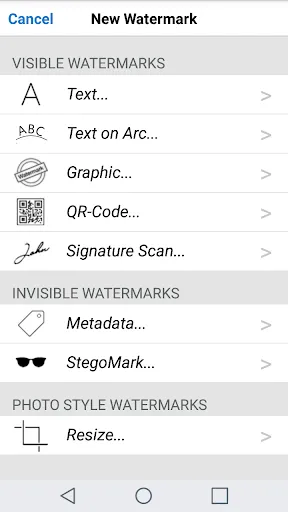
Only iWatermark+ has 7 Watermark Types-
5 Visible Watermarks:
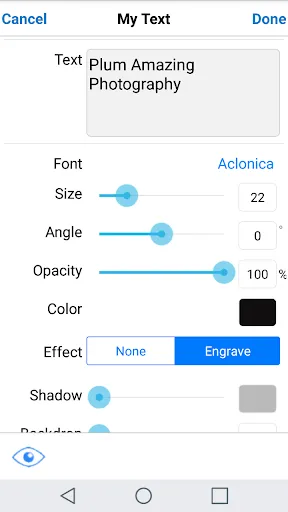
- Text - and change the font, color, angle, opacity, etc
- Arc Text
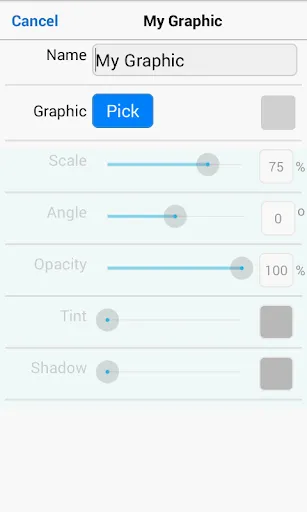
- Bitmap Graphics - import your logo or use our library
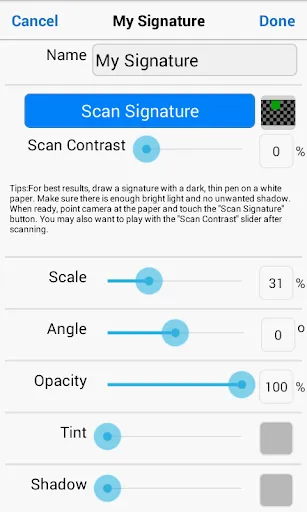
- Signature Scan - creates a watermark of your signature
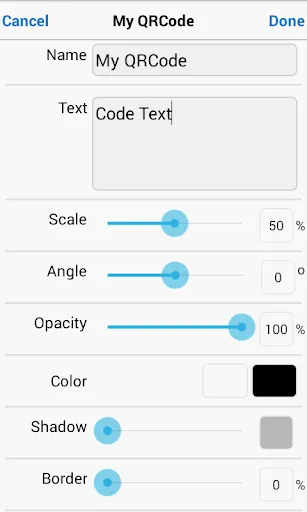
- QRCode - creates a watermark that is like a barcode, readable by any smartphone camera and can contain up to 4000 characters of info
2 Invisible Watermarks:
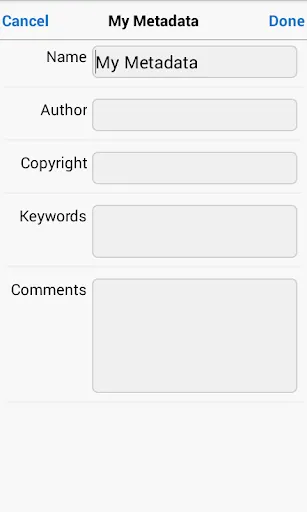
- Metadata - for making watermarks that include IPTC/EXIF tags (like camera info, GPS, copyright, etc.) info
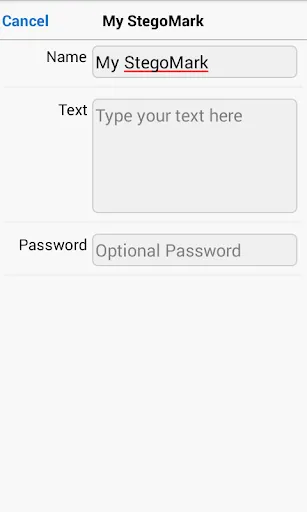
- Steganographic - for hiding a watermark in the color data of a photo
Only iWatermark+ has these features:
* watermark photos/videos (1080 & 4k)
* creates 7 watermark types, text, text on an arc, bitmap, signature, QR, metadata, and steganographic
* steganographic watermark that embeds info invisibly in the photo
* keeps a database of all your watermarks
* apply multiple watermarks to one photo
* watermark one or multiple photos in batch mode
* 292 excellent fonts for your text watermarks
* engrave and emboss text
* signature scanner to instantly import your signature or graphic as a watermark
* live preview and editing of font, color, scale, opacity, size, position and angle
* view metadata & exif in photos
* create metadata tags in text watermarks
* share to Facebook, WhatsApp, Twitter, Instagram, etc.
Watermarking displays your ownership of a photo. Like signing your name to a document, watermarking subtly displays, no matter where your photo goes, that it’s your property.
Touch is what iWatermark+ on Android is all about:
♦ With your finger drag the watermark to any position on the page
♦ Create your own text or graphic watermarks or select from the included example watermarks (both text and graphics)
♦ Single or batch process many photos at a time
♦ Choose from the many fonts
♦ By touch easily adjust the watermarks scale, opacity, font, color and angle and more
Why Watermark?
Digitally sign your photos/artwork with iWatermark+ to claim, secure and maintain your intellectual property and reputation.
✔ Photos go viral then they fly off globally. Watermark with name, email or url so your photo has a visible and legal connection to you
✔ Build your company brand, by having your company watermark on all it's photos
✔ Promote your company, name and website by using QR codes as watermarks
✔ Avoid the surprise of seeing your photos and/or artwork elsewhere on the web or in an ad
✔ Avoid the conflicts, costly litigation and headaches from plagiarists who claim they didn't know that you created it
✔ Avoid intellectual property (IP) squabbles
Localizations: ✔ English ✔ French, ✔ German, ✔ Japanese, ✔ Chinese, ✔ Vietnamese, ✔ Hindi, ✔ Spanish ✔ Urdu ✔ Indonesian
Contact us for help
Text, Logo, QR-Code, Signature on photo or video and more. Adding a watermark displays that it was created and is owned by you. Watermarking your Android (or Canon, Nikon, Sony, Olympus, Samsung) photos & videos is easy with a watermark or watermarks using your name, logo, copyright, trademark, QR code, signature, etc. Sign your photos with 5 visible and 2 invisible = 7 watermark types. Use one or multiple watermarks simultaneously on one or a batch of photos. Then share to Facebook, WhatsApp, Instagram, Twitter, etc...
Why? Often when a photo or video goes viral the owner/creator becomes unknown, is lost or forgotten. Adding a watermark subtly displays, no matter where your photo goes, that it is owned by you. Watermark with your logo, email, website url, signature, QR or other info to maintain a connection to your photos.
iWatermark+, is the only watermarking tool available for all 4 platforms Android, iOS, Mac and Windows. iWatermark+ is the most popular and advanced utility for creating watermarks and watermarking photos
Only iWatermark+ has 7 Watermark Types-
5 Visible Watermarks:
- Text - and change the font, color, angle, opacity, etc
- Arc Text
- Bitmap Graphics - import your logo or use our library
- Signature Scan - creates a watermark of your signature
- QRCode - creates a watermark that is like a barcode, readable by any smartphone camera and can contain up to 4000 characters of info
2 Invisible Watermarks:
- Metadata - for making watermarks that include IPTC/EXIF tags (like camera info, GPS, copyright, etc.) info
- Steganographic - for hiding a watermark in the color data of a photo
Only iWatermark+ has these features:
* watermark photos/videos (1080 & 4k)
* creates 7 watermark types, text, text on an arc, bitmap, signature, QR, metadata, and steganographic
* steganographic watermark that embeds info invisibly in the photo
* keeps a database of all your watermarks
* apply multiple watermarks to one photo
* watermark one or multiple photos in batch mode
* 292 excellent fonts for your text watermarks
* engrave and emboss text
* signature scanner to instantly import your signature or graphic as a watermark
* live preview and editing of font, color, scale, opacity, size, position and angle
* view metadata & exif in photos
* create metadata tags in text watermarks
* share to Facebook, WhatsApp, Twitter, Instagram, etc.
Watermarking displays your ownership of a photo. Like signing your name to a document, watermarking subtly displays, no matter where your photo goes, that it’s your property.
Touch is what iWatermark+ on Android is all about:
♦ With your finger drag the watermark to any position on the page
♦ Create your own text or graphic watermarks or select from the included example watermarks (both text and graphics)
♦ Single or batch process many photos at a time
♦ Choose from the many fonts
♦ By touch easily adjust the watermarks scale, opacity, font, color and angle and more
Why Watermark?
Digitally sign your photos/artwork with iWatermark+ to claim, secure and maintain your intellectual property and reputation.
✔ Photos go viral then they fly off globally. Watermark with name, email or url so your photo has a visible and legal connection to you
✔ Build your company brand, by having your company watermark on all it's photos
✔ Promote your company, name and website by using QR codes as watermarks
✔ Avoid the surprise of seeing your photos and/or artwork elsewhere on the web or in an ad
✔ Avoid the conflicts, costly litigation and headaches from plagiarists who claim they didn't know that you created it
✔ Avoid intellectual property (IP) squabbles
Localizations: ✔ English ✔ French, ✔ German, ✔ Japanese, ✔ Chinese, ✔ Vietnamese, ✔ Hindi, ✔ Spanish ✔ Urdu ✔ Indonesian
Contact us for help
Permainan
Tangkapan skrin iWatermark+ Watermark Manager
Versi Lama iWatermark+ Watermark Manager





Cadangan Editor


Aplikasi Seperti iWatermark+ Watermark Manager
 iWatermark+ Watermark Manager
 Watermark - Watermark Photo &
 Manager App for Field Manager
 Add Watermark - Video Waterma
 AGC ToolKit - Watermark LUT
 Add Watermark
 Auto Watermark Camera: Logo Text & Time stamp
 Watermark: Logo, Text on Photo
 Remove & Add Watermark
 SaveTik - no watermark
 Watermark on Photos & Video
 Photo Watermark
Aplikasi oleh Plum Amazing
iWatermark+ Watermark Manager FAQ
Bagaimana saya boleh memuat turun iWatermark+ Watermark Manager dari PGYER APK HUB?
Adakah iWatermark+ Watermark Manager di PGYER APK HUB percuma untuk dimuat turun?
Adakah saya perlu akaun untuk memuat turun iWatermark+ Watermark Manager dari PGYER APK HUB?
Bagaimana saya boleh melaporkan masalah dengan iWatermark+ Watermark Manager di PGYER APK HUB?
Adakah anda dapati ini membantu
Ya
Tidak
Ulasan Pengguna
+ Ulasan
4.7
5
4
3
2
1
C
Claudia
2025-02-23
23
0
With iWatermark+ Watermark Manager, adding watermarks to my photos has never been easier. The app is fast, efficient, and offers excellent support.
H
Hillary
2025-02-28
25
0
iWatermark+ Watermark Manager is a game-changer for photographers. It allows me to protect my work with professional-looking watermarks in just a few clicks.
O
Owen
2025-02-05
9
0
I love how iWatermark+ Watermark Manager integrates seamlessly with my workflow. It's a must-have app for anyone serious about image protection.
Paling Popular

Finger Football
Gamotronix

Talking Pierre the Parrot
Outfit7 Limited

Tips Dream League Soccer 2017
amorphisnguyen

Poppo Live
Poppo Team

StarMaker: Sing Karaoke Songs
SKYWORK AI PTE. LTD.

CookieRun: OvenBreak
Devsisters Corporation

Netflix
Netflix, Inc.

TikTok
TikTok Pte. Ltd.

Legend of Solgard
Snowprint Studios AB

X
X Corp.

Clash Royale
Supercell

Plague Inc.
Ndemic Creations

Relic Bag: Shadow Hunter
Fansipan Limited

PUBG MOBILE
Level Infinite

Red Dead redemption 2 Mobile
Tarik EL hamdi

War Thunder Mobile
GAIJIN NETWORK LTD

Off Road 4x4 Driving Simulator
Azur Interactive Games Limited

Call of Duty: Warzone Mobile
Activision Publishing, Inc.

GunboundM
DargomStudio

Car Parking Multiplayer 2
olzhass

Marvel Spider Man
Welcome to the Marvel Spider-Man APK, your gateway to the exciting world of Spider-Man, now adapted

Pure Sniper: Gun Shooter Games
Miniclip.com

Shadow Fight 2 Special Edition
NEKKI

Reddit
reddit Inc.