

Voice Calculator Pro
Рейтинг
Aug 11, 2024Последнее обновление
1.4.20Версия
Как установить файл XAPK / APK
Поделиться
О Voice Calculator Pro
ATNSOFT Calculator lets you:
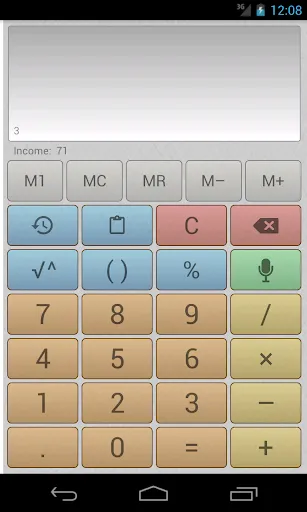
✓ Instantly enter numbers and mathematical expressions using an ergonomic on-screen keyboard and voice input (currently supports English, Arabic, Bengali, Chinese, Croatian, Czech, Dutch, French, German, Greek, Hindi, Hungarian, Indonesian, Italian, Japanese, Korean, Polish, Portuguese, Romanian, Russian, Spanish, Swedish, Tamil, Thai, Turkish and Vietnamese). Just press the mic button and speak the expression (for example, 74 point 5 times 4 plus 37 = 74.5 × 4 + 37 = 335): it will appear on screen and the result will be calculated immediately!
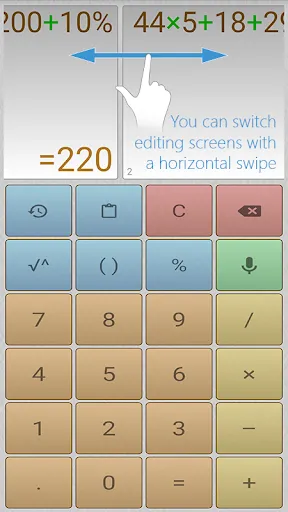
✓ Make two or more calculations simultaneously. To do this, you can switch editing screens with a horizontal swipe along the top edge. You can give names to screens by tapping the screen number.
✓ Quickly copy the result to the clipboard simply by tapping it. There is a special button for pasting from the clipboard (📋).
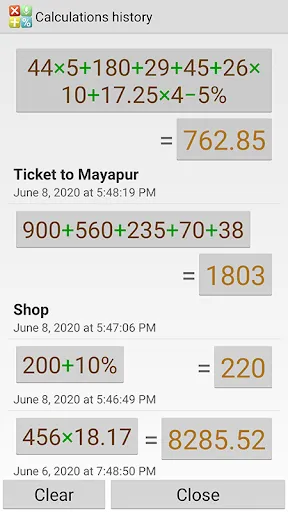
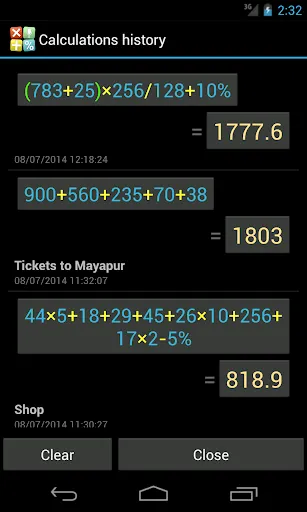
✓ All calculations are recorded in the calculations history, from where you can insert the expression and result into the editor. These records can be instantly deleted with a horizontal swipe. Any record from the history can be tagged with text by tapping the date or time.
✓ Execute mathematical operations with incredibly large numbers and expressions.
✓ Raise to the n-th power or extract the root of the n-th power (for example: 5 cubed = 5^3 = 125; the cube root of 27 = 3√27 = 3).
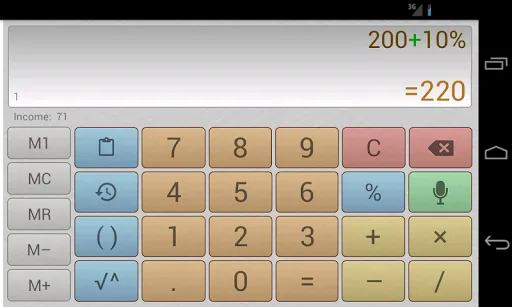
✓ Percentage calculations (for example: 200 + 10% = 220; 10 % 200 = 20).
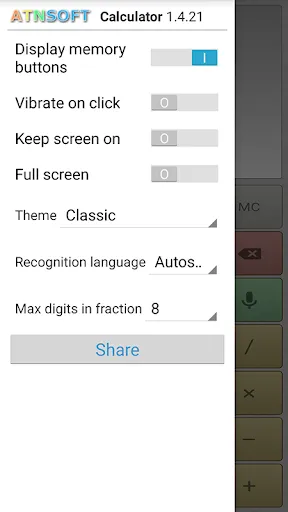
✓ Convenient, user-friendly settings that can be opened by swiping from the left edge of the screen or using a menu button. The settings include: vibrate on click, full-screen mode, keep screen on, and other options.
✓ The result is always displayed naturally, without incomprehensible E's, dashes, and numbers.
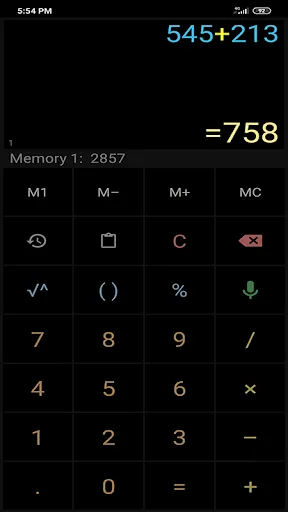
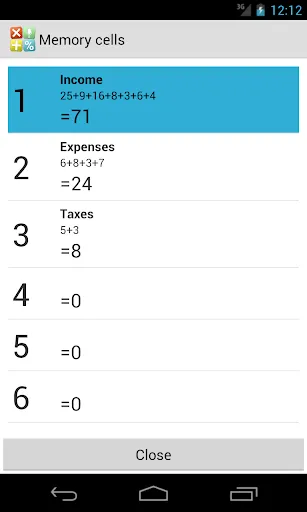
✓ Easily work with many memory cells, and easily switch between them. You can set a name for each cell, letting you intuitively use the memory for a specific field of activity.
✓ Quickly switch themes.
Important: For voice input to work without the Internet, the appropriate voice baselines must be turned on in the Android settings. However, voice recognition is more accurate and higher-quality with an internet connection.
If voice input doesn't work, then in the Android settings select: Language & input > Voice input > Basic Google recognition.
Get the Pro Version for Free!
We'll be happy to send you a coupon or even a few ones for the Pro version free installation in exchange for:
– an interesting article, blog post, YouTube video or any other item promoting the application;
– or quality translation of the application texts into another language. The application has already been translated into Dutch, French, German, Hungarian, Italian, Japanese, Portuguese, Romanian, Russian, Spanish, Swedish and Thai.
Please feel free to use the contact form to share your ideas:
https://atnsoft.com/support
✓ Instantly enter numbers and mathematical expressions using an ergonomic on-screen keyboard and voice input (currently supports English, Arabic, Bengali, Chinese, Croatian, Czech, Dutch, French, German, Greek, Hindi, Hungarian, Indonesian, Italian, Japanese, Korean, Polish, Portuguese, Romanian, Russian, Spanish, Swedish, Tamil, Thai, Turkish and Vietnamese). Just press the mic button and speak the expression (for example, 74 point 5 times 4 plus 37 = 74.5 × 4 + 37 = 335): it will appear on screen and the result will be calculated immediately!
✓ Make two or more calculations simultaneously. To do this, you can switch editing screens with a horizontal swipe along the top edge. You can give names to screens by tapping the screen number.
✓ Quickly copy the result to the clipboard simply by tapping it. There is a special button for pasting from the clipboard (📋).
✓ All calculations are recorded in the calculations history, from where you can insert the expression and result into the editor. These records can be instantly deleted with a horizontal swipe. Any record from the history can be tagged with text by tapping the date or time.
✓ Execute mathematical operations with incredibly large numbers and expressions.
✓ Raise to the n-th power or extract the root of the n-th power (for example: 5 cubed = 5^3 = 125; the cube root of 27 = 3√27 = 3).
✓ Percentage calculations (for example: 200 + 10% = 220; 10 % 200 = 20).
✓ Convenient, user-friendly settings that can be opened by swiping from the left edge of the screen or using a menu button. The settings include: vibrate on click, full-screen mode, keep screen on, and other options.
✓ The result is always displayed naturally, without incomprehensible E's, dashes, and numbers.
✓ Easily work with many memory cells, and easily switch between them. You can set a name for each cell, letting you intuitively use the memory for a specific field of activity.
✓ Quickly switch themes.
Important: For voice input to work without the Internet, the appropriate voice baselines must be turned on in the Android settings. However, voice recognition is more accurate and higher-quality with an internet connection.
If voice input doesn't work, then in the Android settings select: Language & input > Voice input > Basic Google recognition.
Get the Pro Version for Free!
We'll be happy to send you a coupon or even a few ones for the Pro version free installation in exchange for:
– an interesting article, blog post, YouTube video or any other item promoting the application;
– or quality translation of the application texts into another language. The application has already been translated into Dutch, French, German, Hungarian, Italian, Japanese, Portuguese, Romanian, Russian, Spanish, Swedish and Thai.
Please feel free to use the contact form to share your ideas:
https://atnsoft.com/support
Геймплей
Скриншоты Voice Calculator Pro
Старые версии Voice Calculator Pro





Рекомендация редактора


Приложения, похожие на Voice Calculator Pro
 Voice Text Text Voice FULL PRO
 Voice Calculator Pro
 Calculator Pro: Calculator App
 Voice Changer - Voice Effects
 Voice Memo (Voice Recorder)
 Voice Recorder, Voice Memos
 Voice Recorder & Voice Memos
 Voice Changer Voice Editor App
 Voice SMS, Type SMS by Voice
 Voice Changer - Voice Effect
 Voice Recorder: Voice Notes
 Voice Lock & Voice Screen Lock
Приложения от ATNSOFT

Voice Calculator Pro FAQ
Как мне скачать Voice Calculator Pro с PGYER APK HUB?
Бесплатно ли скачивать Voice Calculator Pro на PGYER APK HUB?
Нужен ли аккаунт для скачивания Voice Calculator Pro с PGYER APK HUB?
Как мне сообщить о проблеме с Voice Calculator Pro на PGYER APK HUB?
Вы нашли это полезным?
Да
Нет
Отзывы пользователей
+ Отзывы
4.5
5
4
3
2
1
A
Andrea
2025-01-29
5
0
I love using Voice Calculator Pro for quick math on the go. It's fast, reliable, and super user-friendly.
A
Anna
2025-03-05
23
0
This app, Voice Calculator Pro, is a must-have for anyone who needs to do math quickly and efficiently.
E
Estelle
2024-12-27
1
0
Voice Calculator Pro is brilliant! The interface is clean, and the voice input works flawlessly.
Самые популярные

Plague Inc.
Ndemic Creations

Super Mario Odyssey
Super Mario Odyssey APK - Explore the World Like Never Before!
Embark on an exhilarating adventure w

Hole.io
VOODOO

StarMaker: Sing Karaoke Songs
SKYWORK AI PTE. LTD.

Poppo Live
Poppo Team

CookieRun: OvenBreak
Devsisters Corporation

Netflix
Netflix, Inc.

TikTok
TikTok Pte. Ltd.

Legend of Solgard
Snowprint Studios AB

X
X Corp.

Clash Royale
Supercell

Tips Dream League Soccer 2017
amorphisnguyen

Relic Bag: Shadow Hunter
Fansipan Limited

PUBG MOBILE
Level Infinite

Pure Sniper: Gun Shooter Games
Miniclip.com

War Thunder Mobile
GAIJIN NETWORK LTD

GunboundM
DargomStudio

Call of Duty: Warzone Mobile
Activision Publishing, Inc.

Off Road 4x4 Driving Simulator
Azur Interactive Games Limited

Car Parking Multiplayer 2
olzhass

Talking Pierre the Parrot
Outfit7 Limited

Red Dead redemption 2 Mobile
Tarik EL hamdi

Shadow Fight 2 Special Edition
NEKKI

Reddit
reddit Inc.