

Magnifier Camera (Magnifying G
Puan
Jun 24, 2024Son Güncelleme
1.4.0Sürüm
Magnifier Camera (Magnifying G Hakkında
Please watch the teach video to know how to use it.
Magnifier + Flashlight (best lighted magnifying glass app for free)
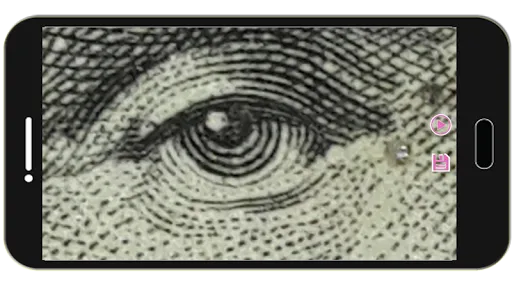
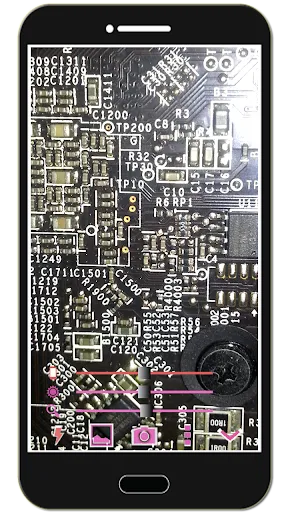
Let your phone become a perfect smart magnifier or smart microscope.
Handy!
Easy to see small text.
Open flashlight when start APP.
You can also use it as a simple version of the skin quality check device. (Skin detector)
[Quick Magnifier Camera Guideline]
When you start camera, the APP will set the magnifier zoom to middle value. You can drag zoom seek bar to let magnifier zoom in/out. (Or use two fingers to let magnifier zoom in/out)
When you start camera, the APP will auto detect the micro focus mode. If it exist, the APP will auto set to micro focus mode. If it doesn't exist, the APP will set to auto focus mode.
You can use the following method to change other settings:
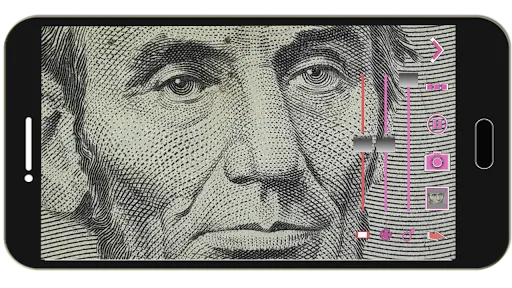
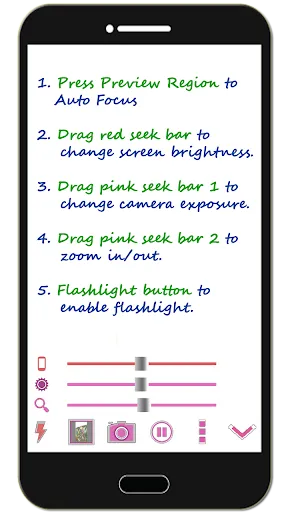
1. Press preview Region to focus.
2. Drag red seek bar to change screen brightness.
3. Drag pink seek bar 1 to change camera exposure.
4. Drag pink seek bar 2 to let magnifier zoom in/out. (Or use two fingers to let magnifier zoom in/out on preview screen)
5. Press the flashlight button to enable flashlight.
6. Press the pause/resume button to pause/resume preview. (freeze image) Then double click the freeze image to let magnifier zoom in/out. (Or two fingers to let magnifier zoom in/out)
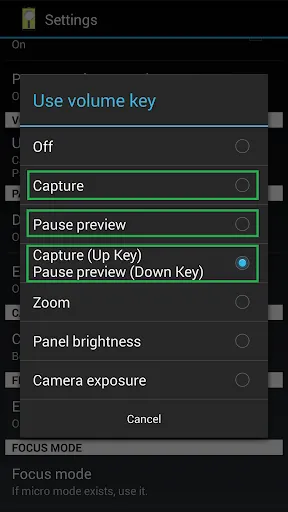
7. [Volume Key] : Use volume-down key to pause/resume preview. (freeze image) Use volume-up key to do camera capture. You can change other option in the camera settings page.
[Others]
1. You also can take a picture if you wish.
2. When focus, the focus area of the image please select the best color change much. If you click on the region are biased in favor of a single color, it is not very good focus. In addition, the lens remains clear, wipe clean the glass will be better focus. And turn on the flashlight also can get a better focus.
3. When camera focus, please don't let the camera's lens be too close to an object. It may be unable to focus. (According to the camera's focal length will vary)
【Recommended External Photo Editor】
( Line Camera )
https://play.google.com/store/apps/details?id=jp.naver.linecamera.android
This APP is now tested more compatible. They support external photo edit more user friendly.
Or you can use system photo editor, it also work. (Test on Samsung Phones.)
【PS】
Please like us on Facebook. Give us the power of love.
https://www.facebook.com/jkfantasy
Magnifier + Flashlight (best lighted magnifying glass app for free)
Let your phone become a perfect smart magnifier or smart microscope.
Handy!
Easy to see small text.
Open flashlight when start APP.
You can also use it as a simple version of the skin quality check device. (Skin detector)
[Quick Magnifier Camera Guideline]
When you start camera, the APP will set the magnifier zoom to middle value. You can drag zoom seek bar to let magnifier zoom in/out. (Or use two fingers to let magnifier zoom in/out)
When you start camera, the APP will auto detect the micro focus mode. If it exist, the APP will auto set to micro focus mode. If it doesn't exist, the APP will set to auto focus mode.
You can use the following method to change other settings:
1. Press preview Region to focus.
2. Drag red seek bar to change screen brightness.
3. Drag pink seek bar 1 to change camera exposure.
4. Drag pink seek bar 2 to let magnifier zoom in/out. (Or use two fingers to let magnifier zoom in/out on preview screen)
5. Press the flashlight button to enable flashlight.
6. Press the pause/resume button to pause/resume preview. (freeze image) Then double click the freeze image to let magnifier zoom in/out. (Or two fingers to let magnifier zoom in/out)
7. [Volume Key] : Use volume-down key to pause/resume preview. (freeze image) Use volume-up key to do camera capture. You can change other option in the camera settings page.
[Others]
1. You also can take a picture if you wish.
2. When focus, the focus area of the image please select the best color change much. If you click on the region are biased in favor of a single color, it is not very good focus. In addition, the lens remains clear, wipe clean the glass will be better focus. And turn on the flashlight also can get a better focus.
3. When camera focus, please don't let the camera's lens be too close to an object. It may be unable to focus. (According to the camera's focal length will vary)
【Recommended External Photo Editor】
( Line Camera )
https://play.google.com/store/apps/details?id=jp.naver.linecamera.android
This APP is now tested more compatible. They support external photo edit more user friendly.
Or you can use system photo editor, it also work. (Test on Samsung Phones.)
【PS】
Please like us on Facebook. Give us the power of love.
https://www.facebook.com/jkfantasy
Oynanış
Magnifier Camera (Magnifying G Ekran Görüntüleri



Magnifier Camera (Magnifying G Eski Sürümleri





Editörün Tavsiyesi


Magnifier Camera (Magnifying G Gibi Uygulamalar
 Magnifier Camera (Magnifying G
 Magnifying Glass - Magnifier
 Magnifier - Magnifying Glass
 Magnifier - Magnifying Glass
 HD Camera - Selfie Camera & Beauty camera
 Magnifier Glass Camera - Best
 Beauty Camera - Selfie Camera
 Beauty Camera X, Selfie Camera
 Footej Camera - PRO HD Camera
 Beauty Camera - Selfie Camera
 DSLR HD Camera : 4K HD Camera
 Beauty Camera:Selfie Camera HD
JK.Fantasy Tarafından Oluşturulan Uygulamalar


Magnifier Camera (Magnifying G FAQ
PGYER APK HUB'dan Magnifier Camera (Magnifying G nasıl indirilir?
PGYER APK HUB'daki Magnifier Camera (Magnifying G ücretsiz mi indirilebilir?
PGYER APK HUB'dan Magnifier Camera (Magnifying G indirmek için bir hesaba ihtiyacım var mı?
PGYER APK HUB'daki Magnifier Camera (Magnifying G ile ilgili bir sorunu nasıl bildirebilirim?
Bu yardımcı oldu mu?
Evet
Hayır
Kullanıcı Yorumları
+ Yorumlar
4.5
5
4
3
2
1
J
Juliana
2025-03-04
10
0
Magnifier Camera (Magnifying G) is an incredibly useful app! It has transformed my smartphone into a powerful magnifying tool. Highly recommend it!
E
Edwin
2024-12-18
24
0
I love using Magnifier Camera (Magnifying G) for reading small text. It's easy to use and the image quality is superb!
W
Wynne
2025-01-25
8
0
Magnifier Camera (Magnifying G) is a must-have app for anyone who needs to zoom in on details. It's straightforward and effective.
En Popüler

Plague Inc.
Ndemic Creations

Super Mario Odyssey
Super Mario Odyssey APK - Explore the World Like Never Before!
Embark on an exhilarating adventure w

Hole.io
VOODOO

StarMaker: Sing Karaoke Songs
SKYWORK AI PTE. LTD.

Poppo Live
Poppo Team

CookieRun: OvenBreak
Devsisters Corporation

Netflix
Netflix, Inc.

TikTok
TikTok Pte. Ltd.

Legend of Solgard
Snowprint Studios AB

X
X Corp.

Clash Royale
Supercell

Tips Dream League Soccer 2017
amorphisnguyen

Relic Bag: Shadow Hunter
Fansipan Limited

PUBG MOBILE
Level Infinite

Pure Sniper: Gun Shooter Games
Miniclip.com

War Thunder Mobile
GAIJIN NETWORK LTD

GunboundM
DargomStudio

Call of Duty: Warzone Mobile
Activision Publishing, Inc.

Off Road 4x4 Driving Simulator
Azur Interactive Games Limited

Car Parking Multiplayer 2
olzhass

Talking Pierre the Parrot
Outfit7 Limited

Red Dead redemption 2 Mobile
Tarik EL hamdi

Shadow Fight 2 Special Edition
NEKKI

Reddit
reddit Inc.