

Dev Tools(Developer)-Decompile
ریٹنگ
Aug 22, 2024تازہ ترین اپ ڈیٹ
7.4.0-csورژن
Dev Tools(Developer)-Decompile کے بارے میں
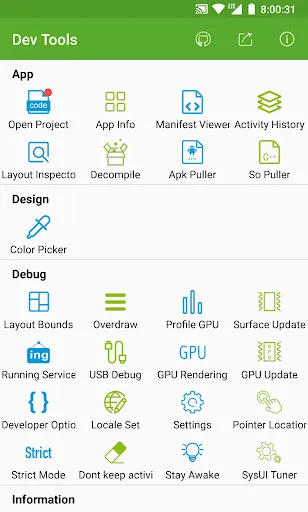
Android Dev Tools is a powerful, productive, automation, essential Android Development Assistant, It can improve your development productivity. It can be used to decompile other app, view layout detail info of other app, view color of screen(color sampler or eyedropper), view the latest open source projects, view activity history, view manifest of any apps, view recently used or installed apps, extract apk or so, debug applications, view phone hardware and software-related information and so on, the more features will be added later. including:
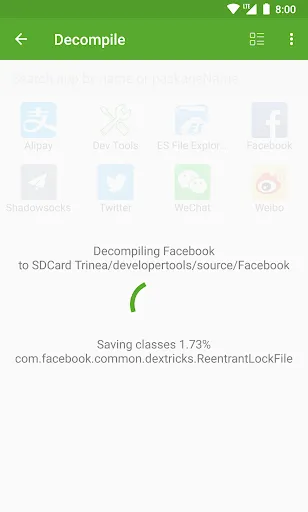
► Decompile other app(Paid)
View app's java file, resource and other file easily, support share files
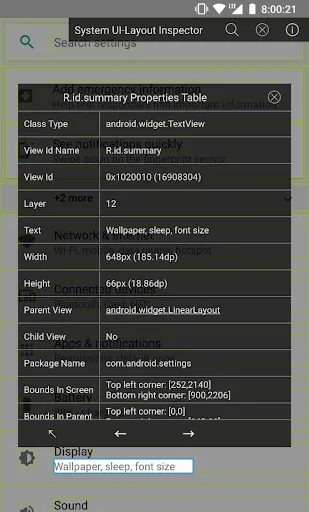
► App Layout Inspector Tool(Paid)
View or export layout or view info of other app, can show view id, width height, parent and child view, coordinate of view.
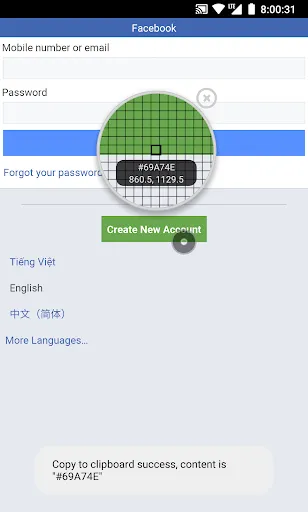
► View screen color(Paid)
Similar to color sampler tool or eyedropper, you can view or copy the color and coordinate of any other App easily, and more ARGB and CMYK
► View the latest open source projects daily(Free)
A well-selected daily Android open source project.
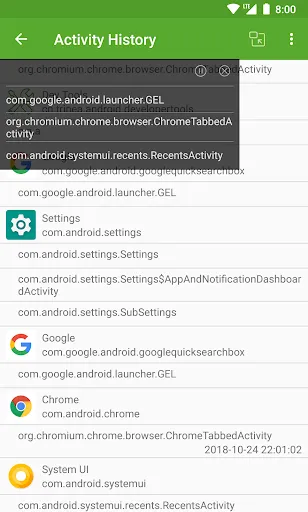
► View activity history(Paid)
View the appName, packageName, title, icon, start time of the activity opened, also include current activity, top activity. support open in small window mode.
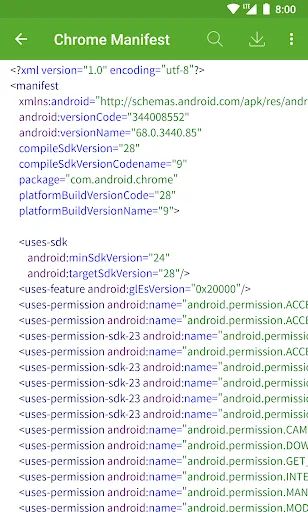
► View manifest of any apps(Paid)
View manifest of any apps, search any content of manifest, save manifest to sdcard in text or html.
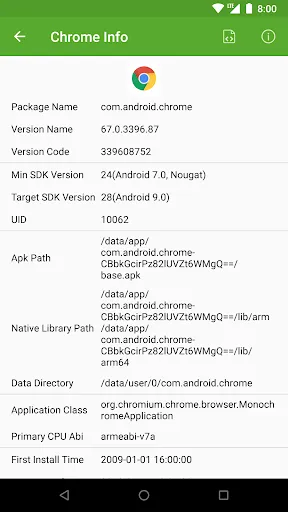
► App Management—View info of apps(Free)
You can manage your app easily. View apps installed, recently used apps, recently installed apps in grid mode.
View app package name, version, uid, apk dir, so dir, data dir, first install and last upgrade time, component info and so on.
► Extract apk or so of apps(Paid)
Extract any app's source apk or so file.
► Open or close the options in the developer options quickly(Free)
What used to take seconds is reduced to one click! it includes show screen layout, debug gpu overdraw, show layout updates, forced GPU rendering, show GPU view updates, show GPU Rendering, show pointer position, strict mode, don't keep activities, stay awake, Running Service.
Note: This part of the function is to solve the cumbersome operation of the developer option through the automated way, if you are tired of the cumbersome operation of the developer option also, then this tool is for you. If you need a tool different from the system developer option, this is not what you want, don't install it, thanks.
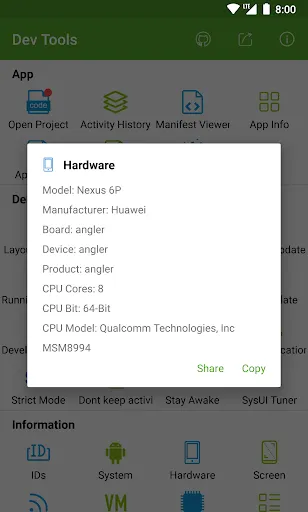
► View the system info quickly(Free)
includes system version information, hardware information, screen information, CPU information, virtual machine information, network-related information, Device ID information.
► Open other common features quickly(Free)
includes settings, System UI Tuner, language switching, developer options, my applications.
Shortcuts:
(1) You can add tool shortcuts to the desktop by long pressing the tool icon;
(2) You can add tool widgets to the desktop;
(3) You can start the tool through the shortcut quickly on Android 7.1, long pressing the application icon in the desktop;
(4) You can add the tool to the notification Quick Settings Tile on Android 7.0.
AccessibilityService: We use this feature to turn on or off some developer options automatically, get classname of current activity(Pro Version), get view info of current page(Pro Version) to save your time. We can use this service only after you granted it. We promise not to collect any of your information.
It is available for Android 4.0 and above, include Android 12, 11, Q, Pie, Oreo, Nougat, Marshmallow, Lollipop MR1, Lollipop, KitKat, Jelly Bean MR2, Jelly Bean MR1, Jelly Bean, Ice Cream Sandwich MR1, Ice Cream Sandwich.
Any suggestions or bugs are welcome to give us feedback:
official website: https://timeshining.com/
GitHub: https://github.com/TimeShining/Android-Dev-Tools
Facebook page: https://facebook.com/Dev-Tools-917225741954586/
► Decompile other app(Paid)
View app's java file, resource and other file easily, support share files
► App Layout Inspector Tool(Paid)
View or export layout or view info of other app, can show view id, width height, parent and child view, coordinate of view.
► View screen color(Paid)
Similar to color sampler tool or eyedropper, you can view or copy the color and coordinate of any other App easily, and more ARGB and CMYK
► View the latest open source projects daily(Free)
A well-selected daily Android open source project.
► View activity history(Paid)
View the appName, packageName, title, icon, start time of the activity opened, also include current activity, top activity. support open in small window mode.
► View manifest of any apps(Paid)
View manifest of any apps, search any content of manifest, save manifest to sdcard in text or html.
► App Management—View info of apps(Free)
You can manage your app easily. View apps installed, recently used apps, recently installed apps in grid mode.
View app package name, version, uid, apk dir, so dir, data dir, first install and last upgrade time, component info and so on.
► Extract apk or so of apps(Paid)
Extract any app's source apk or so file.
► Open or close the options in the developer options quickly(Free)
What used to take seconds is reduced to one click! it includes show screen layout, debug gpu overdraw, show layout updates, forced GPU rendering, show GPU view updates, show GPU Rendering, show pointer position, strict mode, don't keep activities, stay awake, Running Service.
Note: This part of the function is to solve the cumbersome operation of the developer option through the automated way, if you are tired of the cumbersome operation of the developer option also, then this tool is for you. If you need a tool different from the system developer option, this is not what you want, don't install it, thanks.
► View the system info quickly(Free)
includes system version information, hardware information, screen information, CPU information, virtual machine information, network-related information, Device ID information.
► Open other common features quickly(Free)
includes settings, System UI Tuner, language switching, developer options, my applications.
Shortcuts:
(1) You can add tool shortcuts to the desktop by long pressing the tool icon;
(2) You can add tool widgets to the desktop;
(3) You can start the tool through the shortcut quickly on Android 7.1, long pressing the application icon in the desktop;
(4) You can add the tool to the notification Quick Settings Tile on Android 7.0.
AccessibilityService: We use this feature to turn on or off some developer options automatically, get classname of current activity(Pro Version), get view info of current page(Pro Version) to save your time. We can use this service only after you granted it. We promise not to collect any of your information.
It is available for Android 4.0 and above, include Android 12, 11, Q, Pie, Oreo, Nougat, Marshmallow, Lollipop MR1, Lollipop, KitKat, Jelly Bean MR2, Jelly Bean MR1, Jelly Bean, Ice Cream Sandwich MR1, Ice Cream Sandwich.
Any suggestions or bugs are welcome to give us feedback:
official website: https://timeshining.com/
GitHub: https://github.com/TimeShining/Android-Dev-Tools
Facebook page: https://facebook.com/Dev-Tools-917225741954586/
Dev Tools(Developer)-Decompile سکرین شاٹس
Dev Tools(Developer)-Decompile کی پرانی ورژنز
 Dev Tools 6.8.6-csFeb 22, 2024ڈاؤن لوڈ
 Dev Tools 6.9.2-csFeb 22, 2024ڈاؤن لوڈ
 Dev Tools 7.0.0-gpFeb 22, 2024ڈاؤن لوڈ





ایڈیٹر کی تجویز


Dev Tools(Developer)-Decompile جیسی ایپس


Trinea کی طرف سے ایپس

Dev Tools(Developer)-Decompile FAQ
میں Dev Tools(Developer)-Decompile کو PGYER APK HUB سے کیسے ڈاؤن لوڈ کروں؟
کیا PGYER APK HUB پر Dev Tools(Developer)-Decompile کو مفت ڈاؤن لوڈ کرنے کی اجازت ہے؟
کیا مجھے PGYER APK HUB سے Dev Tools(Developer)-Decompile ڈاؤن لوڈ کرنے کے لئے اکاؤنٹ کی ضرورت ہے؟
میں PGYER APK HUB پر Dev Tools(Developer)-Decompile کے ساتھ کوئی مسئلہ کیسے رپورٹ کرسکتا ہوں؟
کیا آپ کو یہ مددگار پایا ہے؟
ہاں
نہیں
صارف کی تبصرے
+ جائزہ
4.4
5
4
3
2
1
T
TechGuru_007
2021-03-25
2
0
Dev Tools (Developer) Decompile is a lifesaver for developers. The tool effortlessly decompiles apps, providing insights into code structures and functionalities. Highly recommend for anyone diving deep into app development or debugging.
S
SwiftCodeMaster
2022-09-30
0
0
This app is a game-changer! Dev Tools (Developer) Decompile has simplified the process of understanding complex app codes. It's like having a personal developer assistant at your fingertips.
C
CodeWhizPhoe
2021-07-12
0
0
Dev Tools (Developer) Decompile has made my coding journey smoother. I can now easily analyze and modify code without getting lost in the complexities. A must-have for all developers.
سب سے مقبول

Finger Football
Gamotronix

Talking Pierre the Parrot
Outfit7 Limited

Tips Dream League Soccer 2017
amorphisnguyen

Poppo Live
Poppo Team

StarMaker: Sing Karaoke Songs
SKYWORK AI PTE. LTD.

CookieRun: OvenBreak
Devsisters Corporation

Netflix
Netflix, Inc.

TikTok
TikTok Pte. Ltd.

Legend of Solgard
Snowprint Studios AB

X
X Corp.

Clash Royale
Supercell

Plague Inc.
Ndemic Creations

Relic Bag: Shadow Hunter
Fansipan Limited

PUBG MOBILE
Level Infinite

Red Dead redemption 2 Mobile
Tarik EL hamdi

War Thunder Mobile
GAIJIN NETWORK LTD

Off Road 4x4 Driving Simulator
Azur Interactive Games Limited

Call of Duty: Warzone Mobile
Activision Publishing, Inc.

GunboundM
DargomStudio

Car Parking Multiplayer 2
olzhass

Marvel Spider Man
Welcome to the Marvel Spider-Man APK, your gateway to the exciting world of Spider-Man, now adapted

Pure Sniper: Gun Shooter Games
Miniclip.com

Shadow Fight 2 Special Edition
NEKKI

Reddit
reddit Inc.