
Leaf Spy Pro Battery Diagnostics Review 2026: SOH, Cell Balance, and Used-Leaf Checks

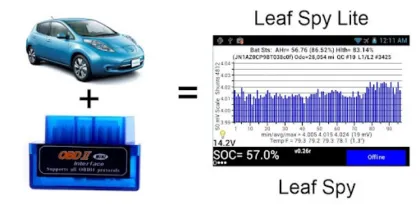

Leaf Spy Pro gives Nissan Leaf owners access to battery and vehicle information that the standard dashboard does not show. Connect a supported OBD-II adapter, pair it with an Android phone, and the app can display battery state of health, cell-pair voltages, temperature sensors, energy estimates, charging history, diagnostic trouble codes, and other data reported by the car.
For an owner evaluating a used Leaf, tracking battery aging, comparing charging behavior, or investigating a warning light, that visibility can be valuable. It can also be misunderstood. Leaf Spy Pro does not turn a phone into a Nissan dealer diagnostic system, and no single number can prove that a high-voltage battery is healthy or unsafe. The app reports data; interpreting that data still requires context and, when a real fault is involved, qualified service.
Google Play currently lists Leaf Spy Pro at $14.99 in the United States, with more than 50,000 downloads, a rating around 4.0 stars, an Everyone content rating, and an update dated April 15, 2026. It requires a compatible Nissan Leaf and a supported Bluetooth OBD-II adapter. The developer recommends compatible low-energy adapters such as LELink models rather than assuming every inexpensive ELM327 clone will work.
This review explains what Leaf Spy Pro can reveal, how the Android setup works, which readings matter, where interpretation becomes risky, and whether the paid version is worthwhile in 2026.
What Leaf Spy Pro Actually Connects To
Leaf Spy Pro communicates with electronic control modules in the vehicle through the OBD-II diagnostic port. A small adapter plugs into that port and creates a Bluetooth connection to the phone. The app sends supported requests and translates the car's responses into gauges, graphs, tables, and logs.
The adapter is not optional. The phone cannot read the Leaf's battery management system over ordinary Bluetooth by itself. Compatibility matters because many devices sold as ELM327 adapters use inconsistent firmware, incomplete command sets, or unreliable wireless radios. A device may work with a generic engine-code app yet fail with the Nissan-specific data Leaf Spy needs.
Bluetooth Low Energy adapters can connect without traditional pairing and typically draw less power. Classic Bluetooth adapters may require pairing in Android settings before the app can use them. The exact workflow depends on adapter model, Android version, and app settings.
The OBD-II port is normally below the dashboard. The vehicle should be parked safely before connecting hardware or changing settings. An adapter protruding into the driver's footwell can become a physical hazard if its size or cable interferes with pedals or movement.

Setup on Android
Installation is the easy part. The more important steps are choosing the correct adapter, configuring the connection type, and confirming that the app has established reliable communication with the car.
After plugging in the adapter, start the Leaf and place it in the operating state recommended by the app documentation. Open Leaf Spy Pro, select the appropriate Bluetooth connection settings, and allow the permissions required for nearby-device access on current Android versions. Older Android releases may associate Bluetooth scanning with location permission even when the app is not trying to navigate.
The status area indicates whether the phone sees the adapter and whether vehicle data is flowing. A connection to the adapter alone is not enough; the app must also communicate with the Leaf's control modules. If readings remain frozen or show impossible values, do not assume the car is at fault.
Common connection problems include an unsupported adapter, another diagnostic app holding the Bluetooth link, incorrect connection settings, Android battery optimization suspending the app, or a loose OBD plug. Closing other OBD apps and restarting the adapter, phone, and car often clarifies whether the issue is temporary.
Leaving an adapter installed can create security and power concerns. Some adapters remain active after the car is off, and low-quality hardware may draw more current than expected. Remove it when it is not needed unless the manufacturer and vehicle-specific guidance support permanent installation.
Battery State of Health
State of health, usually shown as SOH, is the number most owners notice first. It represents the battery management system's estimate of available capacity relative to a reference condition. A lower percentage generally indicates less usable energy than when the battery was new.
SOH is useful for trend analysis, but it is not a laboratory measurement. The estimate can move as the battery management system observes charging, discharging, temperature, and cell behavior. Software updates or recalibration can change the displayed value without a sudden physical change in the pack.
A single reading should not determine a purchase. Compare SOH with model year, battery size, odometer, dashboard capacity bars, climate, charging history, observed range, cell balance, and a road test. A vehicle with a plausible SOH can still have another fault, while a temporarily surprising number may stabilize after normal use.
Owners who record readings periodically under similar conditions gain more value than those who check obsessively after every drive. Monthly or seasonal trends reveal gradual aging more clearly than daily fluctuations.
The app may also display values familiar to the Leaf community, including AHr and Hx. These metrics are useful when compared with the same vehicle over time, but their exact internal calculation is not fully exposed to the user. Treat them as indicators, not independent proof of pack condition.
Cell-Pair Voltage Screen
The high-voltage battery contains groups of cells monitored as cell pairs. Leaf Spy Pro displays the voltage of each pair and highlights balancing activity through shunt indicators. It also shows minimum, average, maximum, and the spread between the highest and lowest values.
Small differences are normal. Battery management systems continuously monitor and balance the pack, and voltage behavior changes with state of charge, temperature, load, and recent charging. A spread observed while parked at high charge cannot be compared blindly with a spread under acceleration at low charge.
An unusually large or repeatable imbalance can justify further investigation, especially if one pair consistently drops more than others under load. It still does not identify the repair by itself. Connection errors, stale data, temperature, and operating conditions must be ruled out.
For used-car evaluation, observe whether the graph looks broadly consistent and whether outliers persist during a controlled drive. Do not perform aggressive acceleration or diagnostic testing in unsafe traffic. A professional battery test is appropriate when warning lights, severe imbalance, reduced-power events, or other symptoms appear.

Battery Temperature
Temperature strongly affects charging speed, available power, range, and aging. Leaf Spy Pro reads the battery temperature sensors reported by the vehicle and presents minimum, average, and maximum values.
These readings are particularly useful because many Leaf generations rely on passive rather than liquid battery thermal management. A pack can remain warm after repeated fast charging or highway driving, especially in hot weather. Cold conditions can also restrict performance and charging.
Temperature should be interpreted in context. Ambient weather, garage conditions, recent driving, charging power, battery size, and sensor location all influence the display. Sensor readings are not necessarily identical to the hottest point inside every module.
Leaf Spy can help an owner observe patterns, such as whether a second rapid-charge session begins with a much warmer pack. It should not be used to defeat vehicle protections or justify charging behavior contrary to Nissan guidance. The car's own warnings and limits take priority.
State of Charge, GIDs, and Energy Estimates
The dashboard state-of-charge percentage and Leaf Spy's reported SOC may differ because they serve different purposes and may use different scaling or buffers. The app can also show remaining energy in GIDs and estimated kilowatt-hours.
GIDs are a community-established unit derived from data reported by the Leaf, historically used to estimate available energy more precisely than early dashboard displays. The value is helpful for comparison, but it is not a guaranteed fixed amount of energy across every battery, software version, temperature, and age.
Distance-to-empty estimates depend on assumed efficiency. Leaf Spy allows users to select an energy-efficiency value and can estimate distance to milestones such as low-battery or very-low-battery warnings. This is more transparent than a single unexplained range number, but it remains an estimate.
Wind, speed, elevation, rain, cabin heating, tire pressure, payload, and traffic can change consumption rapidly. Never plan to arrive with no margin simply because the app predicts enough energy. The dashboard warnings and safe access to charging should guide the decision.

Charging History and Counters
Leaf Spy Pro can display counts for quick-charge sessions and Level 1 or Level 2 charging connections. These numbers provide clues about how a vehicle has been used, but they do not describe every session's duration, power, temperature, or state of charge.
A high quick-charge count does not automatically mean a damaged battery. Ten short sessions in cool weather are different from ten back-to-back sessions that held the pack at elevated temperature. Likewise, a low count does not prove gentle treatment.
The counters are best considered alongside temperature history, age, climate, mileage, SOH, and real-world performance. They can also help owners confirm that a recent charging event registered as expected.
The app may display the maximum current and voltage available from connected charging equipment. That information can help diagnose why charging is slower than anticipated, although the vehicle, station, cable, temperature, battery state, and electrical supply all contribute to actual power.
Tire Pressure and Vehicle Details
Supported Leaf years can report individual tire pressures. Leaf Spy Pro may also provide low-pressure or pressure-difference warnings and help associate tire positions after rotation on compatible vehicles.
The feature is convenient, but the pressure displayed by a sensor is not a replacement for checking cold tire pressure with a reliable gauge. Sensor batteries age, position mapping can be wrong after service, and temperature changes pressure. Follow the tire placard and Nissan specifications rather than a generic target.
The app can also show VIN, odometer, ambient temperature, and other vehicle information. These fields are useful when saving logs or documenting a used-car inspection. Verify identity and mileage through normal vehicle records; an app screen alone is not legal provenance.
Some Pro functions can change automatic door-lock behavior or register tire positions. Any write function deserves more caution than passive monitoring. Confirm model-year compatibility, maintain stable power, and understand how to restore the original setting before making changes.
Diagnostic Trouble Codes
Leaf Spy Pro can read diagnostic trouble codes, often abbreviated DTCs. Codes identify the control module and condition that triggered a fault. They can narrow a problem, document a warning light, or provide useful information to a technician.
A code is not always a parts-replacement instruction. The same code can result from wiring, low 12-volt battery voltage, communication interruption, a sensor, software, or the component named in a description. Service-manual diagnostics remain necessary.
Clearing codes without understanding them can erase evidence and temporarily hide a warning while the underlying condition remains. Some faults relate to high-voltage systems, brakes, airbags, charging, or other safety-critical components. Those should be handled by qualified personnel with appropriate equipment.
Leaf Spy Pro is most useful for recording codes and freeze-state context before service. Take screenshots, note the vehicle state, and avoid clearing anything until the consequences are understood.

Logging and Data Analysis
The app can log many readings to CSV and optionally include GPS location. Logs allow long-term trend analysis, comparison across drives, and graphing in spreadsheet software.
Logging is valuable when investigating an intermittent symptom. A cell-voltage spread, temperature rise, or communication fault may appear only under particular load and state-of-charge conditions. A time series is more informative than a single screenshot.
GPS logging introduces privacy considerations. A file can reveal home, work, travel times, and repeated routes. Store logs securely, remove location columns before sharing when they are unnecessary, and check what cloud or backup services automatically receive the files.
Data quality depends on a stable adapter connection. Gaps, repeated values, and impossible jumps may indicate dropped communication rather than vehicle behavior. Review logs critically before drawing conclusions.
Spreadsheet analysis should preserve units and timestamps. Comparing Fahrenheit with Celsius or mixing miles and kilometers can create convincing but incorrect charts. Record the app version, vehicle details, and test conditions alongside important measurements.
Used Nissan Leaf Inspections
Leaf Spy Pro is popular among used-Leaf shoppers because battery condition has a direct effect on useful range and vehicle value. A thoughtful inspection combines the app with physical inspection, records, charging tests, and a normal road test.
Begin with the correct model year and battery configuration. Confirm the VIN and dashboard information. Check SOH and AHr, inspect the cell-pair graph at a moderate state of charge, view battery temperatures, and note charging counters. Save screenshots rather than relying on memory.
Then compare the readings with what the vehicle actually does. Observe energy consumption, warning lights, heater and air-conditioning operation, charging behavior, brakes, tires, suspension, 12-volt battery condition, and accessories. Leaf Spy cannot assess crash repairs, water intrusion, mechanical wear, title history, or structural condition.
Avoid universal pass/fail thresholds copied from forums. Climate, age, battery generation, warranty rules, software, and intended use all matter. A lower-capacity car may still be suitable for a short commute if priced appropriately; a high-SOH reading does not justify ignoring other faults.
For an expensive purchase or unclear result, obtain an inspection from a technician experienced with electric vehicles and Nissan Leaf systems.
Interface and Learning Curve
Leaf Spy Pro prioritizes information density over visual polish. Screens contain abbreviations, graphs, small labels, and configuration options that make sense only after reading documentation. New users should expect a learning period.
The interface is functional once the vocabulary becomes familiar. Moving between battery, energy, temperature, tire, and service information is faster than navigating a generic scan tool. Color and graphical cues help identify extremes, although screenshots from different app versions can look different.
The built-in help and community documentation are important parts of the product. The Play listing notes that a PDF help file is available from the developer. Users should consult current instructions because adapter recommendations, Android permissions, supported model years, and screen meanings can change.
Large phones make dense screens easier to read, but a phone mount should never obstruct visibility or encourage interaction while driving. Configure logging before moving and review the data after parking.
Compatibility and Adapter Choice
The app is intended for Nissan Leaf vehicles, not every Nissan EV or every car with an OBD port. Compatibility varies by model year and feature. A reading or service function supported on an early Leaf may be unavailable or behave differently on a later vehicle.
Adapter choice is the most common source of avoidable frustration. The Play listing specifically recommends approved Bluetooth Low Energy hardware such as LELink rather than anonymous ELM327 devices. Counterfeit or poorly implemented adapters may connect intermittently, report errors, or fail to reach required modules.
Buy from a reputable seller and confirm the exact model recommended by current Leaf Spy documentation. A cheap adapter that must be replaced costs more time than the initial saving. Do not attempt firmware modifications or pin changes unless following authoritative vehicle-specific instructions.
Android updates can also affect Bluetooth and permission behavior. The April 2026 app update suggests active compatibility maintenance, but owners should check recent release notes and reviews for their phone and Android version before relying on the setup for an important inspection.

Leaf Spy Lite, Leaf Spy, and Pro
The Leaf Spy family has historically included different feature levels. The exact store availability and included functions can change, so users should compare current listings rather than rely on an old feature chart.
The Pro version is aimed at owners and serious shoppers who want the broadest monitoring, logging, diagnostic, and supported service functions. Someone who only wants to test adapter compatibility or view basic battery information may find a lower tier sufficient where available.
The $14.99 price is modest compared with a professional diagnostic visit, but the app also requires a quality adapter. The total cost should include both. Paying for Pro does not guarantee that unsupported hardware, vehicle years, or phone configurations will work.
What Leaf Spy Pro Does Well
The app reveals information that matters to electric-vehicle ownership. Battery capacity, cell balance, temperature, energy use, charging counters, and logs provide a much richer picture than the dashboard alone.
It is especially valuable for trends. An owner can observe how the same battery changes over months and seasons rather than relying on memory. Exportable data also makes discussions with experienced technicians more concrete.
Leaf Spy Pro has a focused community and years of vehicle-specific development behind it. Generic OBD apps may look more modern but often cannot interpret the same Nissan EV data.
Where It Falls Short
The interface is technical and sometimes intimidating. Important values are surrounded by abbreviations that invite overconfident interpretation. The app could do more to separate informational readings from safety-critical conclusions.
Adapter compatibility remains a burden. Users may blame the app for behavior caused by a clone adapter, Android Bluetooth changes, or incorrect settings. The need to purchase separate hardware also makes the first experience less immediate than an ordinary app.
Some displayed metrics are estimates or proprietary indicators whose exact calculation is not available. Online discussions can give these numbers more precision than they deserve. The app provides excellent observations, but not every observation has a simple diagnosis.
Verdict
Leaf Spy Pro is one of the most useful Android tools for a Nissan Leaf owner who is willing to learn what the data means. It can reveal battery aging, cell balance, temperatures, charging history, energy estimates, tire information, trouble codes, and logs that the factory dashboard leaves hidden.
Its greatest strength is visibility; its greatest risk is false certainty. SOH is not a complete battery inspection, a DTC is not a repair instruction, and a range estimate is not permission to eliminate a safety margin. Used responsibly, the app supports better questions and more informed maintenance. Used carelessly, it can encourage diagnosis beyond the user's expertise.
The price is reasonable for regular owners and used-car shoppers, provided they also budget for a known-compatible adapter. Casual users who need only basic information should compare the currently available lower tiers first.
Rating: 4.4/5
Leaf Spy Pro earns a strong recommendation as a monitoring and information tool—not as a replacement for Nissan service information, professional diagnosis, or safe driving judgment.


