
POS-Point of Sale With Barcode
Đánh giá
Aug 07, 2024Cập nhật mới nhất
5.48Phiên bản
Cách cài đặt tệp XAPK / APK
Chia sẻ
Về POS-Point of Sale With Barcode
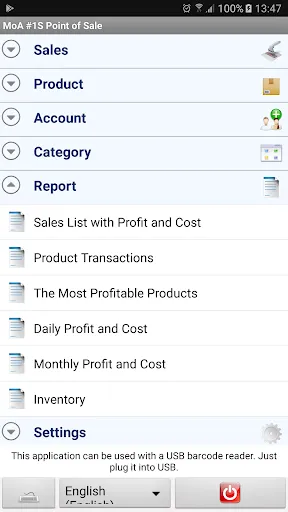
●Report daily, weekly, monthly, yearly profit, cost, turnover and tax amount.
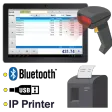
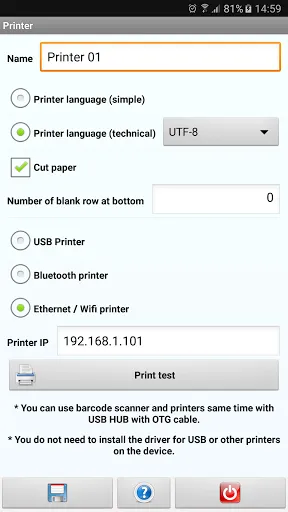
●Print receipt with USB, Bluetooth and IP printer.
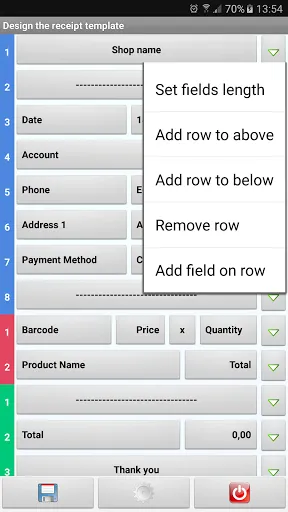
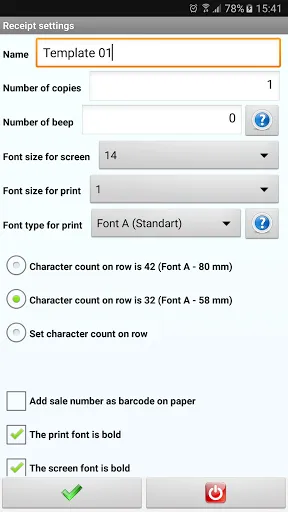
●Design many receipt templates for 2 inch (58 mm), 3 inch (80 mm) printers.
●Show the receipt on the screen and share it as text or image.
●Add many automatic receipt printing, printing many receipts from many printers at the same time.
●Manuel or automatic printing by selecting from the list of receipt templates after saving the sales.
●Stock, inventory list
●Choose customer when selling.
●Barcode reader and printers can use with OTG USB HUB.
●Use this application regardless to the inches of your phone or tablet.
●Report the profit, cost and tax amount which were obtained from a product, a category or a sale.
●Data is stored on the device.
●This application can be used together with Bluetooth or USB barcode reader on the tablets.
●Not need to install the USB barcode reader, when you plug the USB it will work immediately. In addition, the barcode reader can be connected to the tablet via OTG.
●Report the most profitable products.
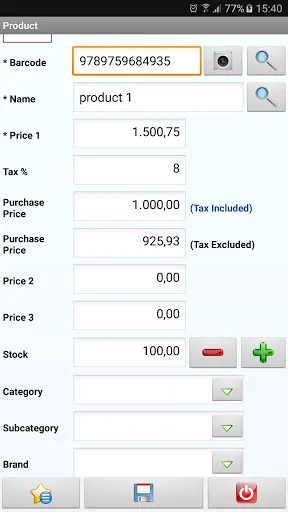
●3 different prices can be determined for the product and you can switch quickly between the prices during the sale. The prices of all products which are for sale can be switched to second or third price by a single tap.
●Report the best-selling and least-selling products.
●Almost for all functions of the application you can specify external keyboard shortcuts. For instance; for save: Ctrl+S or F2 can be specified.
●Open more than one sales displays at the same time.
Without waiting for the completion of a customer’s purchase, a new sales display can be opened for a newcomer customer who is in a hurry and then later you can continue the process of the previous customer where you stopped.
●To read the barcode of the products you may use either the device camera or the external barcode reader.
●Customize all lists. You can change font size, font color, row height and background of the lists. Besides, you can also change column width or you can hide columns.
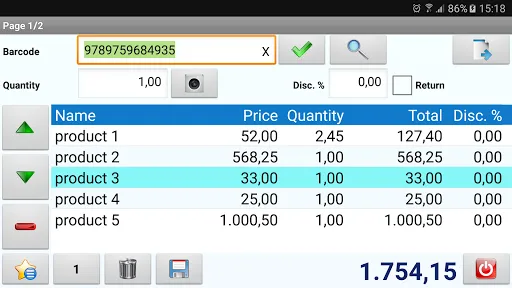
●Sale the products without barcode by clicking on them.
You can speed up the process of choosing during the sale by separating the products without barcode into categories.
●QR code EAN-13, EAN-8, UPC-A, UPC-E and many other barcode types are supported.
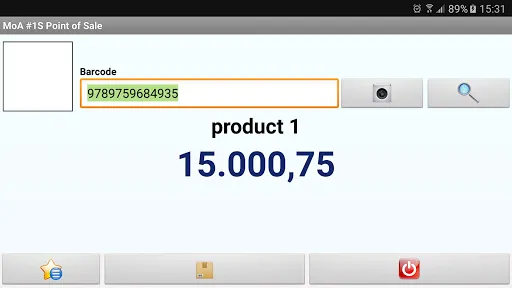
●Display photo, name and price of the product largely on the screen by the help of "show price" section as the barcode of the product is read by device camera or by an external barcode reader or chose the product from the list.
●Use the application by connecting USB external keyboard or mouse to tablets.
●When you tap on sales total on sales screen, the sales total will appear on the screen largely. The change can be also seen in case the amount of received money is written on the opened screen.
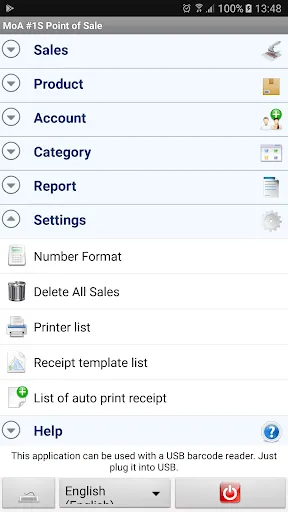
●When you wish, you can delete all sales by a single tab. As a result of this action, only the sales are deleted, records or product are not deleted.
●Classify the products in five different groups (Category, supplier, brand, department, rack). You can customize the labels of the classification. For instance, you can rename Brand as Color. All the Brands in the application will be changed as Color.
●Set decimal places and customize decimal symbol, digit grouping symbol and digit grouping size settings. According to the settings you have done the numbers are formatted as they are input and displayed.
●Specify discount rate for the whole sale.
●Specify automatic discount rate to products. The specified discount rate will be applied during the sale.
●Add photos to products. You can add photos to products by taking photos with the device camera or chose from gallery as well.
●Save returned products.
●Export and share product lists, sale lists and reports to excel, csv and txt formats.
●Switch quickly between these languages: Brazillian Portuguese, Chinese, Czech, English, French, German, Hindi, Indonesian, Italian, Russian, Spanish, Thai
●Print receipt with USB, Bluetooth and IP printer.
●Design many receipt templates for 2 inch (58 mm), 3 inch (80 mm) printers.
●Show the receipt on the screen and share it as text or image.
●Add many automatic receipt printing, printing many receipts from many printers at the same time.
●Manuel or automatic printing by selecting from the list of receipt templates after saving the sales.
●Stock, inventory list
●Choose customer when selling.
●Barcode reader and printers can use with OTG USB HUB.
●Use this application regardless to the inches of your phone or tablet.
●Report the profit, cost and tax amount which were obtained from a product, a category or a sale.
●Data is stored on the device.
●This application can be used together with Bluetooth or USB barcode reader on the tablets.
●Not need to install the USB barcode reader, when you plug the USB it will work immediately. In addition, the barcode reader can be connected to the tablet via OTG.
●Report the most profitable products.
●3 different prices can be determined for the product and you can switch quickly between the prices during the sale. The prices of all products which are for sale can be switched to second or third price by a single tap.
●Report the best-selling and least-selling products.
●Almost for all functions of the application you can specify external keyboard shortcuts. For instance; for save: Ctrl+S or F2 can be specified.
●Open more than one sales displays at the same time.
Without waiting for the completion of a customer’s purchase, a new sales display can be opened for a newcomer customer who is in a hurry and then later you can continue the process of the previous customer where you stopped.
●To read the barcode of the products you may use either the device camera or the external barcode reader.
●Customize all lists. You can change font size, font color, row height and background of the lists. Besides, you can also change column width or you can hide columns.
●Sale the products without barcode by clicking on them.
You can speed up the process of choosing during the sale by separating the products without barcode into categories.
●QR code EAN-13, EAN-8, UPC-A, UPC-E and many other barcode types are supported.
●Display photo, name and price of the product largely on the screen by the help of "show price" section as the barcode of the product is read by device camera or by an external barcode reader or chose the product from the list.
●Use the application by connecting USB external keyboard or mouse to tablets.
●When you tap on sales total on sales screen, the sales total will appear on the screen largely. The change can be also seen in case the amount of received money is written on the opened screen.
●When you wish, you can delete all sales by a single tab. As a result of this action, only the sales are deleted, records or product are not deleted.
●Classify the products in five different groups (Category, supplier, brand, department, rack). You can customize the labels of the classification. For instance, you can rename Brand as Color. All the Brands in the application will be changed as Color.
●Set decimal places and customize decimal symbol, digit grouping symbol and digit grouping size settings. According to the settings you have done the numbers are formatted as they are input and displayed.
●Specify discount rate for the whole sale.
●Specify automatic discount rate to products. The specified discount rate will be applied during the sale.
●Add photos to products. You can add photos to products by taking photos with the device camera or chose from gallery as well.
●Save returned products.
●Export and share product lists, sale lists and reports to excel, csv and txt formats.
●Switch quickly between these languages: Brazillian Portuguese, Chinese, Czech, English, French, German, Hindi, Indonesian, Italian, Russian, Spanish, Thai
Cách chơi
Ảnh chụp màn hình của POS-Point of Sale With Barcode
Các phiên bản cũ của POS-Point of Sale With Barcode





Đề xuất của biên tập viên


Ứng dụng Tương tự POS-Point of Sale With Barcode


Ứng dụng bởi MoA
POS-Point of Sale With Barcode FAQ
Làm thế nào để tải POS-Point of Sale With Barcode từ PGYER APK HUB?
Ứng dụng POS-Point of Sale With Barcode trên PGYER APK HUB có miễn phí không?
Tôi cần tài khoản để tải POS-Point of Sale With Barcode từ PGYER APK HUB không?
Làm thế nào để báo cáo vấn đề với POS-Point of Sale With Barcode trên PGYER APK HUB?
Bạn có thấy thông tin này hữu ích không
Có
Không
Đánh giá của người dùng
+ Đánh giá
4.4
5
4
3
2
1
T
TechSeeker123
2022-03-02
0
0
I'm struggling with the POS-Point of Sale With Barcode app. It seems to stop functioning whenever an update is applied. I've grown fond of its features, but the reliability issue during updates is a real letdown. Any advice on how to resolve this would be greatly appreciated.
Phổ biến nhất

Plague Inc.
Ndemic Creations

Super Mario Odyssey
Super Mario Odyssey APK - Explore the World Like Never Before!
Embark on an exhilarating adventure w

Hole.io
VOODOO

StarMaker: Sing Karaoke Songs
SKYWORK AI PTE. LTD.

Poppo Live
Poppo Team

CookieRun: OvenBreak
Devsisters Corporation

Netflix
Netflix, Inc.

TikTok
TikTok Pte. Ltd.

Legend of Solgard
Snowprint Studios AB

X
X Corp.

Clash Royale
Supercell

Tips Dream League Soccer 2017
amorphisnguyen

Relic Bag: Shadow Hunter
Fansipan Limited

PUBG MOBILE
Level Infinite

Pure Sniper: Gun Shooter Games
Miniclip.com

War Thunder Mobile
GAIJIN NETWORK LTD

GunboundM
DargomStudio

Call of Duty: Warzone Mobile
Activision Publishing, Inc.

Off Road 4x4 Driving Simulator
Azur Interactive Games Limited

Car Parking Multiplayer 2
olzhass

Talking Pierre the Parrot
Outfit7 Limited

Red Dead redemption 2 Mobile
Tarik EL hamdi

Shadow Fight 2 Special Edition
NEKKI

Reddit
reddit Inc.