

Commerzbank photoTAN
评分
Jun 23, 2024最近更新
9.8.2版本
关于Commerzbank photoTAN
Current information: Due to new protective features in the photoTAN app against the tapping of key material, the app requires the right to access the hardware identity as of version 9.0.0. This data remains on the device and is not transmitted to Commerzbank. Unfortunately, it is not possible to request this right individually. The overall right "Phone function and contacts" must always be requested (partly different designation depending on the Android version).
The right is absolutely necessary to use the app. Subsequent removal of the right can result in the app no longer being able to be used to control orders, as the keys are no longer available.
################
The new photoTAN app from Commerzbank
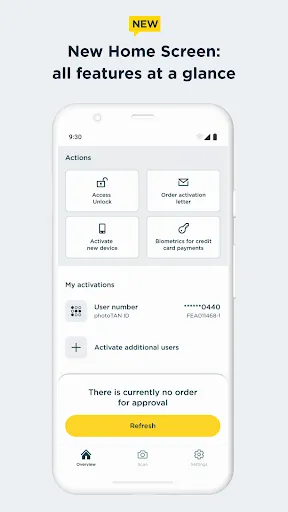
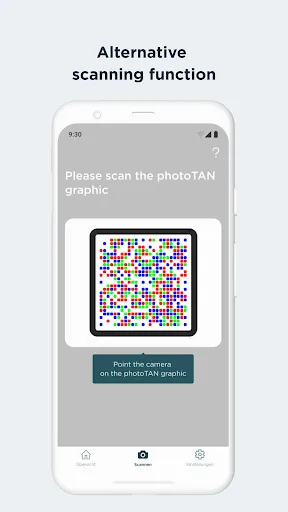
Receive push message, check order, approve - with the new photoTAN push function you can approve orders quickly and securely with just one click. With the photoTAN scan function, you still have the option of scanning a photoTAN graphic to generate a TAN.
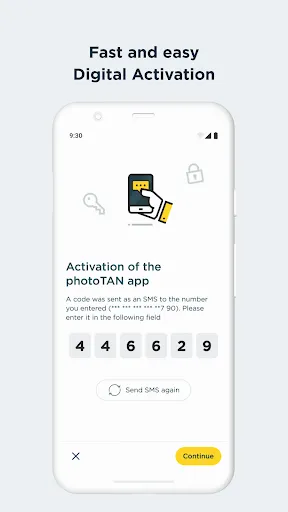
It is now possible to fully legitimize yourself from the comfort of your own home with the VideoIdent app. With our new feature, the digital first activation, you can after the legitimation with VideoIdent in the next 3 hours easily and quickly activate the photoTAN app with a code that you receive by SMS. This means you no longer have to wait for the activation graphic
The photoTAN app is our most innovative security method. The app offers the highest possible security through a modern and convenient TAN procedure - for all customers who use Commerzbank's online and / or mobile banking.
What do I need the photoTAN app for?
The photoTAN app is one of our security factors. The photoTAN is an important part of every login and transaction in your online and mobile banking. It is used to verify the order data you have entered and to generate the transaction number (TAN).
How does photoTAN-Push work?
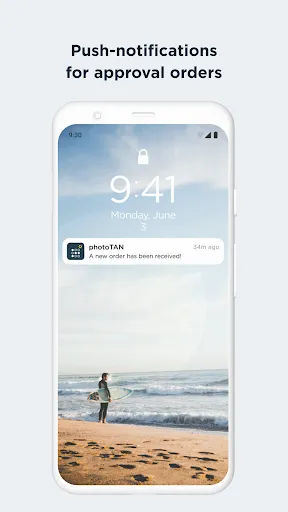
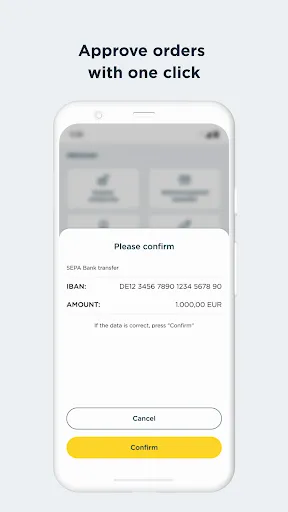
The push function of our new photoTAN app is particularly convenient. As soon as a new order is available for you to approve, we send you a notification to your smartphone when you use photoTAN-Push. When you then open the photoTAN app, the order to be approved is displayed directly for you to check. If the data displayed is correct, you release the order with just one click.
How does photoTAN scan work?
After placing an order in Online Banking, a mosaic-like colorful graphic appears on the monitor. You scan this with the photoTAN app. A TAN is displayed immediately. You can then check the essential details of your order again in the app. If everything is correct, simply enter the TAN on the computer and the order is confirmed.
By the way: With our mobile banking, you can make transfers even faster and easier than on your computer. To do this, use the free Commerzbank banking app!
The advantages of the new photoTAN app at a glance:
• Security: Commerzbank's most innovative TAN procedure.
• Uncomplicated: You receive a notification on your smartphone when a new order is ready for approval.
• Fast: You can approve orders with just one click.
• Free of charge: The use of photoTAN is free of charge for you.
• Mobile banking: Quick order approvals via the banking app using the App2App function.
• Offline usability: If your smartphone is offline, you can continue to approve orders easily with the scan function.
For more information on the new photoTAN procedure, visit http://www.commerzbank.de/phototan.
The right is absolutely necessary to use the app. Subsequent removal of the right can result in the app no longer being able to be used to control orders, as the keys are no longer available.
################
The new photoTAN app from Commerzbank
Receive push message, check order, approve - with the new photoTAN push function you can approve orders quickly and securely with just one click. With the photoTAN scan function, you still have the option of scanning a photoTAN graphic to generate a TAN.
It is now possible to fully legitimize yourself from the comfort of your own home with the VideoIdent app. With our new feature, the digital first activation, you can after the legitimation with VideoIdent in the next 3 hours easily and quickly activate the photoTAN app with a code that you receive by SMS. This means you no longer have to wait for the activation graphic
The photoTAN app is our most innovative security method. The app offers the highest possible security through a modern and convenient TAN procedure - for all customers who use Commerzbank's online and / or mobile banking.
What do I need the photoTAN app for?
The photoTAN app is one of our security factors. The photoTAN is an important part of every login and transaction in your online and mobile banking. It is used to verify the order data you have entered and to generate the transaction number (TAN).
How does photoTAN-Push work?
The push function of our new photoTAN app is particularly convenient. As soon as a new order is available for you to approve, we send you a notification to your smartphone when you use photoTAN-Push. When you then open the photoTAN app, the order to be approved is displayed directly for you to check. If the data displayed is correct, you release the order with just one click.
How does photoTAN scan work?
After placing an order in Online Banking, a mosaic-like colorful graphic appears on the monitor. You scan this with the photoTAN app. A TAN is displayed immediately. You can then check the essential details of your order again in the app. If everything is correct, simply enter the TAN on the computer and the order is confirmed.
By the way: With our mobile banking, you can make transfers even faster and easier than on your computer. To do this, use the free Commerzbank banking app!
The advantages of the new photoTAN app at a glance:
• Security: Commerzbank's most innovative TAN procedure.
• Uncomplicated: You receive a notification on your smartphone when a new order is ready for approval.
• Fast: You can approve orders with just one click.
• Free of charge: The use of photoTAN is free of charge for you.
• Mobile banking: Quick order approvals via the banking app using the App2App function.
• Offline usability: If your smartphone is offline, you can continue to approve orders easily with the scan function.
For more information on the new photoTAN procedure, visit http://www.commerzbank.de/phototan.
游戏玩法
Commerzbank photoTAN应用截图
Commerzbank photoTAN的历史版本






编辑推荐


类似Commerzbank photoTAN的应用


Commerzbank A.G.的应用
用户评论
+ 测评
4.4
5
4
3
2
1
V
Vicky
2025-02-28
30
0
I love using Commerzbank photoTAN for my transactions. It's fast, secure, and incredibly user-friendly.
R
Rita
2025-02-19
9
0
Commerzbank photoTAN has made my online banking experience so much smoother. Highly recommend it to anyone looking for a reliable TAN app.
P
Phyllis
2025-01-04
15
0
The security features in Commerzbank photoTAN are top-notch. I feel much safer knowing my transactions are protected.
最受欢迎

Plague Inc.
Ndemic Creations

Super Mario Odyssey
Super Mario Odyssey APK - Explore the World Like Never Before!
Embark on an exhilarating adventure w

Hole.io
VOODOO

StarMaker: Sing Karaoke Songs
SKYWORK AI PTE. LTD.

Poppo Live
Poppo Team

CookieRun: OvenBreak
Devsisters Corporation

Netflix
Netflix, Inc.

TikTok
TikTok Pte. Ltd.

Legend of Solgard
Snowprint Studios AB

X
X Corp.

Clash Royale
Supercell

Tips Dream League Soccer 2017
amorphisnguyen

Relic Bag: Shadow Hunter
Fansipan Limited

PUBG MOBILE
Level Infinite

Pure Sniper: Gun Shooter Games
Miniclip.com

War Thunder Mobile
GAIJIN NETWORK LTD

GunboundM
DargomStudio

Call of Duty: Warzone Mobile
Activision Publishing, Inc.

Off Road 4x4 Driving Simulator
Azur Interactive Games Limited

Car Parking Multiplayer 2
olzhass

Talking Pierre the Parrot
Outfit7 Limited

Red Dead redemption 2 Mobile
Tarik EL hamdi

Shadow Fight 2 Special Edition
NEKKI

Reddit
reddit Inc.