
Locker for Whats Chat App
评分
Jul 18, 2024最近更新
4.0.1.09版本
关于Locker for Whats Chat App
Looking for a WhatsApp locker app that can help you keep your individual and group chats safe from prying eyes? If yes, then your search ends with Locker for Whats Chat App by Systweak Software. The WhatsApp chat locker can help protect media files, chats and the entire WhatsApp application from unauthorized access.
Using Locker for Whats Chat App, you can lend your Android phone to a friend, colleague, or family member, and needn’t to worry about anyone spying on your WhatsApp. It is a WhatsApp fingerprint locker which makes it safer compared to others.
With this private chat locker, you do not have to stress about your personal and sensitive chats being exposed. Even in the event that someone is able to identify your smartphone’s passcode, he or she won’t be able to access your WhatsApp chats. As you can lock your WhatsApp chats individually as well as the entire app with this locker for WhatsApp.
Additionally, to being a WhatsApp group chat locker, this app doubles as a messenger to unknown numbers. As it provides you with an easy option to add the phone number directly into the app before texting them on WhatsApp rather than adding in contact.
Here are key features of Systweak Software’s Locker for Whats Chat App:
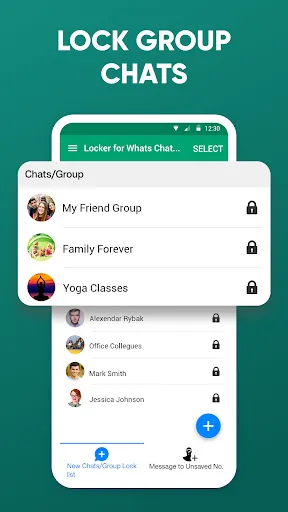
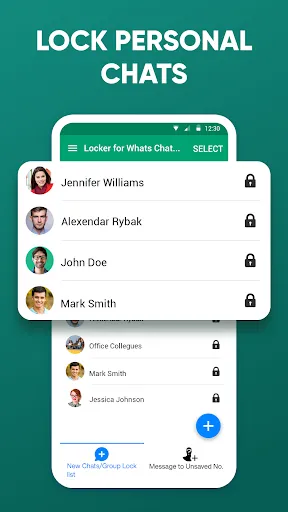
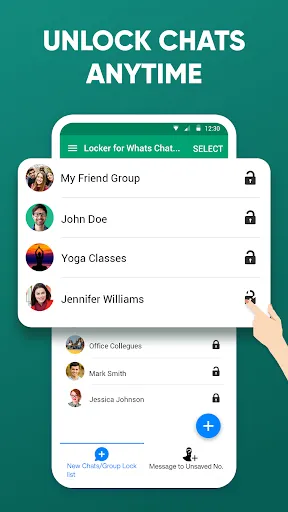
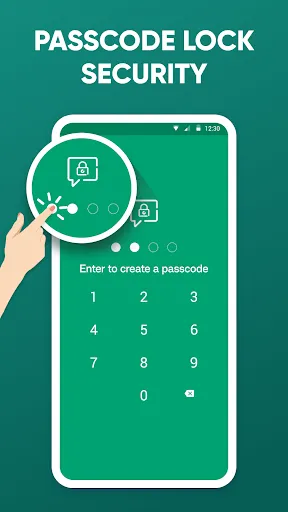
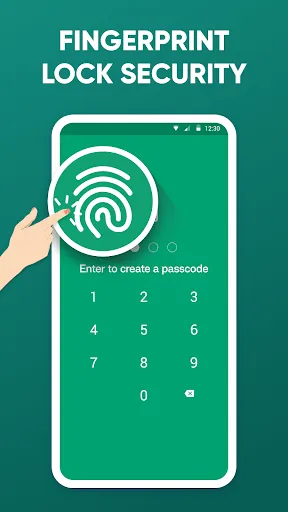
● Lock personal or group chats behind a 4-digit passcode or fingerprint lock.
● Lock/ unlock chats with fingerprint or PIN.
● Lock the entire WhatsApp Messenger app.
● Single password for both app and chats.
● Send a message to an unknown number without adding it to your contacts.
● A lightweight app that takes less storage space.
● Easy password recovery in case you have forgotten your password.
● The WhatsApp Locker for Android asks for minimum permissions.
● Does not consume much battery.
● No data sharing.
How Does Locker for Whats Chat App Work?
Here is how easy it is to use this WhatsApp Locker-
1. Download and install Locker for Whats Chat App.
2. Once you have installed the app, give the required permissions.
3. Set a 4-digit passcode. Reconfirm by entering the passcode once again.
4. Setup a “Passcode Recovery Email” that can be helpful in retrieving forgotten code. You can change your recovery email by going to “Settings” and then tapping on “Change Recovery Email”.
5. Give accessibility permissions
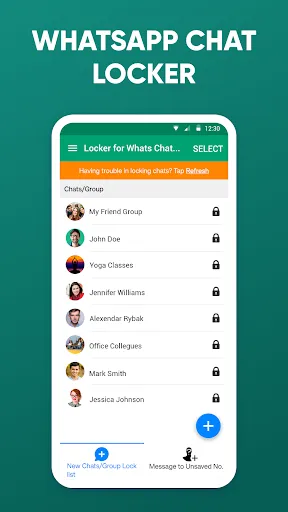
6. Once that’s done, tap on the ‘+’ icon from the bottom right of the screen
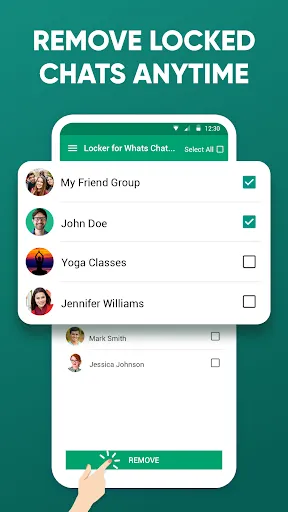
7. Select the chat that you want to lock
8. To unlock a personal or group chat, tap on the lock icon next to the chat
And, that’s it! To access the chat or even make audio and video calls, the user would need a PIN or your fingerprint to get through.
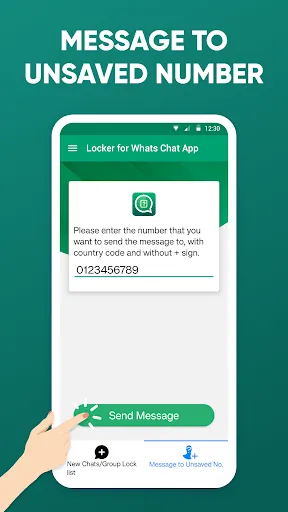
To message an unsaved number on WhatsApp-
1. Tap on the ‘Message to Unsaved No.’
2. Enter the mobile number you want to send messages to with the country code and without the ‘+’ sign.
3. Tap on the green-colored ‘Send Message’ button.
Please Note: A free trial of Locker for Whats Chat App offers to lock only 2 chats. To lock more chats, you can subscribe to the premium version.
Upgrade To Premium Version -
Download & install three more recommended applications from Systweak Software to unlock the premium version for the WhatsApp locker Android app for free OR buy the monthly, yearly plan.
What should you do in case you forgot the password for Locker for Whats Chat App?
Worry not! To recover the passcode for this chat locker for WhatsApp, follow these steps -
1. Tap on the three vertical dots at the top-right corner.
2. Tap on “Forgot passcode” and then tap on OK.
3. An email with your passcode will be sent to your registered email ID.
Note
Accessibility permission is required to protect user WhatsApp chat, lock private chats and group chats. The user’s private information is not collected or stored. Nobody is given access to it.
Using Locker for Whats Chat App, you can lend your Android phone to a friend, colleague, or family member, and needn’t to worry about anyone spying on your WhatsApp. It is a WhatsApp fingerprint locker which makes it safer compared to others.
With this private chat locker, you do not have to stress about your personal and sensitive chats being exposed. Even in the event that someone is able to identify your smartphone’s passcode, he or she won’t be able to access your WhatsApp chats. As you can lock your WhatsApp chats individually as well as the entire app with this locker for WhatsApp.
Additionally, to being a WhatsApp group chat locker, this app doubles as a messenger to unknown numbers. As it provides you with an easy option to add the phone number directly into the app before texting them on WhatsApp rather than adding in contact.
Here are key features of Systweak Software’s Locker for Whats Chat App:
● Lock personal or group chats behind a 4-digit passcode or fingerprint lock.
● Lock/ unlock chats with fingerprint or PIN.
● Lock the entire WhatsApp Messenger app.
● Single password for both app and chats.
● Send a message to an unknown number without adding it to your contacts.
● A lightweight app that takes less storage space.
● Easy password recovery in case you have forgotten your password.
● The WhatsApp Locker for Android asks for minimum permissions.
● Does not consume much battery.
● No data sharing.
How Does Locker for Whats Chat App Work?
Here is how easy it is to use this WhatsApp Locker-
1. Download and install Locker for Whats Chat App.
2. Once you have installed the app, give the required permissions.
3. Set a 4-digit passcode. Reconfirm by entering the passcode once again.
4. Setup a “Passcode Recovery Email” that can be helpful in retrieving forgotten code. You can change your recovery email by going to “Settings” and then tapping on “Change Recovery Email”.
5. Give accessibility permissions
6. Once that’s done, tap on the ‘+’ icon from the bottom right of the screen
7. Select the chat that you want to lock
8. To unlock a personal or group chat, tap on the lock icon next to the chat
And, that’s it! To access the chat or even make audio and video calls, the user would need a PIN or your fingerprint to get through.
To message an unsaved number on WhatsApp-
1. Tap on the ‘Message to Unsaved No.’
2. Enter the mobile number you want to send messages to with the country code and without the ‘+’ sign.
3. Tap on the green-colored ‘Send Message’ button.
Please Note: A free trial of Locker for Whats Chat App offers to lock only 2 chats. To lock more chats, you can subscribe to the premium version.
Upgrade To Premium Version -
Download & install three more recommended applications from Systweak Software to unlock the premium version for the WhatsApp locker Android app for free OR buy the monthly, yearly plan.
What should you do in case you forgot the password for Locker for Whats Chat App?
Worry not! To recover the passcode for this chat locker for WhatsApp, follow these steps -
1. Tap on the three vertical dots at the top-right corner.
2. Tap on “Forgot passcode” and then tap on OK.
3. An email with your passcode will be sent to your registered email ID.
Note
Accessibility permission is required to protect user WhatsApp chat, lock private chats and group chats. The user’s private information is not collected or stored. Nobody is given access to it.
游戏玩法
Locker for Whats Chat App应用截图
Locker for Whats Chat App的历史版本





编辑推荐


类似Locker for Whats Chat App的应用


SYSTWEAK SOFTWARE的应用


用户评论
+ 测评
4.7
5
4
3
2
1
M
Madeline
2025-02-15
27
0
Locker for Whats Chat App is a must-have for anyone who values privacy. It keeps my WhatsApp chats secure and easily accessible!
M
Marilyn
2025-02-26
1
0
Locker for Whats Chat App has been a game-changer for me. My WhatsApp conversations are now completely private and secure.
J
Jacqueline
2025-01-06
16
0
Locker for Whats Chat App is incredibly easy to use and provides excellent security for my WhatsApp messages. I feel much more confident now.
最受欢迎

Plague Inc.
Ndemic Creations

Super Mario Odyssey
Super Mario Odyssey APK - Explore the World Like Never Before!
Embark on an exhilarating adventure w

Hole.io
VOODOO

StarMaker: Sing Karaoke Songs
SKYWORK AI PTE. LTD.

Poppo Live
Poppo Team

CookieRun: OvenBreak
Devsisters Corporation

Netflix
Netflix, Inc.

TikTok
TikTok Pte. Ltd.

Legend of Solgard
Snowprint Studios AB

X
X Corp.

Clash Royale
Supercell

Tips Dream League Soccer 2017
amorphisnguyen

Relic Bag: Shadow Hunter
Fansipan Limited

PUBG MOBILE
Level Infinite

Pure Sniper: Gun Shooter Games
Miniclip.com

War Thunder Mobile
GAIJIN NETWORK LTD

GunboundM
DargomStudio

Call of Duty: Warzone Mobile
Activision Publishing, Inc.

Off Road 4x4 Driving Simulator
Azur Interactive Games Limited

Car Parking Multiplayer 2
olzhass

Talking Pierre the Parrot
Outfit7 Limited

Red Dead redemption 2 Mobile
Tarik EL hamdi

Shadow Fight 2 Special Edition
NEKKI

Reddit
reddit Inc.