

關於Signature Creator
Signature Creator is an intuitive signature stand that gives you to create your own signature.
We have given Signature name functionality so you do not need to remember which signature I did at Bank, Election card, Driving licence, College, Government office etc.
You can draw your creative signature with 100+ autograph styles and with 1000+ colors and with x-small to x-large font size.
We have used portrait mode to serve better.
Functionalities:
* 2 modes: Auto and Manual
* Auto mode contains 100+ styles of signature by entering your signature
* Manual mode contains drawing view for signature, here user has to write his/her signature on the signature view
* Create signature: Do signature
* Different fonts: 100 + variety of fonts
* Pen thickness: Adjust thickness of pen (x-small to x-large)
* Pen color: Set pen color (1000 + colors) with Light/Dark & Alpha adjustable
* Background color: Set background color (1000 + colors) with Light/Dark & Alpha adjustable
* Save: Store your signature in storage
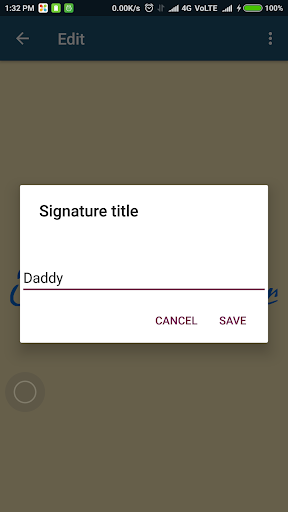
* Signature name: Give name (title) for signature so you can check the purpose of signature. For example, you are doing different signature at bank and school so you do not worry about remembering the which signature is used at which place.
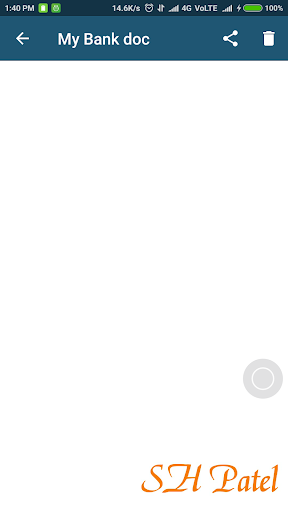
* Drag: Drag the auto mode signature on the signature pad. For example, you would like to create empty document along with your signature just drag your signature to bottom before saving it.
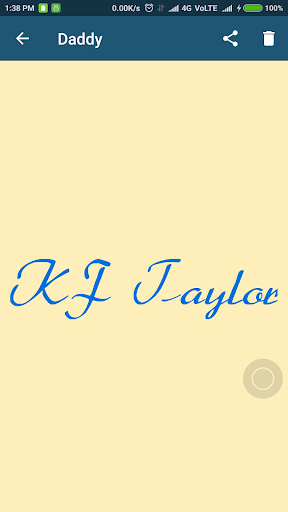
* View: View previously drawn signature
* Share: Share signature on social platform
* Instant view: View current signature
* Delete: Delete previously drawn signature
How to use:
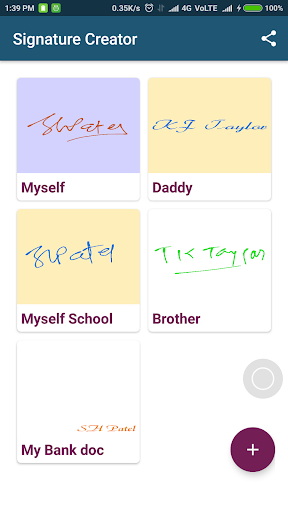
On the Home screen you will find all previously created signatures.
Click on + button in order to initiate your signature.
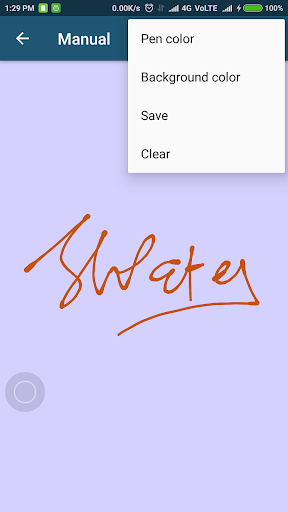
Draw signature in manual mode.
You can change signature color of your signature pad with more than 1000 colors.
You can change background color of your signature pad with more than 1000 colors.
Click on save button to save your signature on storage. (Application would ask for signature name so give name as you want. For example, Myself, MySelf Bank, Myself College, Daddy, Mother, Brother)
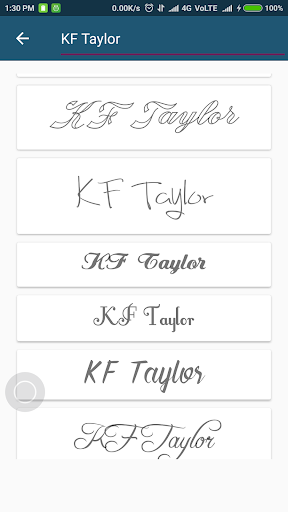
Now for auto mode, start typing your signature on editable view.
Select any one of signature from listing. We've used more than 100 autograph fonts.
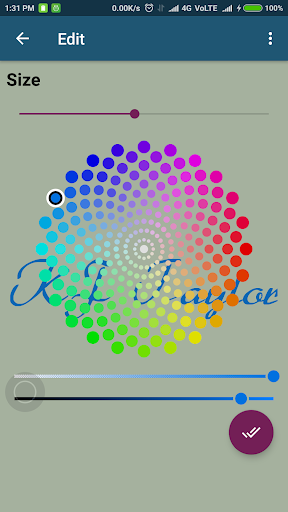
You can edit your signature by changing more than 1000 colors, changing pen thickness.
You can change background color of your signature pad with more than 1000 colors.
For any color you can adjust Light to Dark color along with Alpha.
Drag your signature on the signature pad.
Save your picture in storage. (Application would ask for signature name so give name as you want. For example, Myself, Myself Bank, Myself College, Daddy, Mother, Brother)
You can see all signature which were drawn by you.
You can see enlarge signature.
You can share on social media.
You can delete if you don’t like.
Permission:
We required EXTERNAL STORAGE PERMISSION in order to store/share/view signature.
NOTE:
We are not using your signature anywhere, application stores it in storage in order to view and share your signature.
Enjoy free Signature Creator application for you and your family.
We have given Signature name functionality so you do not need to remember which signature I did at Bank, Election card, Driving licence, College, Government office etc.
You can draw your creative signature with 100+ autograph styles and with 1000+ colors and with x-small to x-large font size.
We have used portrait mode to serve better.
Functionalities:
* 2 modes: Auto and Manual
* Auto mode contains 100+ styles of signature by entering your signature
* Manual mode contains drawing view for signature, here user has to write his/her signature on the signature view
* Create signature: Do signature
* Different fonts: 100 + variety of fonts
* Pen thickness: Adjust thickness of pen (x-small to x-large)
* Pen color: Set pen color (1000 + colors) with Light/Dark & Alpha adjustable
* Background color: Set background color (1000 + colors) with Light/Dark & Alpha adjustable
* Save: Store your signature in storage
* Signature name: Give name (title) for signature so you can check the purpose of signature. For example, you are doing different signature at bank and school so you do not worry about remembering the which signature is used at which place.
* Drag: Drag the auto mode signature on the signature pad. For example, you would like to create empty document along with your signature just drag your signature to bottom before saving it.
* View: View previously drawn signature
* Share: Share signature on social platform
* Instant view: View current signature
* Delete: Delete previously drawn signature
How to use:
On the Home screen you will find all previously created signatures.
Click on + button in order to initiate your signature.
Draw signature in manual mode.
You can change signature color of your signature pad with more than 1000 colors.
You can change background color of your signature pad with more than 1000 colors.
Click on save button to save your signature on storage. (Application would ask for signature name so give name as you want. For example, Myself, MySelf Bank, Myself College, Daddy, Mother, Brother)
Now for auto mode, start typing your signature on editable view.
Select any one of signature from listing. We've used more than 100 autograph fonts.
You can edit your signature by changing more than 1000 colors, changing pen thickness.
You can change background color of your signature pad with more than 1000 colors.
For any color you can adjust Light to Dark color along with Alpha.
Drag your signature on the signature pad.
Save your picture in storage. (Application would ask for signature name so give name as you want. For example, Myself, Myself Bank, Myself College, Daddy, Mother, Brother)
You can see all signature which were drawn by you.
You can see enlarge signature.
You can share on social media.
You can delete if you don’t like.
Permission:
We required EXTERNAL STORAGE PERMISSION in order to store/share/view signature.
NOTE:
We are not using your signature anywhere, application stores it in storage in order to view and share your signature.
Enjoy free Signature Creator application for you and your family.
遊戲玩法
Signature Creator應用截圖

Signature Creator的歷史版本





編輯推薦


類似Signature Creator的應用程式


Brilliancy Tech的應用程式
用戶評論
+ 評論
4.7
5
4
3
2
1
T
TTerence
2024-12-15
8
0
I love using Signature Creator to make professional signatures for my documents. It's quick and easy to use!
M
Marvin
2025-02-22
27
0
This app, Signature Creator, is a must-have for anyone who needs to design signatures regularly. Highly recommend!
A
AAbigail
2024-12-17
27
0
Signature Creator is fantastic! The interface is clean, and the tools are very intuitive. Great job!
最受歡迎

eFootball™ 2024
KONAMI

Football - Offline Game
Yahaha Studio

Tips Dream League Soccer 2017
amorphisnguyen

Football Games League 2023
Red Tiger Games

Marvel Spider Man
Welcome to the Marvel Spider-Man APK, your gateway to the exciting world of Spider-Man, now adapted

Football - Dream Cup
MAMTABEN VADU

Finger Football
Gamotronix

Netflix
Netflix, Inc.

Legend of Solgard
Snowprint Studios AB

X
X Corp.

Clash Royale
Supercell

Plague Inc.
Ndemic Creations

Relic Bag: Shadow Hunter
Fansipan Limited

PUBG MOBILE
Level Infinite

Red Dead redemption 2 Mobile
Tarik EL hamdi

War Thunder Mobile
GAIJIN NETWORK LTD

Off Road 4x4 Driving Simulator
Azur Interactive Games Limited

Call of Duty: Warzone Mobile
Activision Publishing, Inc.

GunboundM
DargomStudio

Car Parking Multiplayer 2
olzhass

EA SPORTS FC™ Mobile Soccer
ELECTRONIC ARTS

Pure Sniper: Gun Shooter Games
Miniclip.com

Shadow Fight 2 Special Edition
NEKKI

StarMaker: Sing Karaoke Songs
SKYWORK AI PTE. LTD.