
World Edit for MCPE
امتیاز
Nov 15, 2024آخرین به روزرسانی
1.01نسخه
نحوه نصب فایل .IPA
اشتراک گذاری
درباره World Edit for MCPE
This is an UNOFFICIAL app (see disclaimer).
Latest version of MCPE 1.2 is supported.
You can edit your existing MCPE worlds by copying & pasting with iTunes. In order do that you must connect your iOS devices over USB ( MAC or PC needed). Please always make backups. Please watch help video how to do that:
https://www.youtube.com/watch?v=i4KjHWFSDcQ
The good part is that we are continuously updating our app to be compatible with latest & future versions of Minecraft PE.
Our app is the easiest & smartest world edit tool for Minecraft PE because it works by selecting your blocks & dragging and dropping to the place you want. You can preview where you will paste your selection like a house, castle or a vehicle.
Just select your creations & drag and drop in your MCPE worlds: World editing is simple as that!
World Edit for Minecraft Features:
---------------------------------------------
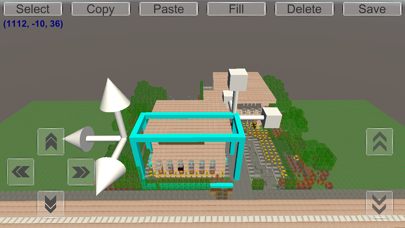
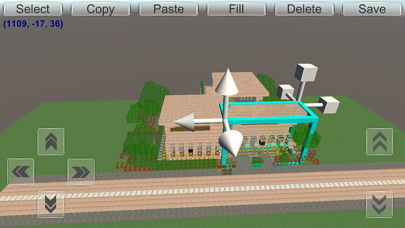
- Select by drag and drop, you can move & resize selection area. You can change the size of the copied blocks.
- Copy your selection of cubes,
- Paste your selection of cubes,
- Delete the selected cubes,
- Fill your selection by typing your block name or by scrolling & tapping on the block list. You can fill your blocks by searching block names.
- You can see your exact location & coordinates in your worlds! On top left of the screen your position in your MCPE world is shown! There is no need for markers anymore!
- On flat worlds current -saved- terrain data is preserved & new flat world terrain data is generated,
- On infinite & old worlds -saved- terrain data is showed & is not generated! If you want to edit your infinite & old type worlds please add at least one cube at every chunk and save your MCPE world!
- Many more features like replace, rotate, undo & redo are coming soon ...
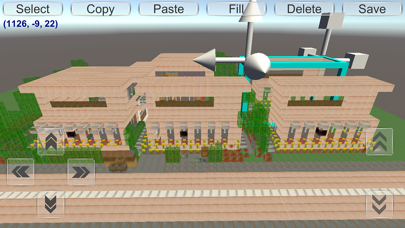
To edit your worlds, you can just select, copy & paste parts of your worlds. You can drag and drop your selections like home or castles anywhere you want in your worlds. In addition, you can see your selections & where you will paste them. You can preview before pasting. You can move & resize your selections. World editing is much more simple, easy & fun to use.
Do you want to copy & paste your hard-worked creations by dragging and dropping? Do you want to make a city from your houses? Do you want to copy your houses, castles, vehicles or any parts from one world to another world of yours? Do you want a simple way to do world edit? Well it is possible now with our easy and fun to use smart world edit tool by simply dragging and dropping :)
Finally, please remember there are no annoying ads in World Edit for Minecraft and it is free to try so there is no risk. Thanks for trying & supporting our app :)
Our app’s web site: http://www.mcpedit.com
You can reach the developer on twitter: @mcpedit (https://twitter.com/mcpedit)
For developers: GitHub project is here: https://github.com/mcpedit/mcpedit
Disclaimer:
This app is not an official Minecraft product and it is not approved or associated with Mojang. This app comes with no warranty of any kind so please always backup your MCPE worlds. You can back up your worlds simply changing the name when saving your MCPE world :)
This application is not affiliated in any way with Mojang AB. The Minecraft Name, the Minecraft Brand and the Minecraft Assets are all property of Mojang AB or their respectful owner. This is an unofficial application for Minecraft Pocket Edition. All rights reserved. For further information, please visit http://account.mojang.com/documents/brand_guidelines
Please remember that this app is a complementary tool for Minecraft PE, it is not Minecraft PE for this reason you are strongly advised to purchase Minecraft PE app. Our app will only ease your world making process :)
Latest version of MCPE 1.2 is supported.
You can edit your existing MCPE worlds by copying & pasting with iTunes. In order do that you must connect your iOS devices over USB ( MAC or PC needed). Please always make backups. Please watch help video how to do that:
https://www.youtube.com/watch?v=i4KjHWFSDcQ
The good part is that we are continuously updating our app to be compatible with latest & future versions of Minecraft PE.
Our app is the easiest & smartest world edit tool for Minecraft PE because it works by selecting your blocks & dragging and dropping to the place you want. You can preview where you will paste your selection like a house, castle or a vehicle.
Just select your creations & drag and drop in your MCPE worlds: World editing is simple as that!
World Edit for Minecraft Features:
---------------------------------------------
- Select by drag and drop, you can move & resize selection area. You can change the size of the copied blocks.
- Copy your selection of cubes,
- Paste your selection of cubes,
- Delete the selected cubes,
- Fill your selection by typing your block name or by scrolling & tapping on the block list. You can fill your blocks by searching block names.
- You can see your exact location & coordinates in your worlds! On top left of the screen your position in your MCPE world is shown! There is no need for markers anymore!
- On flat worlds current -saved- terrain data is preserved & new flat world terrain data is generated,
- On infinite & old worlds -saved- terrain data is showed & is not generated! If you want to edit your infinite & old type worlds please add at least one cube at every chunk and save your MCPE world!
- Many more features like replace, rotate, undo & redo are coming soon ...
To edit your worlds, you can just select, copy & paste parts of your worlds. You can drag and drop your selections like home or castles anywhere you want in your worlds. In addition, you can see your selections & where you will paste them. You can preview before pasting. You can move & resize your selections. World editing is much more simple, easy & fun to use.
Do you want to copy & paste your hard-worked creations by dragging and dropping? Do you want to make a city from your houses? Do you want to copy your houses, castles, vehicles or any parts from one world to another world of yours? Do you want a simple way to do world edit? Well it is possible now with our easy and fun to use smart world edit tool by simply dragging and dropping :)
Finally, please remember there are no annoying ads in World Edit for Minecraft and it is free to try so there is no risk. Thanks for trying & supporting our app :)
Our app’s web site: http://www.mcpedit.com
You can reach the developer on twitter: @mcpedit (https://twitter.com/mcpedit)
For developers: GitHub project is here: https://github.com/mcpedit/mcpedit
Disclaimer:
This app is not an official Minecraft product and it is not approved or associated with Mojang. This app comes with no warranty of any kind so please always backup your MCPE worlds. You can back up your worlds simply changing the name when saving your MCPE world :)
This application is not affiliated in any way with Mojang AB. The Minecraft Name, the Minecraft Brand and the Minecraft Assets are all property of Mojang AB or their respectful owner. This is an unofficial application for Minecraft Pocket Edition. All rights reserved. For further information, please visit http://account.mojang.com/documents/brand_guidelines
Please remember that this app is a complementary tool for Minecraft PE, it is not Minecraft PE for this reason you are strongly advised to purchase Minecraft PE app. Our app will only ease your world making process :)
تصاویر World Edit for MCPE
پیشنهاد ویرایشگر
 Canva: AI Photo & Video Editor
 Proton VPN: Fast & Secure
 Booking.com: Hotels & Travel
 Too Good To Go: End Food Waste
 Waze Navigation & Live Traffic
 Stellarium Mobile - Star Map
 Ticketmaster-Buy, Sell Tickets
 Bolt: Request a Ride
 Life360: Find Friends & Family
 GetYourGuide: Travel & Tickets
 Sky Guide
 Doctolib - Your health partner
برنامههای مشابه World Edit for MCPE
 Gissa Trafikskylten - Perfekt för dig som pluggar för att ta körkor ( bil, moped och motorcykel körkor )
 World Edit for MCPE
 PDF Edit Express - Edit PDFs
 Edit PDF & Convert Photos to PDF - Edit docs, images or sign documents for Dropbox
 Edit Ps - Photo Edit.or With Many Free Editing Tool.s And Effect.s For Picture.s Live.ly Apps
 Sub Edit HD - play & edit subs
 Multi Photo Edit lite - Foto Editor to edit all your photos with 1-Tap
 Kawaii World Skins for MCPE
 Impecta - För återförsäljare
 SagoBoken: Ljudböcker för Barn
 Känner du Pippi Långstrump? För iPhone
 ÖBO - Hem för dig
برنامههای توسط Mustafa Alpay


World Edit for MCPE FAQ
چگونه می توانم World Edit for MCPE را از PGYER IPA HUB دانلود کنم؟
آیا World Edit for MCPE در PGYER IPA HUB رایگان برای دانلود است؟
آیا برای دانلود World Edit for MCPE از PGYER IPA HUB نیاز به حساب کاربری دارم؟
چگونه می توانم یک مشکل با World Edit for MCPE در PGYER IPA HUB گزارش دهم؟
آیا این را مفید یافتید؟
بله
خیر
پرطرفدارترین

ChatGPTIntroducing ChatGPT for iOS: OpenAI’s latest advancements at your fingertips.
This official app is f

Google GeminiThe Google Gemini app is an AI assistant that can help supercharge your creativity and productivity.

Claude by AnthropicGet free access to the newly upgraded Claude 3.5 Sonnet – Anthropic's most advanced model yet. Wheth

GoogleDownload the Google app to stay in the know about things that matter to you. Try AI Overviews, find

CapCut - Video EditorCapCut is a free all-in-one video editing app that helps you create incredible videos.
「Easy to use」

Shop: All your favorite brandsElevate every shopping moment
Shop, track, and explore the latest trends in an all-in-one shopping

Google MapsNavigate your world faster and easier with Google Maps. Over 220 countries and territories mapped an

Uber - Request a rideJoin the millions of riders who trust Uber for their everyday travel needs. Whether you’re running a

ThreadsSay more with Threads — Instagram’s text-based conversation app.
Threads is where communities come t

Gmail - Email by GoogleThe official Gmail app brings the best of Gmail to your iPhone or iPad with robust security, real-ti

TikTokTikTok is THE destination for mobile videos. On TikTok, short-form videos are exciting, spontaneous,

WhatsApp MessengerWhatsApp from Meta is a FREE messaging and video calling app. It’s used by over 2B people in more th

InstagramLittle moments lead to big friendships. Share yours on Instagram.
— From Meta
Connect with friends,

Netflix Game ControllerPlay games on your TV with the Netflix Game Controller.
This app connects to your TV and allows you

AirbnbTHE FASTEST, EASIEST WAY TO AIRBNB
Find inspiration, plan a trip with your group, book it, and go. Y

Telegram MessengerPure instant messaging — simple, fast, secure, and synced across all your devices. One of the top 5

Spotify - Music and PodcastsWith the Spotify music and podcast app, you can play millions of songs, albums and original podcasts

DramawaveDramawave - Stream Endless Drama Shorts, Anytime, Anywhere
Welcome to Dramawave the ultimate destina

Whatnot - Live Video ShoppingWhatnot is a social marketplace where you can discover some of your favorite products like sports ca

Google ChromeDownload the new Google Chrome for your iPhone and iPad. Now more simple, secure and faster than eve

FacebookWhere real people propel your curiosity. Whether you’re thrifting gear, showing a reel to that group

XThe X app is the trusted global digital town square for everyone.
With X, you can:
Post content for

Indeed Job SearchDiscover your next job opportunity on Indeed, the free job search app designed to connect you with b

Duolingo - Language LessonsLearn a new language with the world’s most-downloaded education app! Duolingo is the fun, free app f