

YouTube Kids
Rating
Oct 24, 2024Latest update
9.42.1Version
About YouTube Kids
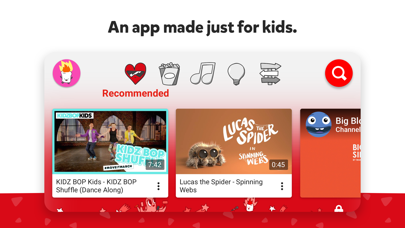
A video app made just for kids
YouTube Kids was created to give kids a more contained environment filled with family-friendly videos on all different topics, igniting your kids’ inner creativity and playfulness. Parents and caregivers can guide the journey as your kids discover new and exciting interests along the way. Learn more at youtube.com/kids
A safer online experience for kids
We work hard to keep the videos on YouTube Kids family-friendly and use a mix of automated filters built by our engineering teams, human review, and feedback from parents to protect our youngest users online. But no system is perfect and inappropriate videos can slip through, so we’re constantly working to improve our safeguards and offer more features to help parents create the right experience for their families.
Customize your child’s experience with Parental Controls
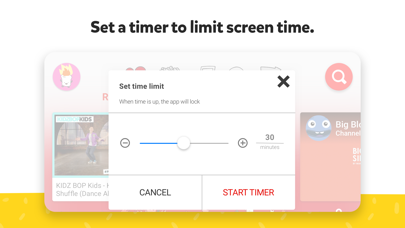
Limit screen time: Set a time limit for how long your kids can watch and help encourage their transition from watching to doing.
Keep up with what they watch: Simply check the watch it again page and you’ll always know what they’ve watched and the newest interests they’re exploring.
Blocking: Don’t like a video? Block the video or whole channel, and never see it again.
Flagging: You can always alert us to inappropriate content by flagging a video for review. Flagged videos are reviewed 24 hours a day, seven days a week.
Create individual experiences as unique as your kids
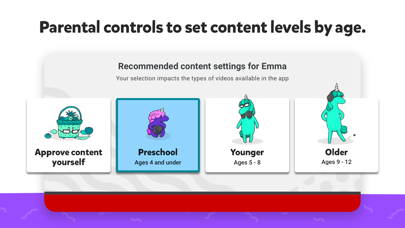
Create up to eight kid profiles, each with their own viewing preferences, video recommendations, and settings. Choose from “Approved Content Only” mode or select an age category that fits your child, “Preschool”, “Younger”, or “Older”.
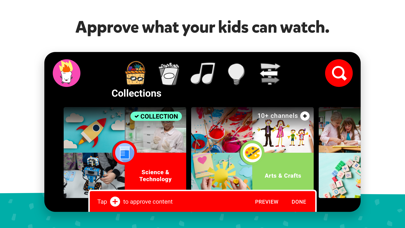
Select the “Approved Content Only” mode if you want to handpick the videos, channels and/or collections that you’ve approved your child to watch. In this mode, kids won’t be able to search for videos. The “Preschool” Mode designed for kids 4 and under curates videos that promote creativity, playfulness, learning, and exploration. The “Younger” Mode allows kids 5-8 to explore their interests in a wide variety of topics including songs, cartoons, and crafts. While our “Older” Mode gives kids 9 and up the chance to search and explore additional content such as popular music and gaming videos for kids.
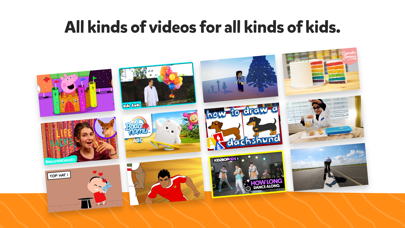
All kinds of videos for all kinds of kids
Our library is filled with family-friendly videos on all different topics, igniting your kids’ inner creativity and playfulness. It’s everything from their favorite shows and music to learning how to build a model volcano (or make slime ;-), and everything in between.
Other important information:
Parental setup is needed to ensure the best experience possible for your kid.
Your kid may also see videos with commercial content from YouTube creators that are not paid ads.The Privacy Notice for Google Accounts managed with Family Link describes our privacy practices when your kid uses YouTube Kids with their Google Account. When your kid uses YouTube Kids without signing into their Google Account, the YouTube Kids Privacy Notice applies.
YouTube Kids was created to give kids a more contained environment filled with family-friendly videos on all different topics, igniting your kids’ inner creativity and playfulness. Parents and caregivers can guide the journey as your kids discover new and exciting interests along the way. Learn more at youtube.com/kids
A safer online experience for kids
We work hard to keep the videos on YouTube Kids family-friendly and use a mix of automated filters built by our engineering teams, human review, and feedback from parents to protect our youngest users online. But no system is perfect and inappropriate videos can slip through, so we’re constantly working to improve our safeguards and offer more features to help parents create the right experience for their families.
Customize your child’s experience with Parental Controls
Limit screen time: Set a time limit for how long your kids can watch and help encourage their transition from watching to doing.
Keep up with what they watch: Simply check the watch it again page and you’ll always know what they’ve watched and the newest interests they’re exploring.
Blocking: Don’t like a video? Block the video or whole channel, and never see it again.
Flagging: You can always alert us to inappropriate content by flagging a video for review. Flagged videos are reviewed 24 hours a day, seven days a week.
Create individual experiences as unique as your kids
Create up to eight kid profiles, each with their own viewing preferences, video recommendations, and settings. Choose from “Approved Content Only” mode or select an age category that fits your child, “Preschool”, “Younger”, or “Older”.
Select the “Approved Content Only” mode if you want to handpick the videos, channels and/or collections that you’ve approved your child to watch. In this mode, kids won’t be able to search for videos. The “Preschool” Mode designed for kids 4 and under curates videos that promote creativity, playfulness, learning, and exploration. The “Younger” Mode allows kids 5-8 to explore their interests in a wide variety of topics including songs, cartoons, and crafts. While our “Older” Mode gives kids 9 and up the chance to search and explore additional content such as popular music and gaming videos for kids.
All kinds of videos for all kinds of kids
Our library is filled with family-friendly videos on all different topics, igniting your kids’ inner creativity and playfulness. It’s everything from their favorite shows and music to learning how to build a model volcano (or make slime ;-), and everything in between.
Other important information:
Parental setup is needed to ensure the best experience possible for your kid.
Your kid may also see videos with commercial content from YouTube creators that are not paid ads.The Privacy Notice for Google Accounts managed with Family Link describes our privacy practices when your kid uses YouTube Kids with their Google Account. When your kid uses YouTube Kids without signing into their Google Account, the YouTube Kids Privacy Notice applies.
YouTube Kids Screenshots
Editor's Recommendation
 Canva: AI Photo & Video Editor
 Proton VPN: Fast & Secure
 Booking.com: Hotels & Travel
 Too Good To Go: End Food Waste
 Waze Navigation & Live Traffic
 Stellarium Mobile - Star Map
 Ticketmaster-Buy, Sell Tickets
 Bolt: Request a Ride
 Life360: Find Friends & Family
 GetYourGuide: Travel & Tickets
 Sky Guide
 Doctolib - Your health partner
Apps Like YouTube Kids
 Ana Maria Brogui – for Youtube - O primeiro programa de culinária do Youtube BR agora no seu celular!
 Kids Songs - Free Kids Music for YouTube Kids
 Kids Videos HD - safe YouTube video for kids
 Music Kids - Free Music Videos for YouTube Kids
 Kids Tube - ABC & Music Video for YouTube Kids
 ABC Kids - Learning Games & Music for YouTube Kids
 ABC Kids English French & Music for YouTube Kids
 Kids Tube: Alphabet & abc Videos for YouTube Kids
 Kids ABC Music & Nursery Rhymes for YouTube Kids
 English For Kids - Music Video for YouTube Kids
 Kids Safe YouTube YT Kids TV
 Music Kids: Music & ABC Videos for YouTube Kids
Apps by Google


Most Popular

ChatGPTIntroducing ChatGPT for iOS: OpenAI’s latest advancements at your fingertips.
This official app is f

Google GeminiThe Google Gemini app is an AI assistant that can help supercharge your creativity and productivity.

Claude by AnthropicGet free access to the newly upgraded Claude 3.5 Sonnet – Anthropic's most advanced model yet. Wheth

GoogleDownload the Google app to stay in the know about things that matter to you. Try AI Overviews, find

CapCut - Video EditorCapCut is a free all-in-one video editing app that helps you create incredible videos.
「Easy to use」

Shop: All your favorite brandsElevate every shopping moment
Shop, track, and explore the latest trends in an all-in-one shopping

Google MapsNavigate your world faster and easier with Google Maps. Over 220 countries and territories mapped an

Uber - Request a rideJoin the millions of riders who trust Uber for their everyday travel needs. Whether you’re running a

ThreadsSay more with Threads — Instagram’s text-based conversation app.
Threads is where communities come t

Gmail - Email by GoogleThe official Gmail app brings the best of Gmail to your iPhone or iPad with robust security, real-ti

TikTokTikTok is THE destination for mobile videos. On TikTok, short-form videos are exciting, spontaneous,

WhatsApp MessengerWhatsApp from Meta is a FREE messaging and video calling app. It’s used by over 2B people in more th

InstagramLittle moments lead to big friendships. Share yours on Instagram.
— From Meta
Connect with friends,

Netflix Game ControllerPlay games on your TV with the Netflix Game Controller.
This app connects to your TV and allows you

AirbnbTHE FASTEST, EASIEST WAY TO AIRBNB
Find inspiration, plan a trip with your group, book it, and go. Y

Telegram MessengerPure instant messaging — simple, fast, secure, and synced across all your devices. One of the top 5

Spotify - Music and PodcastsWith the Spotify music and podcast app, you can play millions of songs, albums and original podcasts

DramawaveDramawave - Stream Endless Drama Shorts, Anytime, Anywhere
Welcome to Dramawave the ultimate destina

Whatnot - Live Video ShoppingWhatnot is a social marketplace where you can discover some of your favorite products like sports ca

Google ChromeDownload the new Google Chrome for your iPhone and iPad. Now more simple, secure and faster than eve

FacebookWhere real people propel your curiosity. Whether you’re thrifting gear, showing a reel to that group

XThe X app is the trusted global digital town square for everyone.
With X, you can:
Post content for

Indeed Job SearchDiscover your next job opportunity on Indeed, the free job search app designed to connect you with b

Duolingo - Language LessonsLearn a new language with the world’s most-downloaded education app! Duolingo is the fun, free app f