

Ring Sizer for Japan
Beoordeling
Sep 21, 2024Laatste update
2.3Versie
Over Ring Sizer for Japan
This app is an app for measuring the size of the jewelry ring of Japan.
(This is not an app that automatically measures ring size or finger size.)
Units of jewelry ring size of Japan is pronounced "gou".
If you came to Japan, please try to use, such as in the case of considering the ring.
※ Warning:
- The accuracy of the scales cannot be guaranteed.
- Calibration and PPI values will be reset when the model changes.
- Set the PPI value only when the model is undecided.
- When you change the PPI value, perform calibration after the change.
How to use
■Ring tab
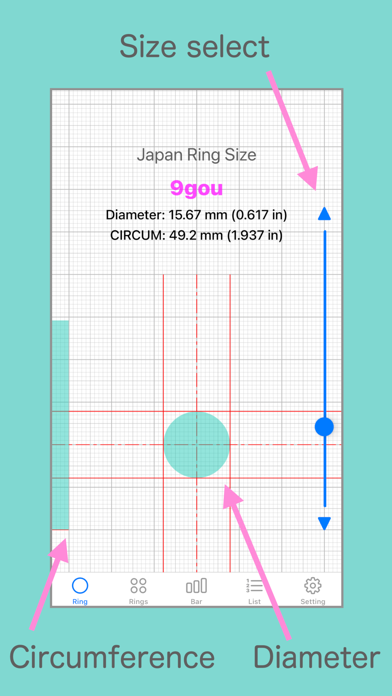
1. Select the size of the ring.
2. Display the ring inside diameter and inside circumference of the length in units mm and inches.
3. View the circle of the inside diameter of the ring.
4. View the inside circumference of the length of the ring in a bar graph.
- If you want to see your ring size in Japan.
Make sure that the inside diameter of the your ring is equal to the circular to be displayed on the screen.
Or circular screen Make sure the slightly larger size.
- If you want to know your ring size from the circumference of your finger.
Wrap the paper around the finger. To see its length.
Make sure that the length of the paper is equal to length of the bar graph to be displayed on the screen.
Or the screen of the bar graph, make sure a little long length.
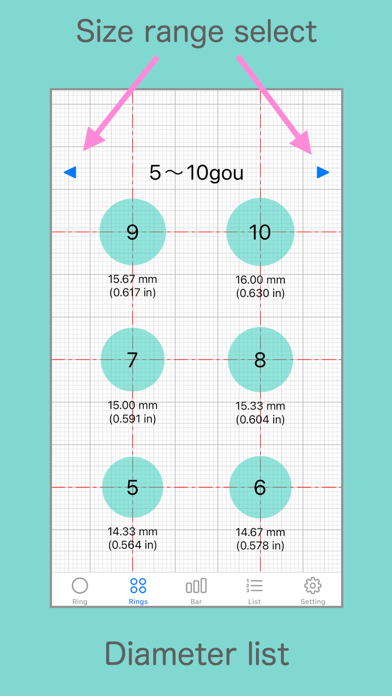
■ Rings tab
-Displays a list of circles (inner diameter of the ring) within the displayable range.
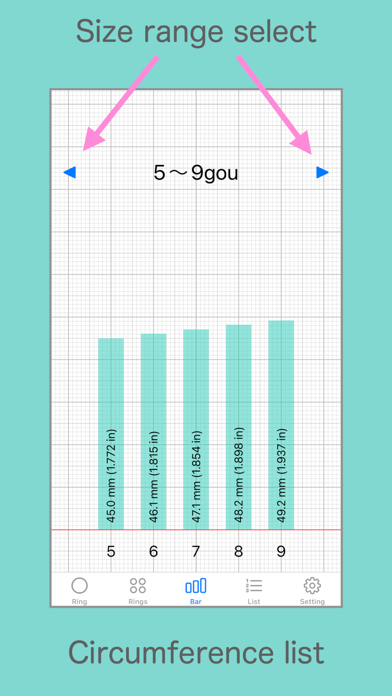
■ Bar tab
-Displays a list of bar graphs (inner circumference length of the ring) within the displayable range.
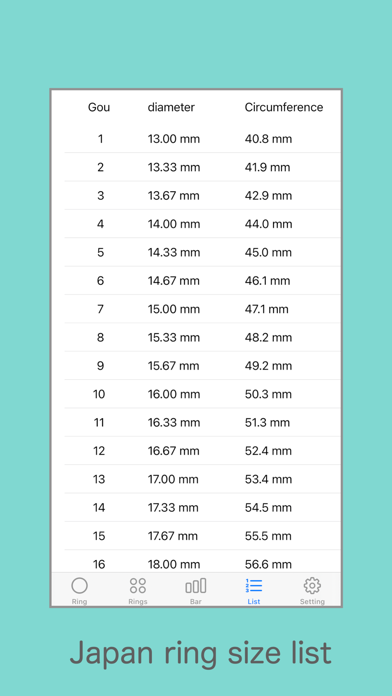
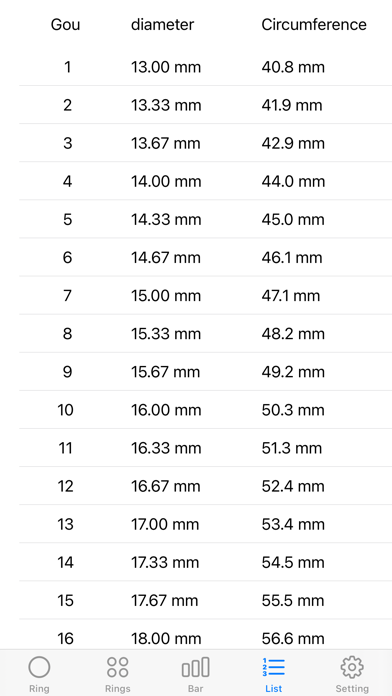
■ list
-Displays a list of ring numbers, inner diameters, and inner circumferences.
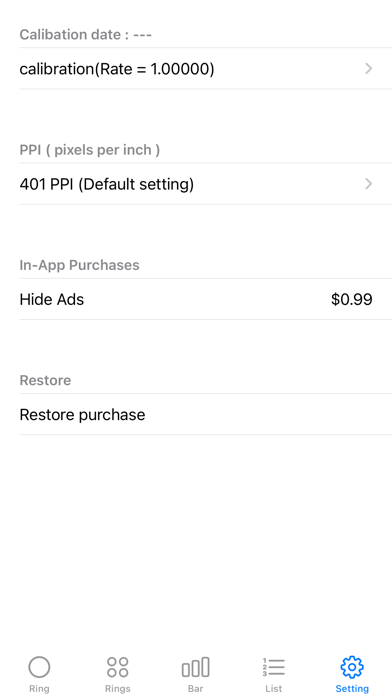
■ Settings tab
- Calibration
- PPI (pixels per inch) setting
- In-app purchase (ads not displayed)
- In-app purchase restoration
■ Calibration
Adjust the length of the ruler.
Use the correct ruler for adjustment.
"Calibration" button: Records the adjusted state and reflects the calibration result on the ruler.
"Reset" button: Returns the adjustment status to the specified value. It will not be recorded.
"Initialize" button: Returns the adjustment status to the specified value and reflects it on the ruler.
* Caution: The calibration value will be reset when the model changes.
■ PPI (pixels per inch) setting
If the model is undecided, check the PPI value of the model before setting the PPI value.
* Please set only when the model is undecided.
"OK" button: Record the entered PPI value and reflect it on the ruler display.
"Initialize" button: Returns the PPI value to the specified value and reflects it on the ruler.
* Caution: The PPI value will be reset when the model changes.
Conforms to the Japanese Industrial Standards (JIS S 4700:1998 table2).
※:Use this application at your own risk.
(This is not an app that automatically measures ring size or finger size.)
Units of jewelry ring size of Japan is pronounced "gou".
If you came to Japan, please try to use, such as in the case of considering the ring.
※ Warning:
- The accuracy of the scales cannot be guaranteed.
- Calibration and PPI values will be reset when the model changes.
- Set the PPI value only when the model is undecided.
- When you change the PPI value, perform calibration after the change.
How to use
■Ring tab
1. Select the size of the ring.
2. Display the ring inside diameter and inside circumference of the length in units mm and inches.
3. View the circle of the inside diameter of the ring.
4. View the inside circumference of the length of the ring in a bar graph.
- If you want to see your ring size in Japan.
Make sure that the inside diameter of the your ring is equal to the circular to be displayed on the screen.
Or circular screen Make sure the slightly larger size.
- If you want to know your ring size from the circumference of your finger.
Wrap the paper around the finger. To see its length.
Make sure that the length of the paper is equal to length of the bar graph to be displayed on the screen.
Or the screen of the bar graph, make sure a little long length.
■ Rings tab
-Displays a list of circles (inner diameter of the ring) within the displayable range.
■ Bar tab
-Displays a list of bar graphs (inner circumference length of the ring) within the displayable range.
■ list
-Displays a list of ring numbers, inner diameters, and inner circumferences.
■ Settings tab
- Calibration
- PPI (pixels per inch) setting
- In-app purchase (ads not displayed)
- In-app purchase restoration
■ Calibration
Adjust the length of the ruler.
Use the correct ruler for adjustment.
"Calibration" button: Records the adjusted state and reflects the calibration result on the ruler.
"Reset" button: Returns the adjustment status to the specified value. It will not be recorded.
"Initialize" button: Returns the adjustment status to the specified value and reflects it on the ruler.
* Caution: The calibration value will be reset when the model changes.
■ PPI (pixels per inch) setting
If the model is undecided, check the PPI value of the model before setting the PPI value.
* Please set only when the model is undecided.
"OK" button: Record the entered PPI value and reflect it on the ruler display.
"Initialize" button: Returns the PPI value to the specified value and reflects it on the ruler.
* Caution: The PPI value will be reset when the model changes.
Conforms to the Japanese Industrial Standards (JIS S 4700:1998 table2).
※:Use this application at your own risk.
Ring Sizer for Japan Screenshots
Aanbeveling van de redactie
 Canva: AI Photo & Video Editor
 Proton VPN: Fast & Secure
 Booking.com: Hotels & Travel
 Too Good To Go: End Food Waste
 Waze Navigation & Live Traffic
 Stellarium Mobile - Star Map
 Ticketmaster-Buy, Sell Tickets
 Bolt: Request a Ride
 Life360: Find Friends & Family
 GetYourGuide: Travel & Tickets
 Sky Guide
 Doctolib - Your health partner
Apps zoals Ring Sizer for Japan
 Gissa Trafikskylten - Perfekt för dig som pluggar för att ta körkor ( bil, moped och motorcykel körkor )
 Ring Sizer - Ring Measure app
 Ring Sizer - Ring Fing
 Ring Sizer – Ring Size Meter
 Find ring size - Ring sizer
 Ring Sizer - Measure Ring Size
 Ring Sizer - Ring Size Measure
 Ring sizer - know your ring size
 Ring Sizer Tool - Ring Measure
 Ring Sizer for Japan
 Ring Sizer by Happy Health
 The Diamond Store Ring Sizer
Apps door mitsunori oishi


Ring Sizer for Japan FAQ
Hoe download ik Ring Sizer for Japan van PGYER IPA HUB?
Is de Ring Sizer for Japan op PGYER IPA HUB gratis te downloaden?
Heb ik een account nodig om Ring Sizer for Japan van PGYER IPA HUB te downloaden?
Hoe kan ik een probleem melden met Ring Sizer for Japan op PGYER IPA HUB?
Heeft u dit nuttig gevonden?
Ja
Nee
Meest Populair

ChatGPTIntroducing ChatGPT for iOS: OpenAI’s latest advancements at your fingertips.
This official app is f

Google GeminiThe Google Gemini app is an AI assistant that can help supercharge your creativity and productivity.

Claude by AnthropicGet free access to the newly upgraded Claude 3.5 Sonnet – Anthropic's most advanced model yet. Wheth

GoogleDownload the Google app to stay in the know about things that matter to you. Try AI Overviews, find

CapCut - Video EditorCapCut is a free all-in-one video editing app that helps you create incredible videos.
「Easy to use」

Shop: All your favorite brandsElevate every shopping moment
Shop, track, and explore the latest trends in an all-in-one shopping

Google MapsNavigate your world faster and easier with Google Maps. Over 220 countries and territories mapped an

Uber - Request a rideJoin the millions of riders who trust Uber for their everyday travel needs. Whether you’re running a

ThreadsSay more with Threads — Instagram’s text-based conversation app.
Threads is where communities come t

Gmail - Email by GoogleThe official Gmail app brings the best of Gmail to your iPhone or iPad with robust security, real-ti

TikTokTikTok is THE destination for mobile videos. On TikTok, short-form videos are exciting, spontaneous,

WhatsApp MessengerWhatsApp from Meta is a FREE messaging and video calling app. It’s used by over 2B people in more th

InstagramLittle moments lead to big friendships. Share yours on Instagram.
— From Meta
Connect with friends,

Netflix Game ControllerPlay games on your TV with the Netflix Game Controller.
This app connects to your TV and allows you

AirbnbTHE FASTEST, EASIEST WAY TO AIRBNB
Find inspiration, plan a trip with your group, book it, and go. Y

Telegram MessengerPure instant messaging — simple, fast, secure, and synced across all your devices. One of the top 5

Spotify - Music and PodcastsWith the Spotify music and podcast app, you can play millions of songs, albums and original podcasts

DramawaveDramawave - Stream Endless Drama Shorts, Anytime, Anywhere
Welcome to Dramawave the ultimate destina

Whatnot - Live Video ShoppingWhatnot is a social marketplace where you can discover some of your favorite products like sports ca

Google ChromeDownload the new Google Chrome for your iPhone and iPad. Now more simple, secure and faster than eve

FacebookWhere real people propel your curiosity. Whether you’re thrifting gear, showing a reel to that group

XThe X app is the trusted global digital town square for everyone.
With X, you can:
Post content for

Indeed Job SearchDiscover your next job opportunity on Indeed, the free job search app designed to connect you with b

Duolingo - Language LessonsLearn a new language with the world’s most-downloaded education app! Duolingo is the fun, free app f