

Noise Control
Ocena
Sep 11, 2024Najnowsza aktualizacja
2.1Wersja
Jak zainstalować plik .IPA
Udostępnij
O Noise Control
Noise Control "ask" people to shut up by "saying SHHH..." automatically! Yes, this is the Noise Control App used by many elementary teachers for innovative classroom noise management!
Noise Control is the pioneering intelligent iPhone App of its kind and we are proud of your precious support for innovation!
What's more, Noise Control is interculturally effective since "Shhhhh.... " is quite simply a cross-cultural way of saying Shut Up!
Tired of constantly asking your kids to stop making noise? In a library and want those talking people to stay quiet but don't want them to know you are the one who "SHHH...." them? "Noise Control" handle these for you automatically!
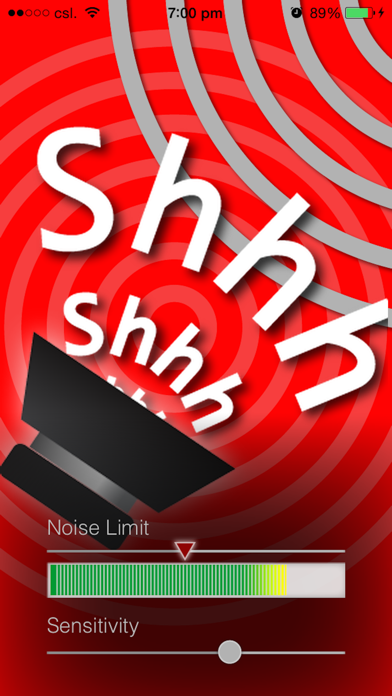
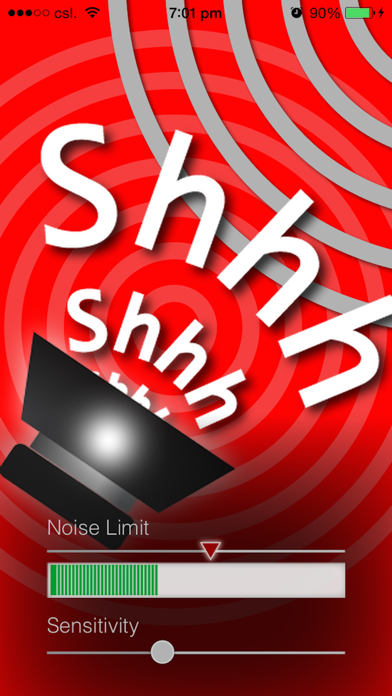
"Noise Control" continuously monitors the ambient sound level. If the sound level is higher than a user specified "Noise Limit" for enough time (e.g. 1.5 seconds), "Noise Control" will "SHHH..." automatically. (While at the same time, you can pretend to be busy or actually keep busy with something else)
Of course, you can always tap on the "Loud Speaker" image and "Noise Control" will shush ASAP on your demand.
KEY FEATURES:
1) Cross-Cultural
"Shhhhhh.... " is quite simply a cross-cultural way of saying Shut Up!
2) Ambient Sound Level Monitoring
Utilizing the built-in mic of your iPhone to monitor ambient sound level.
3) User Specified Noise Limit
Use the "Noise Limit" slider to set the sound level limit which helps "Noise Control" to decide when to shush!
4) Dynamic Sound Level Meter
Helps you visually monitor the environment sound level and determine the "Noise Limit" accordingly
5) Instant Shush Button
Tap on the "Loud Speaker" figure and "Noise Control" will shush as soon as it can.
6) Smart Sound Monitor
"Noise Control" shushes only when the sound level is higher than the "Noise Limit" for cumulatively enough time within the pass few seconds (approx. 1.5 to 3 sec). So don't worry when you drop your pen or need a quick cough.
7) Adjustable Mic Sensitivity
Adjust the mic input sensitivity to cater different environment
8) Silent Mode Friendly
Works even when your iPhone is switched to "Silent Mode" with the "ring/silent" switch
Note:
- "Noise Control" requires access to built-in microphone, you MUST allow Noise Control to access microphone when prompted
- "Noise Control" requires iOS devices with built-in microphone.
- To let other people hear when "Noise Control" shushes, remember not to connect your iPhone to any headphone/earphone/headsets.
- "Noise Control" was named "Keep Quiet..." prior to version 1.1
Noise Control is the pioneering intelligent iPhone App of its kind and we are proud of your precious support for innovation!
What's more, Noise Control is interculturally effective since "Shhhhh.... " is quite simply a cross-cultural way of saying Shut Up!
Tired of constantly asking your kids to stop making noise? In a library and want those talking people to stay quiet but don't want them to know you are the one who "SHHH...." them? "Noise Control" handle these for you automatically!
"Noise Control" continuously monitors the ambient sound level. If the sound level is higher than a user specified "Noise Limit" for enough time (e.g. 1.5 seconds), "Noise Control" will "SHHH..." automatically. (While at the same time, you can pretend to be busy or actually keep busy with something else)
Of course, you can always tap on the "Loud Speaker" image and "Noise Control" will shush ASAP on your demand.
KEY FEATURES:
1) Cross-Cultural
"Shhhhhh.... " is quite simply a cross-cultural way of saying Shut Up!
2) Ambient Sound Level Monitoring
Utilizing the built-in mic of your iPhone to monitor ambient sound level.
3) User Specified Noise Limit
Use the "Noise Limit" slider to set the sound level limit which helps "Noise Control" to decide when to shush!
4) Dynamic Sound Level Meter
Helps you visually monitor the environment sound level and determine the "Noise Limit" accordingly
5) Instant Shush Button
Tap on the "Loud Speaker" figure and "Noise Control" will shush as soon as it can.
6) Smart Sound Monitor
"Noise Control" shushes only when the sound level is higher than the "Noise Limit" for cumulatively enough time within the pass few seconds (approx. 1.5 to 3 sec). So don't worry when you drop your pen or need a quick cough.
7) Adjustable Mic Sensitivity
Adjust the mic input sensitivity to cater different environment
8) Silent Mode Friendly
Works even when your iPhone is switched to "Silent Mode" with the "ring/silent" switch
Note:
- "Noise Control" requires access to built-in microphone, you MUST allow Noise Control to access microphone when prompted
- "Noise Control" requires iOS devices with built-in microphone.
- To let other people hear when "Noise Control" shushes, remember not to connect your iPhone to any headphone/earphone/headsets.
- "Noise Control" was named "Keep Quiet..." prior to version 1.1
Zrzuty ekranu Noise Control
Rekomendacja redakcji
 Canva: AI Photo & Video Editor
 Proton VPN: Fast & Secure
 Booking.com: Hotels & Travel
 Too Good To Go: End Food Waste
 Waze Navigation & Live Traffic
 Stellarium Mobile - Star Map
 Ticketmaster-Buy, Sell Tickets
 Bolt: Request a Ride
 Life360: Find Friends & Family
 GetYourGuide: Travel & Tickets
 Sky Guide
 Doctolib - Your health partner
Aplikacje podobne do Noise Control
 Fan Noise: White Noise Machine
 Rx Noise- Pink Noise for Sleep
 Fan Noise - white noise app
 Noise Machine - white noise
 Just Noise #1 White Noise Machine
 AI Noise Reducer, Remove Noise
 White Noise & Fan Noise
 Soft Noise Sounds: White Noise
 White Noise - Sounds for sleep, relaxation, yoga, stress relief, anxiety help, zen meditation, health and wellbeing. White noise machine, rain, nature, storm, city, ocean, ambience and other sound effects for infant, baby, child and adult sleeping aid
 Nap Noise - White Noise Sounds
 Noise Level Meter - measure noise in Decibel (db)
 Noise Gauge Lite - Measure noise strenth around you
Aplikacje autorstwa Y Lau


Najbardziej popularne

ChatGPTIntroducing ChatGPT for iOS: OpenAI’s latest advancements at your fingertips.
This official app is f

Google GeminiThe Google Gemini app is an AI assistant that can help supercharge your creativity and productivity.

Claude by AnthropicGet free access to the newly upgraded Claude 3.5 Sonnet – Anthropic's most advanced model yet. Wheth

GoogleDownload the Google app to stay in the know about things that matter to you. Try AI Overviews, find

CapCut - Video EditorCapCut is a free all-in-one video editing app that helps you create incredible videos.
「Easy to use」

Shop: All your favorite brandsElevate every shopping moment
Shop, track, and explore the latest trends in an all-in-one shopping

Google MapsNavigate your world faster and easier with Google Maps. Over 220 countries and territories mapped an

Uber - Request a rideJoin the millions of riders who trust Uber for their everyday travel needs. Whether you’re running a

ThreadsSay more with Threads — Instagram’s text-based conversation app.
Threads is where communities come t

Gmail - Email by GoogleThe official Gmail app brings the best of Gmail to your iPhone or iPad with robust security, real-ti

TikTokTikTok is THE destination for mobile videos. On TikTok, short-form videos are exciting, spontaneous,

WhatsApp MessengerWhatsApp from Meta is a FREE messaging and video calling app. It’s used by over 2B people in more th

InstagramLittle moments lead to big friendships. Share yours on Instagram.
— From Meta
Connect with friends,

Netflix Game ControllerPlay games on your TV with the Netflix Game Controller.
This app connects to your TV and allows you

AirbnbTHE FASTEST, EASIEST WAY TO AIRBNB
Find inspiration, plan a trip with your group, book it, and go. Y

Telegram MessengerPure instant messaging — simple, fast, secure, and synced across all your devices. One of the top 5

Spotify - Music and PodcastsWith the Spotify music and podcast app, you can play millions of songs, albums and original podcasts

DramawaveDramawave - Stream Endless Drama Shorts, Anytime, Anywhere
Welcome to Dramawave the ultimate destina

Whatnot - Live Video ShoppingWhatnot is a social marketplace where you can discover some of your favorite products like sports ca

Google ChromeDownload the new Google Chrome for your iPhone and iPad. Now more simple, secure and faster than eve

FacebookWhere real people propel your curiosity. Whether you’re thrifting gear, showing a reel to that group

XThe X app is the trusted global digital town square for everyone.
With X, you can:
Post content for

Indeed Job SearchDiscover your next job opportunity on Indeed, the free job search app designed to connect you with b

Duolingo - Language LessonsLearn a new language with the world’s most-downloaded education app! Duolingo is the fun, free app f