

关于Black Menu for Wikipedia
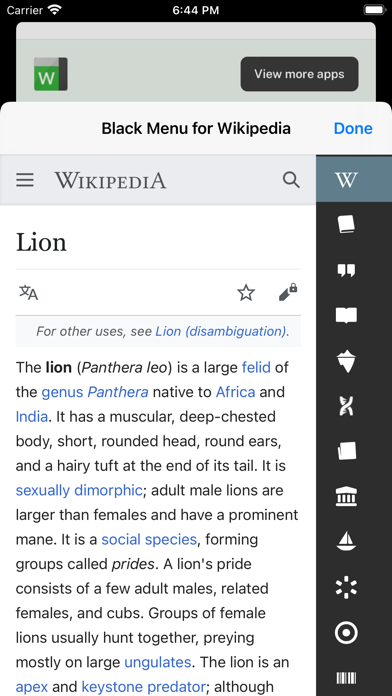
Black Menu for Wikipedia lets you access the best of the Wikipedia Universe, in a simple, easy, and convenient way.
This extension has a comprehensive menu of Wikimedia Foundation projects. You can access them by browsing through the black menu entries. By clicking the menu entry of your choice, you'll go to the corresponding Wikimedia Foundation project in a new tab.
Wikipedia – The primary page, containing a search box which lets you access the vast collection of Wikipedia articles right inside Black Menu for Wikipedia. This page also features today's featured Wikipedia article and recent news reported by Wikipedia.
Wiktionary – Search for thousands of words featured in the Wiktionary dictionary and thesaurus. This page also features Wiktionary the word of the day.
Wikiquote – Browse Wikiquote's broad collection of quotes using the search bar or search for quotes by categories. This page also features the Wikiquote quote of the day.
Wikibooks – The Wikibooks page includes an overview of the Wikibooks project and a search bar to search and access an array of 2,600+ books.
Wikisource – Browse through the ample library of Wikisource texts using the search bar at the top of the page. The Wikisource page also include the featured text of the month, new texts, and Wikisource highlights. You can also browse through texts by categories and author.
Wikispecies – Search through Wikispecies' collection of organisms using the search bar at the top of the page. A featured author and the species of the week are also displayed on this page.
Wikinews – Check up on the news as reported by Wikipedia. If you want to look through the news archives, just use the search bar at the top of the Wikinews page.
Wikiversity – This page includes a introduction to Wikiversity and the search bar at the top of this page lets you search through Wikiversity's extensive assortment of educational resources.
Wikivoyage – Explore the world using the free worldwide travel guide that anyone can edit. Search for travel guides by continent or use the search bar at the top of the page. Also look for itineraries, phrasebooks, travel topics and other topics. The Wikivoyage page also features the destination of the month, a destination off the beaten path and the featured travel topic.
Commons – Search for and view all the media files Wikipedia Commons has to offer using the search bar. Also browse through media files by topic, location, type, author, license and source. This page also features the Commons' picture of the day.
Meta-Wiki – This page includes an introduction to Meta-Wiki, the global community site for Wikimedia projects and the Wikimedia movement. Use the search bar to browse through various projects and pages.
This extension has a comprehensive menu of Wikimedia Foundation projects. You can access them by browsing through the black menu entries. By clicking the menu entry of your choice, you'll go to the corresponding Wikimedia Foundation project in a new tab.
Wikipedia – The primary page, containing a search box which lets you access the vast collection of Wikipedia articles right inside Black Menu for Wikipedia. This page also features today's featured Wikipedia article and recent news reported by Wikipedia.
Wiktionary – Search for thousands of words featured in the Wiktionary dictionary and thesaurus. This page also features Wiktionary the word of the day.
Wikiquote – Browse Wikiquote's broad collection of quotes using the search bar or search for quotes by categories. This page also features the Wikiquote quote of the day.
Wikibooks – The Wikibooks page includes an overview of the Wikibooks project and a search bar to search and access an array of 2,600+ books.
Wikisource – Browse through the ample library of Wikisource texts using the search bar at the top of the page. The Wikisource page also include the featured text of the month, new texts, and Wikisource highlights. You can also browse through texts by categories and author.
Wikispecies – Search through Wikispecies' collection of organisms using the search bar at the top of the page. A featured author and the species of the week are also displayed on this page.
Wikinews – Check up on the news as reported by Wikipedia. If you want to look through the news archives, just use the search bar at the top of the Wikinews page.
Wikiversity – This page includes a introduction to Wikiversity and the search bar at the top of this page lets you search through Wikiversity's extensive assortment of educational resources.
Wikivoyage – Explore the world using the free worldwide travel guide that anyone can edit. Search for travel guides by continent or use the search bar at the top of the page. Also look for itineraries, phrasebooks, travel topics and other topics. The Wikivoyage page also features the destination of the month, a destination off the beaten path and the featured travel topic.
Commons – Search for and view all the media files Wikipedia Commons has to offer using the search bar. Also browse through media files by topic, location, type, author, license and source. This page also features the Commons' picture of the day.
Meta-Wiki – This page includes an introduction to Meta-Wiki, the global community site for Wikimedia projects and the Wikimedia movement. Use the search bar to browse through various projects and pages.
Black Menu for Wikipedia应用截图
编辑推荐
 Canva: AI Photo & Video Editor
 Proton VPN: Fast & Secure
 Booking.com: Hotels & Travel
 Too Good To Go: End Food Waste
 Waze Navigation & Live Traffic
 Stellarium Mobile - Star Map
 Ticketmaster-Buy, Sell Tickets
 Bolt: Request a Ride
 Life360: Find Friends & Family
 GetYourGuide: Travel & Tickets
 Sky Guide
 Doctolib - Your health partner
类似Black Menu for Wikipedia的应用
 Gissa Trafikskylten - Perfekt för dig som pluggar för att ta körkor ( bil, moped och motorcykel körkor )
 Black Menu for Wikipedia
 menu card restaurant menu
 Menu Maker, Menu Templates
 Today's Menu - Choosing a Menu
 Menu Panda - Visual Menu App
 Le Menu - Digital Menu Card
 Menü Mester - Ebéd Menü
 Audio for Wikipedia
 ランダム Wikipedia edition
 Wikipedia
 WikiLens for Wikipedia
Carlos Jeurissen的应用


最受欢迎

ChatGPTIntroducing ChatGPT for iOS: OpenAI’s latest advancements at your fingertips.
This official app is f

Google GeminiThe Google Gemini app is an AI assistant that can help supercharge your creativity and productivity.

Claude by AnthropicGet free access to the newly upgraded Claude 3.5 Sonnet – Anthropic's most advanced model yet. Wheth

GoogleDownload the Google app to stay in the know about things that matter to you. Try AI Overviews, find

CapCut - Video EditorCapCut is a free all-in-one video editing app that helps you create incredible videos.
「Easy to use」

Shop: All your favorite brandsElevate every shopping moment
Shop, track, and explore the latest trends in an all-in-one shopping

Google MapsNavigate your world faster and easier with Google Maps. Over 220 countries and territories mapped an

Uber - Request a rideJoin the millions of riders who trust Uber for their everyday travel needs. Whether you’re running a

ThreadsSay more with Threads — Instagram’s text-based conversation app.
Threads is where communities come t

Gmail - Email by GoogleThe official Gmail app brings the best of Gmail to your iPhone or iPad with robust security, real-ti

TikTokTikTok is THE destination for mobile videos. On TikTok, short-form videos are exciting, spontaneous,

WhatsApp MessengerWhatsApp from Meta is a FREE messaging and video calling app. It’s used by over 2B people in more th

InstagramLittle moments lead to big friendships. Share yours on Instagram.
— From Meta
Connect with friends,

Netflix Game ControllerPlay games on your TV with the Netflix Game Controller.
This app connects to your TV and allows you

AirbnbTHE FASTEST, EASIEST WAY TO AIRBNB
Find inspiration, plan a trip with your group, book it, and go. Y

Telegram MessengerPure instant messaging — simple, fast, secure, and synced across all your devices. One of the top 5

Spotify - Music and PodcastsWith the Spotify music and podcast app, you can play millions of songs, albums and original podcasts

DramawaveDramawave - Stream Endless Drama Shorts, Anytime, Anywhere
Welcome to Dramawave the ultimate destina

Whatnot - Live Video ShoppingWhatnot is a social marketplace where you can discover some of your favorite products like sports ca

Google ChromeDownload the new Google Chrome for your iPhone and iPad. Now more simple, secure and faster than eve

FacebookWhere real people propel your curiosity. Whether you’re thrifting gear, showing a reel to that group

XThe X app is the trusted global digital town square for everyone.
With X, you can:
Post content for

Indeed Job SearchDiscover your next job opportunity on Indeed, the free job search app designed to connect you with b

Duolingo - Language LessonsLearn a new language with the world’s most-downloaded education app! Duolingo is the fun, free app f