
ApowerMirror-TV Screen Sharing
评分
Jul 23, 2024最近更新
1.2.2版本
关于ApowerMirror-TV Screen Sharing
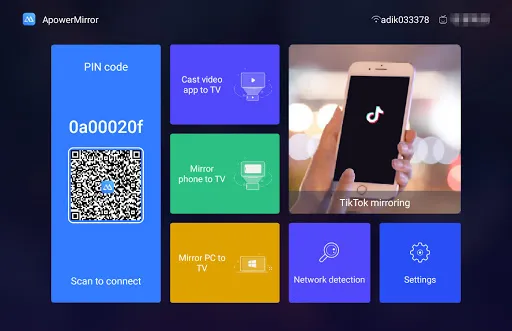
ApowerMirror is a screen mirroring app that enables you to mirror Android or iPhone screen to TV. With this app, you will be able to enjoy your phone screen on TV, stream videos and other media files to TV, and even do presentation on TV.
Key features
☆Screen mirroring
ApowerMirror allows you to cast your phone screen to TV so that you can share your phone screen with your family and friends on a large TV screen.
☆Video streaming
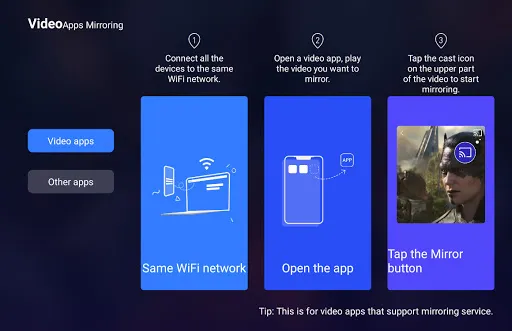
It supports streaming videos from Android or iPhone to TV, including local videos and those on video apps. You can cast local videos after you mirror your phone to TV, and you can stream videos to TV from certain video app that has a streaming feature like DLNA.
☆Supports mainstream Android TV
This app has a high compatibility and can be used to mirror phone to Android TV running Android 5.0 and higher.
Other highlighted features
☆Share gameplay. If you are a game enthusiast and want to share your gameplay with others on a large TV screen, ApowerMirror will help you. Once you mirrored your Android or iPhone to TV, you can enter a game and your gameplay will be shown on your TV.
☆Share photos. ApowerMirror supports accessing photos on your phone from TV and you can share your photos with others on TV.
☆Do presentation. You can do presentation with this app on your TV. Once you mirrored your phone to TV, open the file you want to present on your phone, including PPT, PDF, Word, Excel or any other documents, and then you and your audience will see it on the TV screen immediately.
☆Read eBooks. It also allows you to read eBooks on TV. Open the eBook on your phone, and then you can read it on TV as you wish.
☆Access phone apps. With this app, you may also access the apps on your phone from your TV and enjoy using those apps on TV for a better user experience.
☆Visit website on TV. ApowerMirror also provides you with the opportunity to visit website on TV and you can view all the contents you get on your phone from your TV.
☆Control TV with phone. After you mirror your Android screen to TV, you can use your phone as a remote control to play or pause the video, adjust the volume, forward or rewind, etc.
☆Rotate screen. When you mirror phone screen to TV, you can rotate the screen to make it horizontal or vertical and get the effect you want.
☆Customize frame rate or resolution. You can choose 30 fps or 60 fps according to your needs. For iOS users, when you mirror iPhone to TV, you can adjust the AirPlay resolution to get the best quality.
Note: This app supports TV running Android 5.0 and higher.
ApowerMirror is a professional app that enables you to do screen mirroring and video streaming from phone to TV. To use it, please make sure that your phone and TV are connected to the same WiFi network. If you have any suggestions or problems about ApowerMirror, please feel free to contact us at support@apowersoft.com.
Key features
☆Screen mirroring
ApowerMirror allows you to cast your phone screen to TV so that you can share your phone screen with your family and friends on a large TV screen.
☆Video streaming
It supports streaming videos from Android or iPhone to TV, including local videos and those on video apps. You can cast local videos after you mirror your phone to TV, and you can stream videos to TV from certain video app that has a streaming feature like DLNA.
☆Supports mainstream Android TV
This app has a high compatibility and can be used to mirror phone to Android TV running Android 5.0 and higher.
Other highlighted features
☆Share gameplay. If you are a game enthusiast and want to share your gameplay with others on a large TV screen, ApowerMirror will help you. Once you mirrored your Android or iPhone to TV, you can enter a game and your gameplay will be shown on your TV.
☆Share photos. ApowerMirror supports accessing photos on your phone from TV and you can share your photos with others on TV.
☆Do presentation. You can do presentation with this app on your TV. Once you mirrored your phone to TV, open the file you want to present on your phone, including PPT, PDF, Word, Excel or any other documents, and then you and your audience will see it on the TV screen immediately.
☆Read eBooks. It also allows you to read eBooks on TV. Open the eBook on your phone, and then you can read it on TV as you wish.
☆Access phone apps. With this app, you may also access the apps on your phone from your TV and enjoy using those apps on TV for a better user experience.
☆Visit website on TV. ApowerMirror also provides you with the opportunity to visit website on TV and you can view all the contents you get on your phone from your TV.
☆Control TV with phone. After you mirror your Android screen to TV, you can use your phone as a remote control to play or pause the video, adjust the volume, forward or rewind, etc.
☆Rotate screen. When you mirror phone screen to TV, you can rotate the screen to make it horizontal or vertical and get the effect you want.
☆Customize frame rate or resolution. You can choose 30 fps or 60 fps according to your needs. For iOS users, when you mirror iPhone to TV, you can adjust the AirPlay resolution to get the best quality.
Note: This app supports TV running Android 5.0 and higher.
ApowerMirror is a professional app that enables you to do screen mirroring and video streaming from phone to TV. To use it, please make sure that your phone and TV are connected to the same WiFi network. If you have any suggestions or problems about ApowerMirror, please feel free to contact us at support@apowersoft.com.
ApowerMirror-TV Screen Sharing应用截图
ApowerMirror-TV Screen Sharing的历史版本






编辑推荐


类似ApowerMirror-TV Screen Sharing的应用
 ApowerMirror-TV Screen Sharing
 Miracast Screen Sharing/Mirror
 Screen Mirroring & Sharing
 Lock Screen(Turn off screen)
 Screen Guard - Hide Screen
 Screen Cast : Easy Screen Mirr
 Black Screen White Screen
 Screen Guard - Screen Privacy
 Screen Guard - Privacy Screen
 Screen Guard Privacy Screen
 Smart Screen Off/On Screen Off
 Screen Lock(off screen)
Apowersoft的应用


用户评论
+ 测评
4.9
5
4
3
2
1
E
Emily
2024-12-22
0
0
ApowerMirror-TV Screen Sharing is an incredible app that makes screen sharing to my TV seamless and hassle-free. Highly recommended!
G
Gillian
2024-12-30
18
0
I love using ApowerMirror-TV Screen Sharing for presentations. It's reliable and easy to set up.
M
Manda
2024-12-07
0
0
The quality of screen sharing with ApowerMirror-TV Screen Sharing is outstanding. I use it daily for work and entertainment.
最受欢迎

Reddit
reddit Inc.

SHEIN-Shopping Online
Roadget Business PTE. LTD.

Poppo Live
Poppo Team

TikTok
TikTok Pte. Ltd.

Super Mario Odyssey
Super Mario Odyssey APK - Explore the World Like Never Before!
Embark on an exhilarating adventure w

Mobile Legends: Bang Bang FT
Công ty cổ phần phát triển công nghệ số Hồng Hà

Netflix
Netflix, Inc.

Car Parking Multiplayer 2
olzhass

Legend of Solgard
Snowprint Studios AB

X
X Corp.

Clash Royale
Supercell

Tips Dream League Soccer 2017
amorphisnguyen

Red Dead redemption 2 Mobile
Tarik EL hamdi

PUBG MOBILE
Level Infinite

Pure Sniper: Gun Shooter Games
Miniclip.com

Hole.io
VOODOO

GunboundM
DargomStudio

Plague Inc.
Ndemic Creations

Relic Bag: Shadow Hunter
Fansipan Limited

Call of Duty: Warzone Mobile
Activision Publishing, Inc.

Talking Pierre the Parrot
Outfit7 Limited

War Thunder Mobile
GAIJIN NETWORK LTD

Shadow Fight 2 Special Edition
NEKKI

Once Human
Exptional Global