

Fake GPS Location - Floater
評分
Jul 25, 2024最近更新
1.36版本
關於Fake GPS Location - Floater
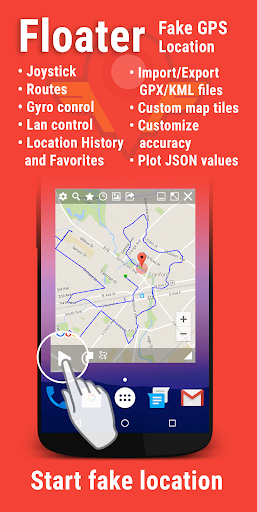
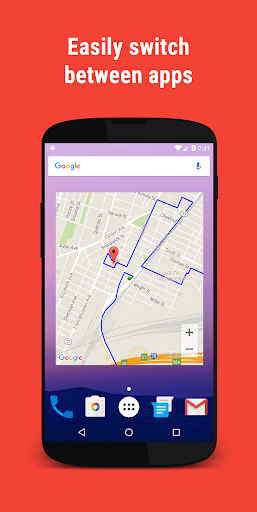
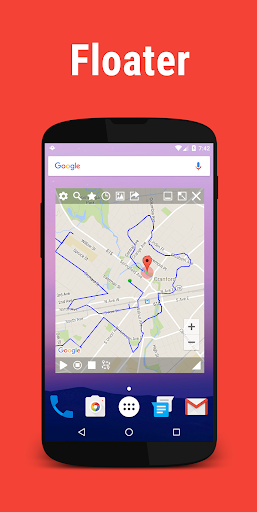
Floater is a fake gps app, that runs from a floating window, allowing easy access to apps or games.
Fake the location on your phone to any place in the world. This app set up a fake GPS location so different apps thinks you are there. You can be in New York, Paris, London etc. Fly gps spoof everywhere!
Designed for developers to properly test their apps that use and track gps information without the need to lock on a GPS signal. Useful when you want to add a geolocation to a photo if you forgot to turn on location when you were taking it. Can also be used as a prank app - any foul/wrong usage will not be supported by our team.
The floating functionality is super useful so you don't need to constantly change apps as you develop your software.
How to:
1. Grant "draw over other apps" permission to enable floating functionality.
2. Enable the Developer settings on your device(on older versions it is not needed)(See tutorial on how to enable this).
3. Enable mock location or select this app as mock location app. In the developer options select "Allow mock location".
4. Set your location to "GPS ONLY"(or "Device only") for best results.
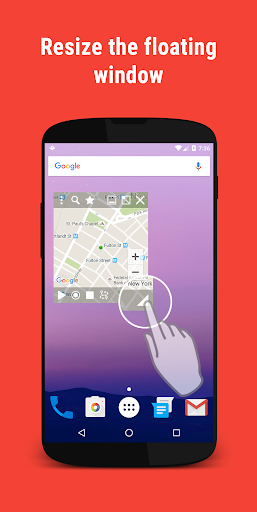
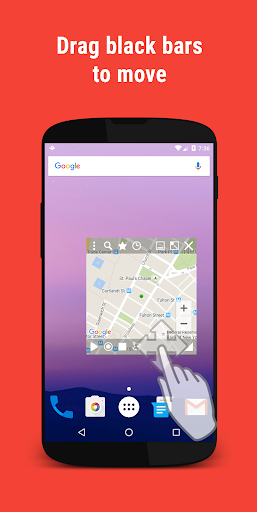
5. Resize the window or minimize it so you can view your app, drag the black bars to move the window.
6. Start the app and move the map to where you want to fake your location. The green dot indicates where you want to be.
7. Select the play button to start faking your location.
8. To stop the fake location click on the stop button not the pause button.
Features:
- Location history
- Save Locations to Favorites
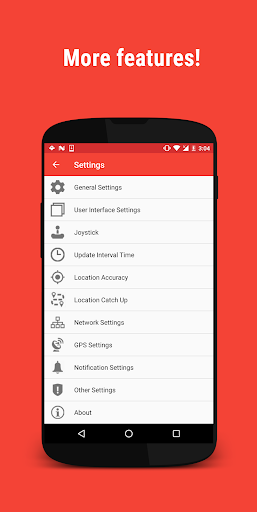
- Change notification look (text, description, buttons, show/hide icon, hide from status bar)
- Network mode, control location of other Floater users on the same network
- mock location GPS coordinate to the service provider.
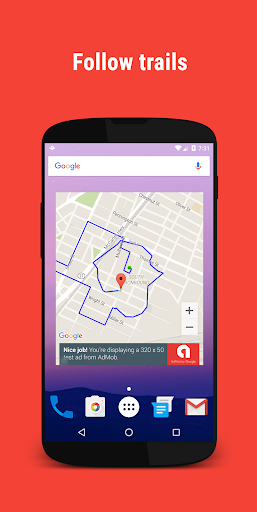
- Create, save and import/export routes (GPX/KML)
- Set fixed/random accuracy
- Set fixed/random speed
- Add different map tiles
- Use gyro to move the map
Permission needed for this app:
- Internet - to display the map
- Storage - needed for export or import GPX/KML files
- Access Coarse and Fine Location - to fake your current location
- Location - needed for when you want to show your real location on the map
Notice:
- There is no need to turn the GPS on, but for best results turn it on and disable "high accuracy" and change it to "GPS ONLY"(or "Device only")
- This app requires you to have play services and maps installed.
- We do not encourage you to use this app together with non complying apps.
- If the app behaves strangely, clear and update GPS data and restart the device.
- Run this app first before the app you are faking so it will receive coordinates from this app and not from the real sensor
- Disable "Use wireless networks" options in Location settings in order to avoid problems where you will keep receiving fake locations even after stopping the app.
- Since this is a floating service, the app may get killed by the Android OS if you are running low on memory or running too many apps. Make sure run this app when you have lots of memory and/or running a few apps to get the best results.
- This app is categorized as a tool to help developers properly test apps with location functionalities. Also works with Tasker, Command line and through Intents. See tutorial for more info.
- Don't use with other location changer apps
Has in-App purchases for removing ads
Please read tutorial if you have any problems using this app. Read it before you leave a rating or comment.
If you find any bugs or want more features - please feel free to contact us using the feedback option or post here: http://forum.xda-developers.com/android/apps-games/app-floater-fake-location-floating-fake-t3397641
Note: Do not use this app with games and apps that clearly violate their terms. Do not use this app for cheating or any foul use. Make sure the app you use comply with using mock location. Happy GPS spoof.
Fake the location on your phone to any place in the world. This app set up a fake GPS location so different apps thinks you are there. You can be in New York, Paris, London etc. Fly gps spoof everywhere!
Designed for developers to properly test their apps that use and track gps information without the need to lock on a GPS signal. Useful when you want to add a geolocation to a photo if you forgot to turn on location when you were taking it. Can also be used as a prank app - any foul/wrong usage will not be supported by our team.
The floating functionality is super useful so you don't need to constantly change apps as you develop your software.
How to:
1. Grant "draw over other apps" permission to enable floating functionality.
2. Enable the Developer settings on your device(on older versions it is not needed)(See tutorial on how to enable this).
3. Enable mock location or select this app as mock location app. In the developer options select "Allow mock location".
4. Set your location to "GPS ONLY"(or "Device only") for best results.
5. Resize the window or minimize it so you can view your app, drag the black bars to move the window.
6. Start the app and move the map to where you want to fake your location. The green dot indicates where you want to be.
7. Select the play button to start faking your location.
8. To stop the fake location click on the stop button not the pause button.
Features:
- Location history
- Save Locations to Favorites
- Change notification look (text, description, buttons, show/hide icon, hide from status bar)
- Network mode, control location of other Floater users on the same network
- mock location GPS coordinate to the service provider.
- Create, save and import/export routes (GPX/KML)
- Set fixed/random accuracy
- Set fixed/random speed
- Add different map tiles
- Use gyro to move the map
Permission needed for this app:
- Internet - to display the map
- Storage - needed for export or import GPX/KML files
- Access Coarse and Fine Location - to fake your current location
- Location - needed for when you want to show your real location on the map
Notice:
- There is no need to turn the GPS on, but for best results turn it on and disable "high accuracy" and change it to "GPS ONLY"(or "Device only")
- This app requires you to have play services and maps installed.
- We do not encourage you to use this app together with non complying apps.
- If the app behaves strangely, clear and update GPS data and restart the device.
- Run this app first before the app you are faking so it will receive coordinates from this app and not from the real sensor
- Disable "Use wireless networks" options in Location settings in order to avoid problems where you will keep receiving fake locations even after stopping the app.
- Since this is a floating service, the app may get killed by the Android OS if you are running low on memory or running too many apps. Make sure run this app when you have lots of memory and/or running a few apps to get the best results.
- This app is categorized as a tool to help developers properly test apps with location functionalities. Also works with Tasker, Command line and through Intents. See tutorial for more info.
- Don't use with other location changer apps
Has in-App purchases for removing ads
Please read tutorial if you have any problems using this app. Read it before you leave a rating or comment.
If you find any bugs or want more features - please feel free to contact us using the feedback option or post here: http://forum.xda-developers.com/android/apps-games/app-floater-fake-location-floating-fake-t3397641
Note: Do not use this app with games and apps that clearly violate their terms. Do not use this app for cheating or any foul use. Make sure the app you use comply with using mock location. Happy GPS spoof.
Fake GPS Location - Floater應用截圖
Fake GPS Location - Floater的歷史版本

編輯推薦


類似Fake GPS Location - Floater的應用程式
 Fake GPS Location - Floater
 Fly GPS-Location fake/Fake GPS
 Fake GPS Location-GPS JoyStick
 Fake GPS - Location Changer
 Fake GPS Go Location Spoofer
 Fake GPS Location Spoofer
 Fake GPS Location- LocaEdit
 Fake GPS Location PRO
 Location Changer Fake GPS-Mock
 Gmocker: Fake GPS Location
 Fake GPS: Spoof Location
 Fake GPS Location
Rapid Developers的應用程式

用戶評論
+ 評論
4.7
5
4
3
2
1
G
Gillian
2024-12-21
30
0
I love using Fake GPS Location - Floater for my travel planning. It helps me visualize my routes and destinations perfectly.
L
Lucine
2024-12-07
21
0
Fake GPS Location - Floater has been a lifesaver for my app development projects. It's reliable and provides accurate location simulation.
D
Debbie
2024-11-28
11
0
This app, Fake GPS Location - Floater, is fantastic for privacy-conscious users. It allows me to control my location data with ease.
最受歡迎

Downloader by AFTVnews
AFTVnews.com

Character AI: AI-Powered Chat
Character.AI

Google Chrome
Google LLC

YouTube
Google LLC

X
X Corp.

Telegram
Telegram FZ-LLC

Netflix
Netflix, Inc.

Tubi: Movies & Live TV
Tubi TV

Disney+
Disney

VPN Proton: Fast & Secure VPN
Proton AG

Microsoft 365 (Office)
Microsoft Corporation

Reddit
reddit Inc.

Signal Private Messenger
Signal Foundation

Vinted - Buy and sell clothes
Vinted

Grand Theft Auto: San Andreas
Rockstar Games

Football League 2024
MOBILE SOCCER

Toca Life World: Build a Story
Toca Boca

EA SPORTS FC™ Mobile Soccer
ELECTRONIC ARTS

Roblox
Roblox Corporation

Free Fire MAX
Garena International I

PUBG MOBILE LITE
Level Infinite

Fortnite
Epic Games, Inc

Free Fire: The Chaos
Garena International I

Block Blast!
Hungry Studio