

FlashAir
Rating
Jul 31, 2024Latest update
4.5.1Version
About FlashAir
Technical support for FlashAir W-03 Class10, FlashAir W-02 Class10 and FlashAir Class6 on FlashAir App will no longer be available. We appreciate your understanding.
With the FlashAir™ App for Android, you can quickly and easily connect, download and share all the images and documents on your wireless FlashAir™ SDHC/SDXC memory card.
3 browsing modes
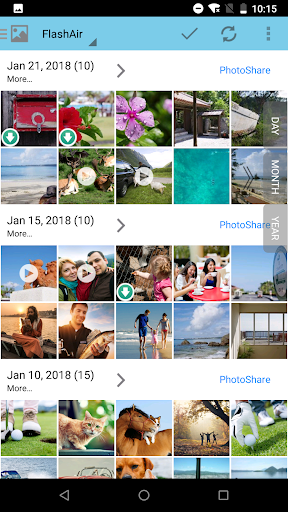
- Photo/Movie view shows thumbnails of photos and movies in a single scrollable grid.
- Music view shows music files in a single scrollable list.
- Folder view shows any files within each folder.
Download, share and open files
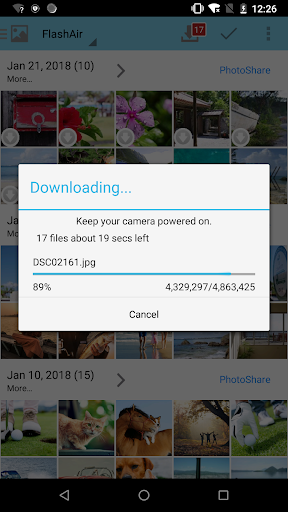
- Save your files to your Android device.
- The app will download photos and videos from the FlashAir W-04 card automatically based on your setting.
- Share your files via E-mail/Twitter/Facebook/Instagram. *Note: You need an internet connection.
- Open a file in another application.
Configurations
- PhotoShare
- Automatic detection of adding or updating files on FlashAir
- Display settings of photos/videos
- Auto save of photos/videos
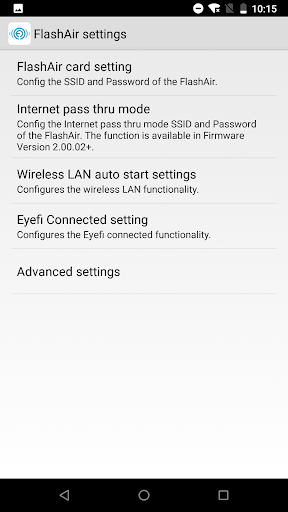
- Configuring SSID and security key (password) of the FlashAir™ card.
- Configuring SSID and security key (password) for internet pass thru mode.
- Timeout
- Administration password (MASTERCODE)
- Eyefi Connected setting
[Important notes]
- This application is compatible Android 5.0 - 14.0 devices.
- Please pay attention to following things when you use this App on your smartphone of Android 6.0 basis.
- Please enable location service or GPS mode on your smartphone.
- If you get a trouble in a wireless connection, please set air plane mode before you use this App.
- This application uses a microSD card inserted into the Android device. Error could occur on the Android device with no micro SD card.
- KIOXIA Corporation may modify or discontinue, temporarily or permanently, the Services or Materials, or any portion thereof, with or without notice
- This application may be terminated its service or functions without former notice.
- THIS APPLICATION IS PROVIDED ON AN “AS IS “BASIS WITHOUT ANY WARRANTIES, EITHER IMPLIED OR STATUTORY, INCLUDING IMPLIED WARRANTIES, CONDITIONS OF MERCHANTABILITY, OR FITNESS FOR A PARTICULAR PURPOSE, TO THE EXTENT PERMITTED BY APPLICABLE LAWS. KIOXIA WOULD NOT BE RESPONSIBLE FOR ANY LIABILITY ARISING FROM THE USE OF THIS APPLICATION.
With the FlashAir™ App for Android, you can quickly and easily connect, download and share all the images and documents on your wireless FlashAir™ SDHC/SDXC memory card.
3 browsing modes
- Photo/Movie view shows thumbnails of photos and movies in a single scrollable grid.
- Music view shows music files in a single scrollable list.
- Folder view shows any files within each folder.
Download, share and open files
- Save your files to your Android device.
- The app will download photos and videos from the FlashAir W-04 card automatically based on your setting.
- Share your files via E-mail/Twitter/Facebook/Instagram. *Note: You need an internet connection.
- Open a file in another application.
Configurations
- PhotoShare
- Automatic detection of adding or updating files on FlashAir
- Display settings of photos/videos
- Auto save of photos/videos
- Configuring SSID and security key (password) of the FlashAir™ card.
- Configuring SSID and security key (password) for internet pass thru mode.
- Timeout
- Administration password (MASTERCODE)
- Eyefi Connected setting
[Important notes]
- This application is compatible Android 5.0 - 14.0 devices.
- Please pay attention to following things when you use this App on your smartphone of Android 6.0 basis.
- Please enable location service or GPS mode on your smartphone.
- If you get a trouble in a wireless connection, please set air plane mode before you use this App.
- This application uses a microSD card inserted into the Android device. Error could occur on the Android device with no micro SD card.
- KIOXIA Corporation may modify or discontinue, temporarily or permanently, the Services or Materials, or any portion thereof, with or without notice
- This application may be terminated its service or functions without former notice.
- THIS APPLICATION IS PROVIDED ON AN “AS IS “BASIS WITHOUT ANY WARRANTIES, EITHER IMPLIED OR STATUTORY, INCLUDING IMPLIED WARRANTIES, CONDITIONS OF MERCHANTABILITY, OR FITNESS FOR A PARTICULAR PURPOSE, TO THE EXTENT PERMITTED BY APPLICABLE LAWS. KIOXIA WOULD NOT BE RESPONSIBLE FOR ANY LIABILITY ARISING FROM THE USE OF THIS APPLICATION.
Gameplay
FlashAir Screenshots

Old Versions of FlashAir

Editor's Recommendation


Apps Like FlashAir

Apps by KIOXIA Corporation
User Reviews
+ Reviews
4.6
5
4
3
2
1
E
Ellen
2024-12-16
10
0
FlashAir is an amazing app! It has completely transformed the way I share files.
P
Phoebe
2024-12-21
24
0
I love using FlashAir for quick and easy file transfers. It's incredibly efficient!
S
Sandra
2025-01-20
26
0
FlashAir is a must-have app for anyone who needs to share files on the go. Highly recommended!
Most Popular

Downloader by AFTVnews
AFTVnews.com

Character AI: AI-Powered Chat
Character.AI

Google Chrome
Google LLC

YouTube
Google LLC

X
X Corp.

Telegram
Telegram FZ-LLC

Netflix
Netflix, Inc.

Tubi: Movies & Live TV
Tubi TV

Disney+
Disney

VPN Proton: Fast & Secure VPN
Proton AG

Microsoft 365 (Office)
Microsoft Corporation

Reddit
reddit Inc.

Signal Private Messenger
Signal Foundation

Vinted - Buy and sell clothes
Vinted

Grand Theft Auto: San Andreas
Rockstar Games

Football League 2024
MOBILE SOCCER

Toca Life World: Build a Story
Toca Boca

EA SPORTS FC™ Mobile Soccer
ELECTRONIC ARTS

Roblox
Roblox Corporation

Free Fire MAX
Garena International I

PUBG MOBILE LITE
Level Infinite

Fortnite
Epic Games, Inc

Free Fire: The Chaos
Garena International I

Block Blast!
Hungry Studio