

Panasonic Image App
रेटिंग
Aug 22, 2024नवीनतम अपडेट
1.10.23संस्करण
Panasonic Image App के बारे में
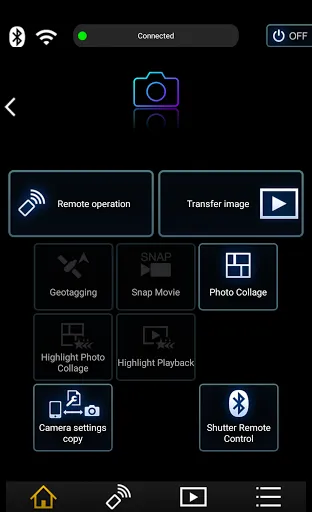
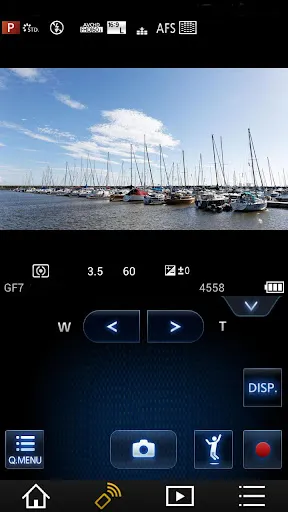
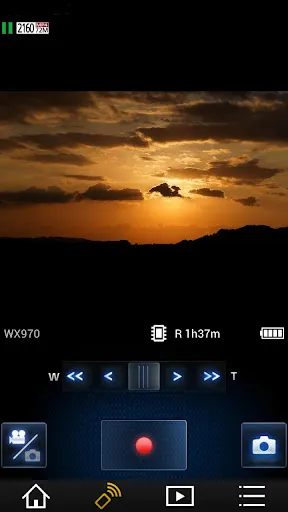
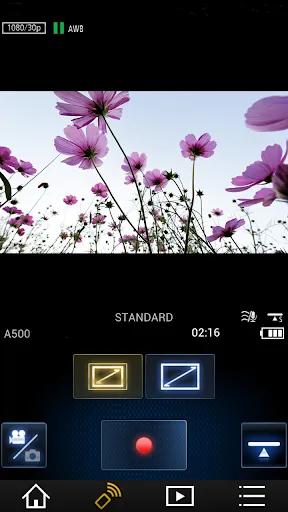
“Panasonic Image App” is an application that makes it possible to use your smartphone to remotely control the shooting and playback functions of a Wi-Fi-compatible digital camera/digital video camera, and to perform upload operations to SNS (Social Networking Service) sites.
The following major functions are available with this application.
・You can watch the same image as on the Live View screen of your digital camera/digital video camera on your smartphone, and control shooting and other camera operations as with a wireless remote controller. (*1)
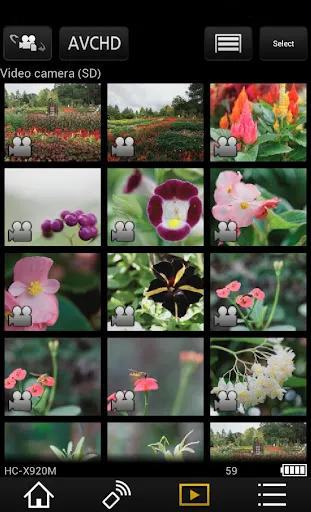
・You can play back still pictures and videos recorded using your digital camera/digital video camera on your smartphone. (*2) (*3) You can also copy them to your smartphone, and upload them to SNS sites. (*3)
Additional functions for digital cameras
・This app allows you to implement continuous connection with a digital camera that has Bluetooth function and make Wi-Fi connections and perform remote operation just with your smart phone. It also allows you to apply location information to recorded images and easily perform automatic transfer of images.(*4)
・You can make settings to automatically transfer still pictures recorded with your digital camera to your smartphone.
・You can add location information acquired with your smartphone to pictures recorded using your digital camera.
(*1) With DMC-SZ8 / SZ9 / SZ10 / TZ55 / TZ56 / TZ57 / TZ58 / ZS35 / ZS45, it is not possible to remotely record videos from a smartphone.
(*2) With DMC-FT5 / GF6 / LF1 / SZ8 / SZ9 / SZ10 / TS5 / TZ37 / TZ40 / TZ41 / TZ55 / TZ56 / TZ57 / TZ58 / ZS27 / ZS30 / ZS35 / ZS45, it is only possible to play back still pictures.
(*3) Not supported on HC-X1000.
(*4) This function can only be used with devices that support Bluetooth 4.0 or above (Bluetooth low energy technology).
[Compatible Operating Systems]
Android 4.4 - 13
[Notes]
・Bluetooth function can only be used with smart phones (Android 5.0 and above) equipped with Bluetooth 4.0 and above (Bluetooth low energy technology).
・Be aware that when using the location information recording function, continued use of the GPS function can lead to a dramatic decrease in battery capacity.
・In order to use the SNS upload functions or the Cloud Sync. Service, you must first obtain a service user ID for Panasonic’s LUMIX CLUB (free of charge).
・For information on using this app or compatible models, visit the following support page.
https://panasonic.jp/support/global/cs/soft/image_app/
・Please understand that we will not be able to contact you directly even if you use the “Email Developer” link.
・The function to transfer images to an AV device can no longer be used. (Version 1.10.7 and later)
・The function to delete images can no longer be used. (Version 1.10.15 and later)
・The function of ""Home Monitor"" can no longer be used. (Version 1.10.19 and later)
・The function of ""Baby Monitor"" can no longer be used. (Version 1.10.19 and later)
The following major functions are available with this application.
・You can watch the same image as on the Live View screen of your digital camera/digital video camera on your smartphone, and control shooting and other camera operations as with a wireless remote controller. (*1)
・You can play back still pictures and videos recorded using your digital camera/digital video camera on your smartphone. (*2) (*3) You can also copy them to your smartphone, and upload them to SNS sites. (*3)
Additional functions for digital cameras
・This app allows you to implement continuous connection with a digital camera that has Bluetooth function and make Wi-Fi connections and perform remote operation just with your smart phone. It also allows you to apply location information to recorded images and easily perform automatic transfer of images.(*4)
・You can make settings to automatically transfer still pictures recorded with your digital camera to your smartphone.
・You can add location information acquired with your smartphone to pictures recorded using your digital camera.
(*1) With DMC-SZ8 / SZ9 / SZ10 / TZ55 / TZ56 / TZ57 / TZ58 / ZS35 / ZS45, it is not possible to remotely record videos from a smartphone.
(*2) With DMC-FT5 / GF6 / LF1 / SZ8 / SZ9 / SZ10 / TS5 / TZ37 / TZ40 / TZ41 / TZ55 / TZ56 / TZ57 / TZ58 / ZS27 / ZS30 / ZS35 / ZS45, it is only possible to play back still pictures.
(*3) Not supported on HC-X1000.
(*4) This function can only be used with devices that support Bluetooth 4.0 or above (Bluetooth low energy technology).
[Compatible Operating Systems]
Android 4.4 - 13
[Notes]
・Bluetooth function can only be used with smart phones (Android 5.0 and above) equipped with Bluetooth 4.0 and above (Bluetooth low energy technology).
・Be aware that when using the location information recording function, continued use of the GPS function can lead to a dramatic decrease in battery capacity.
・In order to use the SNS upload functions or the Cloud Sync. Service, you must first obtain a service user ID for Panasonic’s LUMIX CLUB (free of charge).
・For information on using this app or compatible models, visit the following support page.
https://panasonic.jp/support/global/cs/soft/image_app/
・Please understand that we will not be able to contact you directly even if you use the “Email Developer” link.
・The function to transfer images to an AV device can no longer be used. (Version 1.10.7 and later)
・The function to delete images can no longer be used. (Version 1.10.15 and later)
・The function of ""Home Monitor"" can no longer be used. (Version 1.10.19 and later)
・The function of ""Baby Monitor"" can no longer be used. (Version 1.10.19 and later)
गेमप्ले
Panasonic Image App स्क्रीनशॉट
Panasonic Image App के पुराने संस्करण








Panasonic Image App FAQ
मैं PGYER APK HUB से Panasonic Image App कैसे डाउनलोड करूं?
PGYER APK HUB पर Panasonic Image App मुफ्त डाउनलोड करने के लिए है?
PGYER APK HUB से Panasonic Image App डाउनलोड करने के लिए मुझे एक खाता चाहिए?
मैं PGYER APK HUB पर Panasonic Image App के साथ समस्या कैसे रिपोर्ट कर सकता हूँ?
क्या आपको यह मददगार पाया
हाँ
नहीं
उपयोगकर्ता समीक्षा
+ समीक्षा
4.6
5
4
3
2
1
S
Solomon
2025-02-08
11
0
Panasonic Image App is a game-changer for photo enthusiasts! The interface is intuitive and the editing tools are top-notch.
P
Peggy
2025-01-20
8
0
I absolutely love using Panasonic Image App for managing and enhancing my photos. It’s seamless and efficient.
Q
Quentin
2025-02-16
15
0
Panasonic Image App has revolutionized the way I edit and share my images. Highly recommended for anyone who values quality.
सबसे लोकप्रिय

Hyper
Hyper

Microsoft Word: Edit Documents
Microsoft Corporation

PRX XIT MOBILE PANEL
PRX XIT MOBILE PANEL - Comprehensive Overview
Introduction
Discover the PRX XIT MOBILE PANEL, a cutt

Mega888
Mega888 APK - Ultimate Gaming Experience at Your Fingertips
Overview:
Discover the thrilling world o

KOPLO77
KOPLO77 APK - Comprehensive Overview
Discover the vibrant world of KOPLO77, an innovative applicatio

LostLife
Lost Life APK Download and Guide
Today, we're exploring Lost Life, a popular 3D simulation horror ga

PLN Mobile
P L N

MiChat - Chat, Make Friends
MICHAT PTE. LIMITED

WEBTOON
NAVER WEBTOON

SuperFishing Casino- Slots 777
Joyous.games

ChatGPT
OpenAI

Svipbet.club
TippoParty

WePlay(ويبلاي) - Game & Chat
WEJOY Pte. Ltd.

HeeSay - Blued LIVE & Dating
iRainbow

Max: Stream HBO, TV, & Movies
WarnerMedia Global Digital Services, LLC

App Market
Oppo

ENUYGUN
WINGIE ENUYGUN GROUP

Naruto Senki
Naruto Senki APK is a mobile fighting game inspired by the popular Naruto anime and manga series. It

Game Booster VIP Lag Fix & GFX
TOLAN

999+ Gamebox
AyYıldız

BIGO LIVE Lite – Live Stream
Bigo Technology Pte. Ltd.

InstaGold
Assem Mahgoob

GTA 6
RICHIEMANMARIO ALT