
Live Transcribe & Notification
Penilaian
Jun 30, 2024Pembaruan Terbaru
1.0.235675306Versi
Tentang Live Transcribe & Notification
Live Transcribe & Sound Notifications makes everyday conversations and surrounding sounds more accessible among people who are deaf and hard of hearing, using just your Android phone or tablet.
On most devices, you can directly access Live Transcribe & Sound Notifications with these steps:
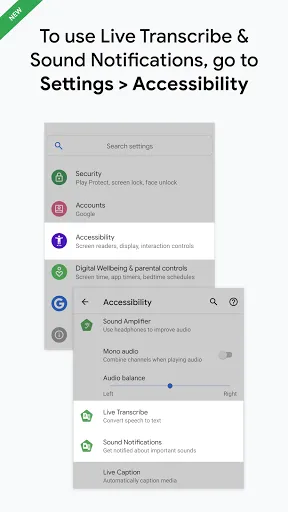
1. Open your device's Settings app.
2. Tap Accessibility, then tap Live Transcribe, or Sound Notifications, depending on which app you’d like to start.
3. Use the Accessibility button, gesture or quick setting (https://support.google.com/accessibility/android/answer/7650693) to start Live Transcribe or Sound Notifications.
Sound Notifications:
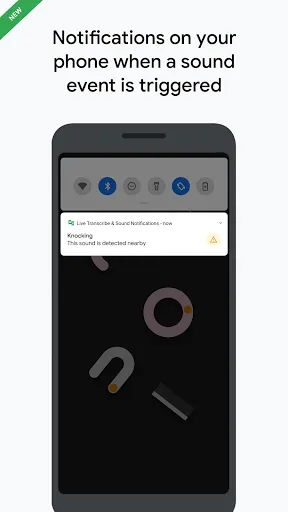
• Get notified of potential risky situations and personal situations based on sounds happening at home (for example, smoke alarm, siren, baby sounds).
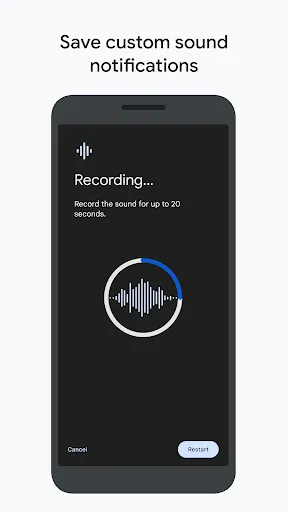
• Add custom sounds to get notified when your appliances beep.• Get notifications with a flashing light or vibration to your mobile device or wearable.
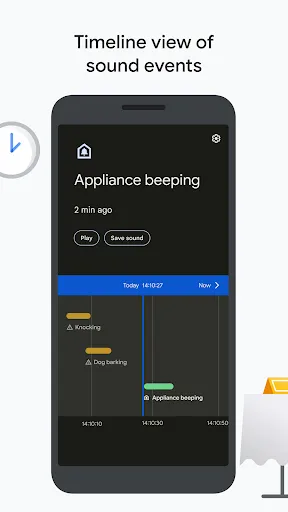
• Timeline view lets you go back in history (currently limited to 12 hours) to see what was happening around you.
Real-time transcription:
• Transcribes in real-time. Text appears on your device as words are spoken.
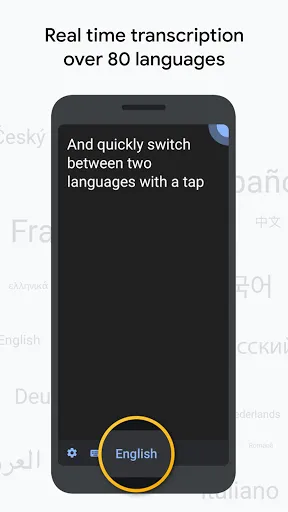
• Choose from over 80 languages and dialects, and quickly switch between two languages.
• Add custom words that you use frequently, like names or household items.
• Set your device to vibrate when someone says your name.
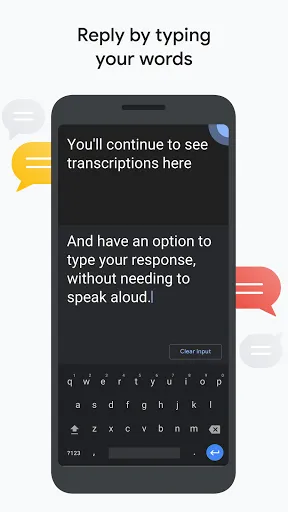
• Type responses in your conversation. Bring up your device’s keyboard and type your words for a continuous dialogue. Transcriptions still appear while you type.
• See the volume of the speaker’s voice compared to the loudness in your environment. You can use this sound indicator to adjust your volume when you speak.
• Use external microphones found in wired headsets, Bluetooth headsets, and USB mics for better audio reception.
Referring back to transcription:
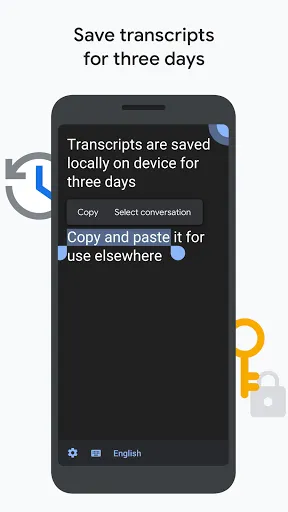
• Choose to save transcriptions for 3 days. Saved transcriptions will stay locally on your device for 3 days, so you can copy and paste them elsewhere. (By default, transcriptions are not saved.)
• Search within saved transcriptions.
• Touch and hold text in transcription to copy and paste.
Requirements:
• Android 6.0 (Marshmallow) and up.
Live Transcribe & Sound Notifications was made in collaboration with Gallaudet University, the premier Deaf and hard of hearing university in the US.
Join the https://groups.google.com/forum/#!forum/accessible to provide feedback and receive product updates. For help using Live Transcribe & Sound Notifications, connect with us at https://g.co/disabilitysupport.
Permissions Notice
Microphone: Live Transcribe needs microphone access to transcribe the speech around you. The audio is not stored after the transcription is processed. Sound Notifications needs microphone access to listen for sounds happening around you. The audio is also not stored after processing is finished.
Accessibility Service: Since this app is an accessibility service, it can observe your actions.
On most devices, you can directly access Live Transcribe & Sound Notifications with these steps:
1. Open your device's Settings app.
2. Tap Accessibility, then tap Live Transcribe, or Sound Notifications, depending on which app you’d like to start.
3. Use the Accessibility button, gesture or quick setting (https://support.google.com/accessibility/android/answer/7650693) to start Live Transcribe or Sound Notifications.
Sound Notifications:
• Get notified of potential risky situations and personal situations based on sounds happening at home (for example, smoke alarm, siren, baby sounds).
• Add custom sounds to get notified when your appliances beep.• Get notifications with a flashing light or vibration to your mobile device or wearable.
• Timeline view lets you go back in history (currently limited to 12 hours) to see what was happening around you.
Real-time transcription:
• Transcribes in real-time. Text appears on your device as words are spoken.
• Choose from over 80 languages and dialects, and quickly switch between two languages.
• Add custom words that you use frequently, like names or household items.
• Set your device to vibrate when someone says your name.
• Type responses in your conversation. Bring up your device’s keyboard and type your words for a continuous dialogue. Transcriptions still appear while you type.
• See the volume of the speaker’s voice compared to the loudness in your environment. You can use this sound indicator to adjust your volume when you speak.
• Use external microphones found in wired headsets, Bluetooth headsets, and USB mics for better audio reception.
Referring back to transcription:
• Choose to save transcriptions for 3 days. Saved transcriptions will stay locally on your device for 3 days, so you can copy and paste them elsewhere. (By default, transcriptions are not saved.)
• Search within saved transcriptions.
• Touch and hold text in transcription to copy and paste.
Requirements:
• Android 6.0 (Marshmallow) and up.
Live Transcribe & Sound Notifications was made in collaboration with Gallaudet University, the premier Deaf and hard of hearing university in the US.
Join the https://groups.google.com/forum/#!forum/accessible to provide feedback and receive product updates. For help using Live Transcribe & Sound Notifications, connect with us at https://g.co/disabilitysupport.
Permissions Notice
Microphone: Live Transcribe needs microphone access to transcribe the speech around you. The audio is not stored after the transcription is processed. Sound Notifications needs microphone access to listen for sounds happening around you. The audio is also not stored after processing is finished.
Accessibility Service: Since this app is an accessibility service, it can observe your actions.
Permainan
Tangkapan layar Live Transcribe & Notification
Versi Lama dari Live Transcribe & Notification




Rekomendasi Editor


Aplikasi Seperti Live Transcribe & Notification
 Live Transcribe & Notification
 transcribe video file and live
 Transcribe - Speech to Text
 Transcribe Audio to text
 Learn and Transcribe ET Lang
 Transcribe Speech to Text
 KODAI - Transcribe to midi
 Transcribe
 OtterAI Transcribe Voice Notes
 AI Transcribe Audio to Text
 Audio Convert Text Transcribe
 FU Live-Live video , AI chat
Aplikasi oleh Research at Google

Live Transcribe & Notification FAQ
Bagaimana cara mengunduh Live Transcribe & Notification dari PGYER APK HUB?
Apakah Live Transcribe & Notification di PGYER APK HUB gratis untuk diunduh?
Apakah saya memerlukan akun untuk mengunduh Live Transcribe & Notification dari PGYER APK HUB?
Bagaimana cara melaporkan masalah dengan Live Transcribe & Notification di PGYER APK HUB?
Apakah Anda menemukan ini membantu
Ya
Tidak
Ulasan Pengguna
+ Ulasan
4.0
5
4
3
2
1
T
TechGleam
2023-12-13
0
0
Live Transcribe & Notification has transformed my note-taking experience. It's incredibly accurate and saves me so much time!
E
EfficientEagle
2020-05-22
0
0
I'm disappointed. Live Transcribe & Notification doesn't seem to work as advertised.
Paling Populer

Finger Football
Gamotronix

Talking Pierre the Parrot
Outfit7 Limited

Tips Dream League Soccer 2017
amorphisnguyen

Poppo Live
Poppo Team

StarMaker: Sing Karaoke Songs
SKYWORK AI PTE. LTD.

CookieRun: OvenBreak
Devsisters Corporation

Netflix
Netflix, Inc.

TikTok
TikTok Pte. Ltd.

Legend of Solgard
Snowprint Studios AB

X
X Corp.

Clash Royale
Supercell

Plague Inc.
Ndemic Creations

Relic Bag: Shadow Hunter
Fansipan Limited

PUBG MOBILE
Level Infinite

Red Dead redemption 2 Mobile
Tarik EL hamdi

War Thunder Mobile
GAIJIN NETWORK LTD

Off Road 4x4 Driving Simulator
Azur Interactive Games Limited

Call of Duty: Warzone Mobile
Activision Publishing, Inc.

GunboundM
DargomStudio

Car Parking Multiplayer 2
olzhass

Marvel Spider Man
Welcome to the Marvel Spider-Man APK, your gateway to the exciting world of Spider-Man, now adapted

Pure Sniper: Gun Shooter Games
Miniclip.com

Shadow Fight 2 Special Edition
NEKKI

Reddit
reddit Inc.