
USB OTG File Manager for Nexus
Рейтинг
Jun 21, 2024Последнее обновление
2.12Версия
Как установить файл XAPK / APK
Поделиться
О USB OTG File Manager for Nexus
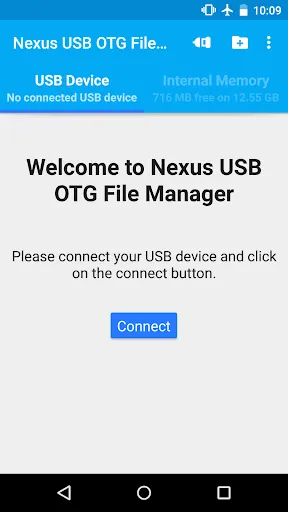
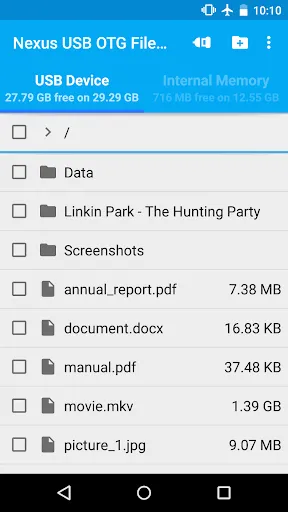
USB OTG File Manager for Nexus allows you to open and copy files from any USB mass storage device with a FAT32 or NTFS filesystem using the USB OTG port of your device, tablet or phone.
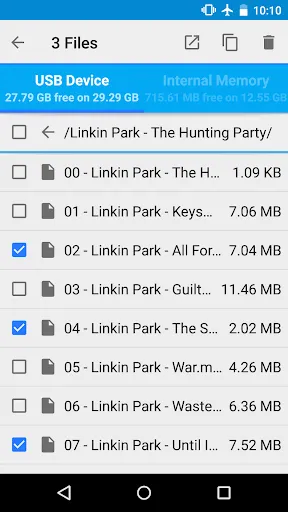
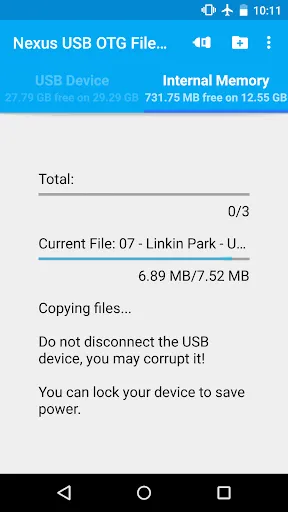
With a FAT32 filesystem, you can copy files to any USB mass storage device and manage your files on it (edit filenames, add directories, delete files) too.
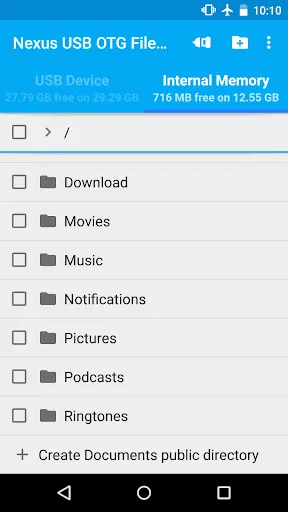
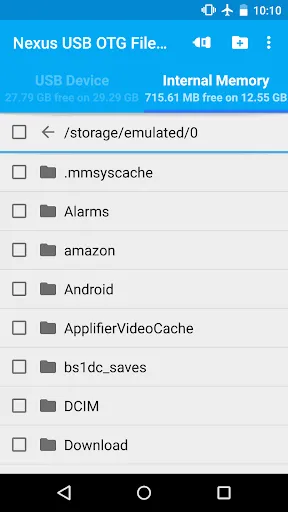
You can also manage your files in the internal memory of your device.
This application has been designed for Nexus products which have an USB "OnTheGo" port, as the Nexus 5, Nexus 7 and Nexus 10, and the brand new Nexus 6 and Nexus 9. But it could work on any device with an USB OTG port Under Android 4.0 or later, including the last Android 5.0 Lollipop.
Root privileges are NOT necessary!
For now, FAT32 filesystem is supported for data read and write, and NTFS filesystem is only supported for data read. You can use USB sticks or SD card readers with any compatible USB OTG cable.
*** NEW FEATURE ***
You can now play playlists (m3u and m3u8 files) and multiple audio files (mp3, aac, m4a, flac, ogg and wav files) at the same time from your USB OTG mass storage device. For that, you need to install my new app Simple Music Player which exists in two versions:
- Free version: https://play.google.com/store/apps/details?id=com.kyuudroid.simplemusicplayer.free
- Paid version to support my developments and get some additional features in the future:
https://play.google.com/store/apps/details?id=com.kyuudroid.simplemusicplayer
Once Simple Music Player is installed, select the files you want to play on your USB device, push the open button and select the Simple Music Player app.
This is a brand new feature, so if you have any issue, don't hesitate to send me an e-mail! Your feedback would be appreciated too.
*** FEATURES ***
USB OTG File Manager for Nexus allows you to open your files directly from your USB device! You just need to have an app that can handle it. For audio and video, I advise you to use VLC.
The new Network Access authorization is only here for local use to be able to open the files. The app NEVER send or receive data to/from Internet.
USB OTG File Manager for Nexus supports devices with multiple logical units (like a GPS with an internal memory and an additional SD card) and allows you to choose which logical unit you want to read.
USB OTG File Manager for Nexus now includes an "Advanced Mode" which allows you to access to all the files of your device. You can now create files and directories outside of the official Android public directories. This is for advanced users only!
Before buying this application, please try the free trial version named USB OTG File Manager Trial for Nexus to be sure that this application is working with your USB devices.
This is not an official Google application. Nexus brand is the property of Google.
With a FAT32 filesystem, you can copy files to any USB mass storage device and manage your files on it (edit filenames, add directories, delete files) too.
You can also manage your files in the internal memory of your device.
This application has been designed for Nexus products which have an USB "OnTheGo" port, as the Nexus 5, Nexus 7 and Nexus 10, and the brand new Nexus 6 and Nexus 9. But it could work on any device with an USB OTG port Under Android 4.0 or later, including the last Android 5.0 Lollipop.
Root privileges are NOT necessary!
For now, FAT32 filesystem is supported for data read and write, and NTFS filesystem is only supported for data read. You can use USB sticks or SD card readers with any compatible USB OTG cable.
*** NEW FEATURE ***
You can now play playlists (m3u and m3u8 files) and multiple audio files (mp3, aac, m4a, flac, ogg and wav files) at the same time from your USB OTG mass storage device. For that, you need to install my new app Simple Music Player which exists in two versions:
- Free version: https://play.google.com/store/apps/details?id=com.kyuudroid.simplemusicplayer.free
- Paid version to support my developments and get some additional features in the future:
https://play.google.com/store/apps/details?id=com.kyuudroid.simplemusicplayer
Once Simple Music Player is installed, select the files you want to play on your USB device, push the open button and select the Simple Music Player app.
This is a brand new feature, so if you have any issue, don't hesitate to send me an e-mail! Your feedback would be appreciated too.
*** FEATURES ***
USB OTG File Manager for Nexus allows you to open your files directly from your USB device! You just need to have an app that can handle it. For audio and video, I advise you to use VLC.
The new Network Access authorization is only here for local use to be able to open the files. The app NEVER send or receive data to/from Internet.
USB OTG File Manager for Nexus supports devices with multiple logical units (like a GPS with an internal memory and an additional SD card) and allows you to choose which logical unit you want to read.
USB OTG File Manager for Nexus now includes an "Advanced Mode" which allows you to access to all the files of your device. You can now create files and directories outside of the official Android public directories. This is for advanced users only!
Before buying this application, please try the free trial version named USB OTG File Manager Trial for Nexus to be sure that this application is working with your USB devices.
This is not an official Google application. Nexus brand is the property of Google.
Скриншоты USB OTG File Manager for Nexus
Старые версии USB OTG File Manager for Nexus





Рекомендация редактора


Приложения, похожие на USB OTG File Manager for Nexus


Приложения от KyuuDroïd
USB OTG File Manager for Nexus FAQ
Как мне скачать USB OTG File Manager for Nexus с PGYER APK HUB?
Бесплатно ли скачивать USB OTG File Manager for Nexus на PGYER APK HUB?
Нужен ли аккаунт для скачивания USB OTG File Manager for Nexus с PGYER APK HUB?
Как мне сообщить о проблеме с USB OTG File Manager for Nexus на PGYER APK HUB?
Вы нашли это полезным?
Да
Нет
Отзывы пользователей
+ Отзывы
4.0
5
4
3
2
1
S
Savannah
2025-02-02
24
0
I’m impressed by how well USB OTG File Manager for Nexus handles large files. It’s a great addition to my app collection.
P
Peter
2025-02-08
7
0
The interface of USB OTG File Manager for Nexus is clean and intuitive. It’s perfect for quick file transfers.
O
Oscar
2024-12-06
19
0
USB OTG File Manager for Nexus is a fantastic app. It’s lightweight yet packed with useful features.
Самые популярные

Finger Football
Gamotronix

Talking Pierre the Parrot
Outfit7 Limited

Tips Dream League Soccer 2017
amorphisnguyen

Poppo Live
Poppo Team

StarMaker: Sing Karaoke Songs
SKYWORK AI PTE. LTD.

CookieRun: OvenBreak
Devsisters Corporation

Netflix
Netflix, Inc.

TikTok
TikTok Pte. Ltd.

Legend of Solgard
Snowprint Studios AB

X
X Corp.

Clash Royale
Supercell

Plague Inc.
Ndemic Creations

Relic Bag: Shadow Hunter
Fansipan Limited

PUBG MOBILE
Level Infinite

Red Dead redemption 2 Mobile
Tarik EL hamdi

War Thunder Mobile
GAIJIN NETWORK LTD

Off Road 4x4 Driving Simulator
Azur Interactive Games Limited

Call of Duty: Warzone Mobile
Activision Publishing, Inc.

GunboundM
DargomStudio

Car Parking Multiplayer 2
olzhass

Marvel Spider Man
Welcome to the Marvel Spider-Man APK, your gateway to the exciting world of Spider-Man, now adapted

Pure Sniper: Gun Shooter Games
Miniclip.com

Shadow Fight 2 Special Edition
NEKKI

Reddit
reddit Inc.