
Niko Home Control
রেটিং
Nov 04, 2024সর্বশেষ আপডেট
3.7.1সংস্করণ
Niko Home Control সম্পর্কে
This app allows you to create a central and easy-to-use control system on your smartphone or tablet. The user-friendly interface gives the resident access to all the functions of the Niko Home Control installation, such as lighting, roll-down shutters, gates, heating and ventilation. Also information about the electricity, gas and water consumption will be displayed on the screen.
What do I need?
Niko Home Control is available in Belgium, the Netherlands, France, UK, Slovakia and Poland. A Niko Home Control installation with IP interface connected to your wireless home network is necessary for indoor control. For remote control, a Niko Home Control gateway needs to be installed between the IP interface and the local network. The installation needs to be upgraded using the Niko Home Control programming software version 1.4.5 (or more recent).
The minimum requirements for this app are iPhone 3GS, iPod touch 3rd generation, iPad 1 or iPad mini and iOS version 5.0.
Features:
• Automatic IP detection.
• Simulation mode possible.
• Control from outside your home if gateway available and account created.
• Automatic adjustment on the screen of your iOS smartphone or tablet.
• Automatic rotation of the screen.
• Split window for tablets: manage your rooms on the left and control your installation on the right OR place two consumption readings next to one another.
+ Controls
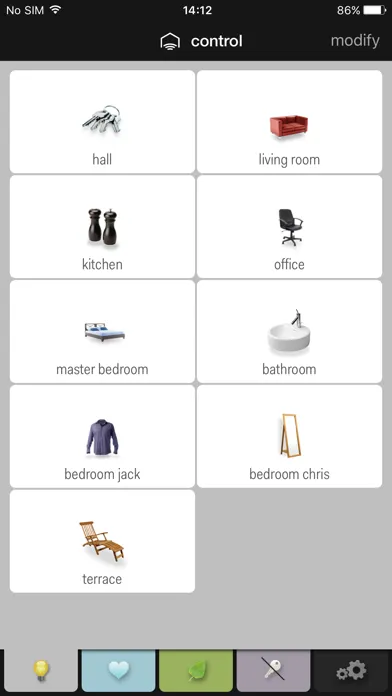
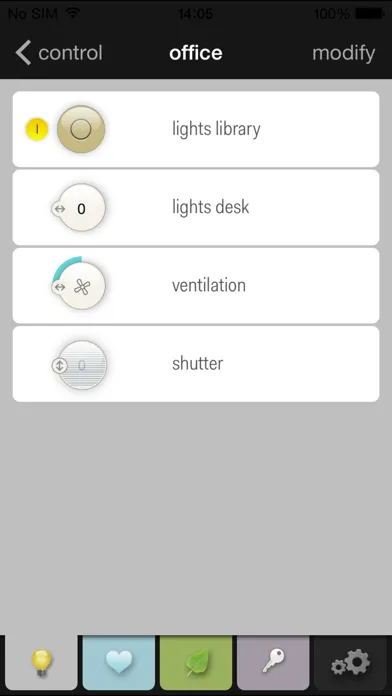
All assigned/programmed actions are listed per location. Shuffle them around to prioritise your locations and actions. Change names or select a different symbol from the library. Remotely control your (dimmed) lights, ventilation, roll-down shutters, sun blinds or thermostat. Instant feedback.
+ Favourites
Select your favourite actions from the complete list of actions. The name of the selected location is indicated under the name of the action.
+ Energy
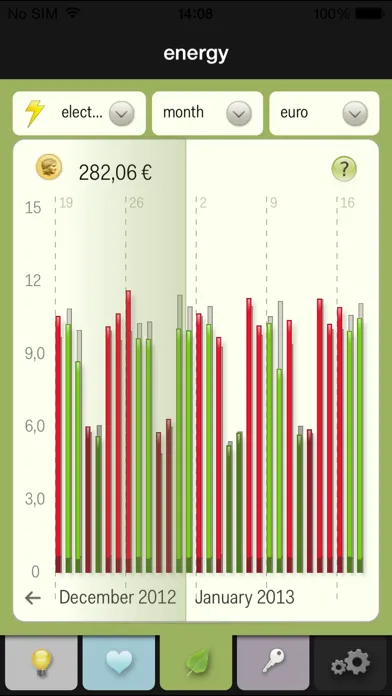
View your live energy consumption or the live yield of your solar panels. Check your historic consumption of electricity, gas or water or the historic yield of your solar panels. View on daily, weekly, monthly or yearly basis and immediately compare with the previous period. Convert to euros or pounds to view the related cost.
+ Settings
Check the notes and information of the installation, reset to the initial programming, modify your log-in data or view the support information.
Control your Niko Home Control installation while you are away from home with the new remote control service! (only works if you have a Niko Home Control gateway installed in your electrical cabinet)
• Create an account and register your gateway at www.niko.eu/remotecontrolservice.
• Set your log-in and password for the remote control service using the settings menu of the Niko Home Control app.
• Select a connection preference: WiFi and/or a mobile network.
• When (re)started, the app automatically searches for a WiFi hotspot. If there are none available, it connects via a mobile network.
• The status of your installation is automatically refreshed. Would you like more frequent status updates? Then press the refresh button or pull the screen downward.
• Feedback function: a rotating wheel indicates that your adjustment is being applied. Upon completion, you will receive a notification of the new status.
• Follow your live consumption by clearly highlighting the regularly measured values.
By downloading the iOS app for Niko Home Control, you accept the terms and conditions of the Niko Home Control app (iOS) which you can find on www.niko.eu under “Legal & privacy”.
What do I need?
Niko Home Control is available in Belgium, the Netherlands, France, UK, Slovakia and Poland. A Niko Home Control installation with IP interface connected to your wireless home network is necessary for indoor control. For remote control, a Niko Home Control gateway needs to be installed between the IP interface and the local network. The installation needs to be upgraded using the Niko Home Control programming software version 1.4.5 (or more recent).
The minimum requirements for this app are iPhone 3GS, iPod touch 3rd generation, iPad 1 or iPad mini and iOS version 5.0.
Features:
• Automatic IP detection.
• Simulation mode possible.
• Control from outside your home if gateway available and account created.
• Automatic adjustment on the screen of your iOS smartphone or tablet.
• Automatic rotation of the screen.
• Split window for tablets: manage your rooms on the left and control your installation on the right OR place two consumption readings next to one another.
+ Controls
All assigned/programmed actions are listed per location. Shuffle them around to prioritise your locations and actions. Change names or select a different symbol from the library. Remotely control your (dimmed) lights, ventilation, roll-down shutters, sun blinds or thermostat. Instant feedback.
+ Favourites
Select your favourite actions from the complete list of actions. The name of the selected location is indicated under the name of the action.
+ Energy
View your live energy consumption or the live yield of your solar panels. Check your historic consumption of electricity, gas or water or the historic yield of your solar panels. View on daily, weekly, monthly or yearly basis and immediately compare with the previous period. Convert to euros or pounds to view the related cost.
+ Settings
Check the notes and information of the installation, reset to the initial programming, modify your log-in data or view the support information.
Control your Niko Home Control installation while you are away from home with the new remote control service! (only works if you have a Niko Home Control gateway installed in your electrical cabinet)
• Create an account and register your gateway at www.niko.eu/remotecontrolservice.
• Set your log-in and password for the remote control service using the settings menu of the Niko Home Control app.
• Select a connection preference: WiFi and/or a mobile network.
• When (re)started, the app automatically searches for a WiFi hotspot. If there are none available, it connects via a mobile network.
• The status of your installation is automatically refreshed. Would you like more frequent status updates? Then press the refresh button or pull the screen downward.
• Feedback function: a rotating wheel indicates that your adjustment is being applied. Upon completion, you will receive a notification of the new status.
• Follow your live consumption by clearly highlighting the regularly measured values.
By downloading the iOS app for Niko Home Control, you accept the terms and conditions of the Niko Home Control app (iOS) which you can find on www.niko.eu under “Legal & privacy”.
Niko Home Control স্ক্রিনশট




সম্পাদকের পুনঃপ্রেরণা


Niko Home Control এর মতো অ্যাপ


Niko n.v. এর দ্বারা অ্যাপ


Niko Home Control FAQ
আমি কিভাবে Niko Home Control পিজিয়ার এপিকে হাব থেকে ডাউনলোড করব?
পিজিয়ার এপিকে হাবে Niko Home Control ডাউনলোড করার জন্য কোন খরচ আছে?
পিজিয়ার এপিকে হাব থেকে Niko Home Control ডাউনলোড করতে কি আমার একটি অ্যাকাউন্ট দরকার?
পিজিয়ার এপিকে হাব থেকে Niko Home Control সমস্যা রিপোর্ট করতে কিভাবে পারি?
আপনি কি এটা সাহায্যকর পেয়েছেন
হ্যাঁ
না
সবচেয়ে জনপ্রিয়

Sing It - Ear TrainerA must app for every musician, singer, or just for fun.
Test,train, and improve your musical ear and

Tube PiP - PiP for YouTubeTube PiP - the ultimate YouTube companion for iOS:
Picture in Picture (PiP) Playback: Watch YouTube

Papaya Ouch!In the game Papaya Ouch!, you can experience backpack management, tower defense, TD, merge, match 2,

Lets Go VPNLets Go VPN, the most advanced VPN, is designed by a team of top developers who strive to ensure all

Paprika Recipe Manager 3Organize your recipes. Create grocery lists. Plan your meals. Download recipes from your favorite we

War Pigeons UnboundedWar is coming. Deep down in top secret military labs they have evolved, mutated - and escaped. The f

Procreate PocketApp of the Year winner Procreate Pocket is the most feature-packed and versatile art app ever design

Cowboy Westland survival runAre you ready to take part in the #1 exciting 3D western adventure? Cowboy Westland survival run mak

Max: Stream HBO, TV, & MoviesIt’s all here. Iconic series, award-winning movies, fresh originals, and family favorites, featuring

TonalEnergy Tuner & MetronomeFor musicians from pros to beginners, whether you sing, play a brass, woodwind or stringed instrumen

SkyView®SkyView® brings stargazing to everyone. Simply point your iPhone, iPad, or iPod at the sky to identi

Ninja Dash 2015Ninja Dash 2015 is the fast paced running game!On these maze fields, rush to the end of this ninja w

Tami-Live Chat&VideoTami is an app that records daily life and ideas.You can use it to record your every day, whether it

SALE Camera - marketing camera effects plus photo editorSALE Camera Help you create the best Business to consumer Stock Photos and Images. provides 300 filt

DevTutor for SwiftUI"DevTutor" is an application designed to assist developers in creating exceptional apps us

Mokens League SoccerDive into Mokens League Soccer and experience the new era of soccer gaming!
Esports for Everyone: Wh

Zombie ZZOMBIE ENDLESS RUNNER LIKES NO OTHER!WHY?* Awesome graphic quality!* Simplified control (Auto-shooti

Dead Z - Zombie SurvivalCatastrophic explosion at the Omega Labs started the apocalypse, now spreading across the Earth.
Tak

HotSchedulesHotSchedules is the industry's leading employee scheduling app because it’s the fastest and easiest

ChatGPTIntroducing ChatGPT for iOS: OpenAI’s latest advancements at your fingertips.
This official app is f

Disney StoreDisney Store is your official home for exclusive collections, designer collaborations, and one-of-a-

fight back tennisa Pong game with Tennis style, the gameplay itself is very simple, you can using Touch. Ball speed w

Dr. Mina AdlyMina Adly mobile app provides students with portable instant access to a selection of services.
Usin

iVerify BasiciVerify Basic is your gateway to enhanced device security and threat awareness, offering a glimpse i