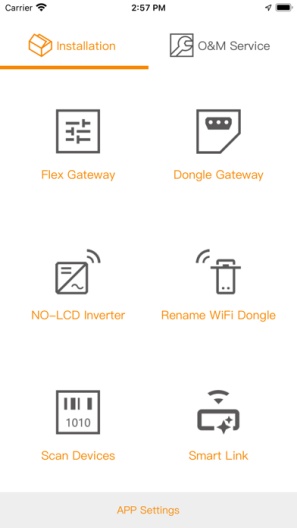
solving the problems of installation, diagnosis and maintenance of PV plants.
*Able to connect to hardware such as FG4E, FG4C, WiFi gateway, GPRS gateway, FOMlink module.
*By connecting the FOMlink module, you can initialize the CPS NO-LCD inverters, modify parameter settings, and upgrade firmware.
*When installing the FG series gateway, you can choose different communication ways to access the Internet; configure the gateway to send data directly to the 3rd party server.
*When installing FG series gateways, you can scan the Modbus and perform required configuration and maintenance.
*When installing FG and various types of gateways, the process of activating and creating a PV plant becomes simpler; even when encountering field problems, the configuration process and diagnostic data can be sent directly to the cloud.Timely access to technical services.
*Operation and maintenance users with accounts can directly view data and alarms through mobile phones; according to different permissions, they can remotely control power plants.
Create Your Own PageTips.
1. This application comes from a third-party product and its content is not controlled by PGYER, so please screen it carefully and install it with caution. PGYER internal testing service platform provides application testing hosting and application crash detection services for third-party applications. PGYER only provides internal testing support for third-party applications, and does not involve any manual editing or collation, nor does it participate in the content development or external operation of any application, and does not have any affiliation with third-party applications, and does not provide any guarantee or commitment.
2. Please check the quality of applications carefully, and do not install applications from unreliable sources because of spam, emails, text descriptions, etc. Please make your own judgement and install trusted applications based on the source of the application installation link. PGYER is not responsible for the rules, policies, or specific content of applications published through PGYER or links to other sites displayed on PGYER. PGYER shall not be liable for any investment or purchase made as a result, click here to see more.
Tips.
1. This application comes from a third-party product and its content is not controlled by PGYER, so please screen it carefully and install it with caution. PGYER internal testing service platform provides application testing hosting and application crash detection services for third-party applications. PGYER only provides internal testing support for third-party applications, and does not involve any manual editing or collation, nor does it participate in the content development or external operation of any application, and does not have any affiliation with third-party applications, and does not provide any guarantee or commitment.
2. Please check the quality of applications carefully, and do not install applications from unreliable sources because of spam, emails, text descriptions, etc. Please make your own judgement and install trusted applications based on the source of the application installation link. PGYER is not responsible for the rules, policies, or specific content of applications published through PGYER or links to other sites displayed on PGYER. PGYER shall not be liable for any investment or purchase made as a result, click here to see more.