
桌面日历 icon

桌面日历

Version:1.0.43 (build 2)
桌面日历 QRcode
Installing...
App download will begin in a moment, please wait... If it doesn\'t, please restart the download.
Install
  • This is not the latest version. Switch to the latest versionx
  • Or use your mobile to scan the QR code to install

    Cannot install/install the app? Check now

    About 桌面日历

    Size
    48.5 MB
    Publish at
    2026-08-08
    Version
    1.0.43
    Build
    2

    What's new in 桌面日历

    修复安卓5.1绑定问题

    Other versions of 桌面日历

    1.0.45 (build 3) 更新几个功能不用扫码确认,一些细节修复 2 Days ago
    1.0.43 (build 1) 优化内存占用 2026-08-05

    Introduction of 桌面日历

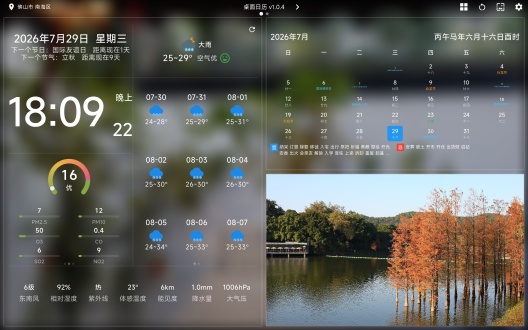
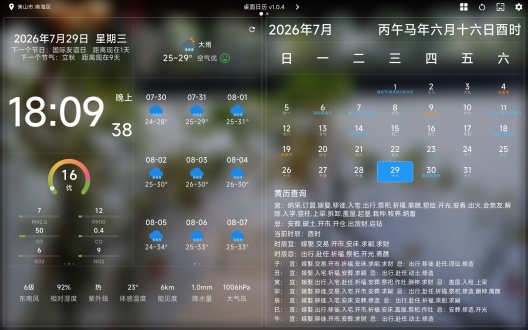
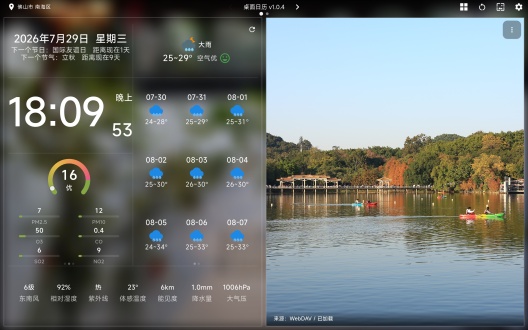
    1. 时间天气:抬头即看,不用掏手机
    大字号时钟 + 日期星期 + 农历/节气/节日提示,下面还有风向、湿度、紫外线、体感温度等。点进详情有 6 日预报,可切 14 天、24 小时温度、降水量等,信息密度够,又不显乱。

    2. 日历 & 日程:大屏看月历更舒服
    月视图公历、农历、节日、节气一屏展示,点日期可进日程。日程支持按周浏览和快速添加,适合放在玄关或书桌当「家庭日程板」。

    3. 照片轮播:本地 / WebDAV 都能当相框
    支持本地目录,也支持 WebDAV 远程图库。我接 NAS 后,平板自动轮播旅行照片;全屏浏览带序号(如 2/61),左上角有来源提示,当 数码相框 很合适。

    4. 网页卡片:把常用站钉在桌面
    内置轻量浏览器,可固定新闻、万年历等网页,带收藏和前进/后退。适合不想装一堆 App、又常看几个固定网站的用户。

    5. RTSP 监控:看板里直接看家
    支持添加 RTSP 视频流,可配置多路,分屏显示。摄像头卡片也能本地预览,分辨率可调。对需要「抬头看监控」的场景,比单独开监控 App 顺手。

    6. 纪念日 / 倒数日:有点仪式感
    分 纪念日、岁月无声、倒数日 三类,文案偏文艺,界面简洁。重要日子放卡片里轮播,比手机备忘录更有「摆在那里」的存在感。

    7. 全屏时钟:夜间/专注模式
    多种主题(如大色块数字钟),可显示星期、农历,右上角可换主题。睡前或工作时开全屏当时钟,比主界面更沉浸。
    Expand

    Screenshots of 桌面日历

    桌面日历 Screenshots1
    桌面日历 Screenshots2
    桌面日历 Screenshots3

    Feedback

    Submit questions you've encountered during the process or suggestions for the app to the developer of the app to help them do better.