inBox NoteSymbol

inBox Note

Version:2.7.5 (build 61)
inBox NoteDownload QR-Code
Installation läuft...
Die App-Installation beginnt in Kürze. Bitte warten Sie. Wenn der Download nicht automatisch startet, klicken Sie hier, um den Download manuell zu starten
Installieren
  • Aktuelle Version ist nicht die neueste,Klicken Sie hier, um die neueste Version herunterzuladenx
  • Oder scannen Sie den QR-Code mit Ihrem Handy, um die Installation abzuschließen

    Kann die App nicht installieren/ installieren? Jetzt überprüfen

    Über inBox Note

    Größe
    8.3 MB
    Erstellungsdatum
    2026-11-13
    Version
    2.7.5
    Build
    61

    Update-Beschreibung von inBox Note

    新增:笔记多置顶与置顶岛,多条备忘紧凑速览一目了然
    新增:免费基础主题「水墨」,纯黑白极简经典回归
    优化:账号相关弹窗升级半屏弹层,危险操作红色确认防误触
    优化:意见反馈全新弹层,飞书问卷、邮件、日志三通道平级
    优化:会员续费按钮到期前 30 天才出现,颜色跟随主题
    优化:「移动到盒子」选择器按新规范改版
    修复:账号页 API 地址显示不完整,现可复制完整投递接口
    修复:新增笔记插在置顶卡片上方、侧边栏 PRO 徽标被挤等问题

    Versionshistorie von inBox Note

    2.7.5 (build 63) 【新增功能】 · 笔记支持多条置顶:最多 5 条,多条自动收 2026-11-15
    2.7.5 (build 62) - 新增: 接线应用内反馈页 - 修复: 行距五档整体下移, 2026-11-14
    2.7.5 (build 60) inBox 笔记 2.7.5 2026-11-13
    2.7.5 (build 59) inBox 笔记 2.7.5 2026-11-13
    2.7.4 (build 58) ✨ 新功能 · 分享页全新改版:卡片式排版更耐看,短笔记导出 2026-11-11
    Mehr laden

    Übersicht von inBox Note

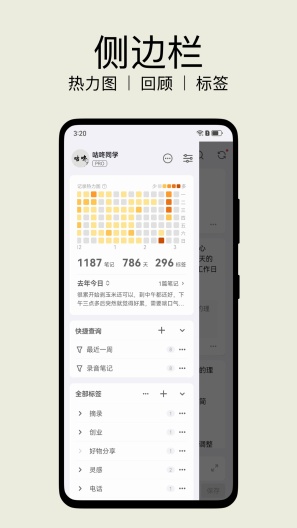
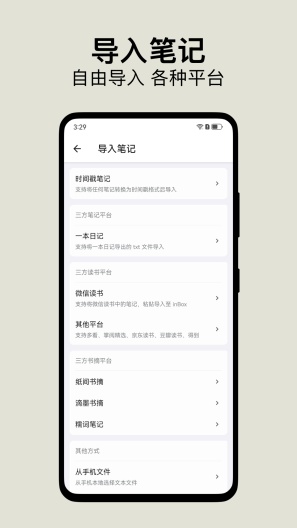
    inBox笔记是一个记录灵感、想法的笔记软件。 它有如下几个特点: 数据离线,纯本地,操作体验流畅,灵活的数据导入导出。 聊天式输入,打开应用就记录。 无分类,使用标签管理笔记。 去中心化,使用 WebDAV 对自己的数据云存储(免费功能) 随机回顾,支持应用内随机回顾和桌面小组件回顾,回顾以帮助我们更好的思考。
    Erweitern

    Screenshots von inBox Note

    inBox NoteApp-Screenshots1
    inBox NoteApp-Screenshots2
    inBox NoteApp-Screenshots3
    inBox NoteApp-Screenshots4