La instalación de la aplicación está a punto de comenzar, por favor espera. Si la descarga no se inicia en el navegador, por favor haz clic aquí para descargar manualmente
Know what you mean, but not quite how to say it? ReplySense brings AI reply suggestions and message polishing to your Android keyboard.
Draft a reply
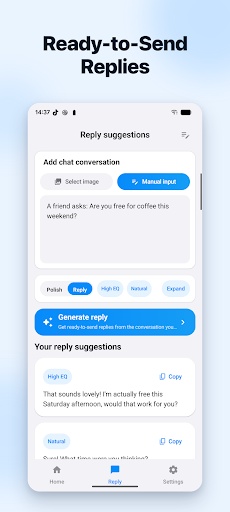
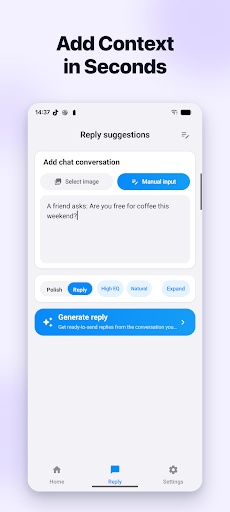
Enter text or select a chat screenshot to get reply suggestions. You can also use clipboard content from the ReplySense keyboard to reduce switching between apps.
Refine your words
Make a draft clearer and adjust its tone. Review, edit and choose a suggestion before inserting it into the message field.
Find your style
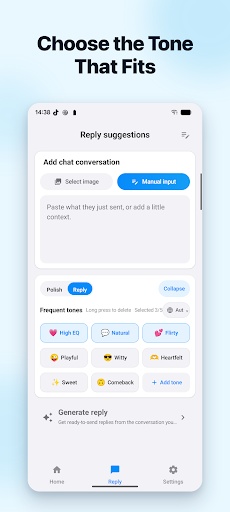
Choose from different reply styles or create custom assistant instructions for everyday conversations and work messages.
Use screen content or voice
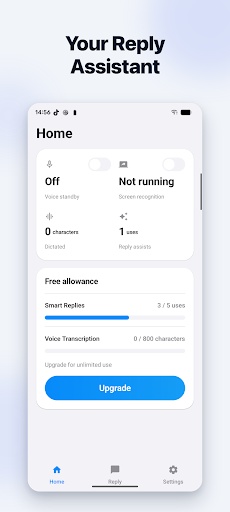
After granting the required system permission, use screen recognition to help prepare a reply. On supported devices, system speech recognition can turn spoken words into text for further processing.
Before you start
AI features require an internet connection. Submitted content is sent to our server and relevant AI services for processing. Enable the keyboard in Android settings. Screen and voice features require the relevant permissions; availability may vary by device and system service.
The app offers auto-renewing memberships through Google Play. See the purchase screen for current prices, billing periods and eligible offers. Manage or cancel renewal in Google Play subscriptions.
AI output may be inaccurate or inappropriate. Review it before sending, and avoid submitting passwords, payment details or other sensitive information.
PGYERConsejo: 1. Esta aplicación proviene de un producto de terceros y su contenido no está controlado por PGYER, por favor asegúrate de identificarlo y proceder con la instalación con precaución. La plataforma de servicios de prueba interna de PGYER proporciona servicios como alojamiento de pruebas de aplicaciones y detección de fallos en aplicaciones de terceros. PGYER solo brinda soporte para pruebas internas de aplicaciones de terceros, no participa en la edición manual ni en la organización de contenido de ninguna aplicación, tampoco participa en el desarrollo de contenido ni en la operación externa de ninguna aplicación de terceros, no existe ninguna relación asociada con las aplicaciones de terceros, y no ofrece garantías ni promesas de ningún tipo.
2. verifique cuidadosamente la calidad de la aplicación y no instale aplicaciones de origen poco confiable a voluntad debido a mensajes basura, correos electrónicos, instrucciones de texto, etc. juzgue e instale aplicaciones de confianza de acuerdo con el origen del enlace de instalación de la Aplicación. Pgyer no es responsable de las reglas, políticas o contenidos específicos de este programa o sitio para las aplicaciones publicadas a través de pgyer o enlaces a otros sitios mostrados en pgyer. Pgyer no asume ninguna responsabilidad por ninguna inversión, compra o comportamiento que se derive de esto, haga clic aquí para ver más aquí.
Consejo: 1. Esta aplicación proviene de un producto de terceros y su contenido no está controlado por PGYER, por favor asegúrate de identificarlo y proceder con la instalación con precaución. La plataforma de servicios de prueba interna de PGYER proporciona servicios como alojamiento de pruebas de aplicaciones y detección de fallos en aplicaciones de terceros. PGYER solo brinda soporte para pruebas internas de aplicaciones de terceros, no participa en la edición manual ni en la organización de contenido de ninguna aplicación, tampoco participa en el desarrollo de contenido ni en la operación externa de ninguna aplicación de terceros, no existe ninguna relación asociada con las aplicaciones de terceros, y no ofrece garantías ni promesas de ningún tipo.
2. verifique cuidadosamente la calidad de la aplicación y no instale aplicaciones de origen poco confiable a voluntad debido a mensajes basura, correos electrónicos, instrucciones de texto, etc. juzgue e instale aplicaciones de confianza de acuerdo con el origen del enlace de instalación de la Aplicación. Pgyer no es responsable de las reglas, políticas o contenidos específicos de este programa o sitio para las aplicaciones publicadas a través de pgyer o enlaces a otros sitios mostrados en pgyer. Pgyer no asume ninguna responsabilidad por ninguna inversión, compra o comportamiento que se derive de esto, haga clic aquí para ver más aquí.