L'installation de l'application va bientôt commencer, veuillez patienter. Si le téléchargement ne démarre pas automatiquement, veuillez cliquer ici pour télécharger manuellement
Capture breathtaking aerial footage and experience the thrill of flying like never before. Get ready to take your photography and videography skills to new heights with this cutting-edge app.
Key Features:
- High-resolution video: Choose from VGA, 720P, and 1080P resolutions to capture stunning visuals with exceptional clarity.
- Photo and video recording: Capture your favorite moments from the sky with just a tap. Preserve memories and share them with friends and family.
- Immersive 3D experience: Dive into a whole new dimension with the 3D function. Explore your surroundings from a unique perspective and feel like you're right there in the action.
Pros and Benefits:
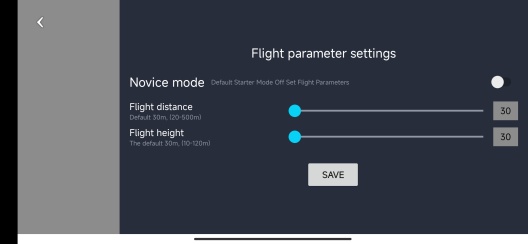
- Unparalleled control: Take full command of your quadcopter with the VS GPS app. Enjoy precise navigation and maneuverability, ensuring smooth flights every time.
- Real-time video streaming: Witness the world from above in real-time. The WiFi camera module streams live video directly to your smartphone, providing a captivating bird's-eye view.
- Easy to use: With a user-friendly interface, the app makes it effortless for beginners and experts alike to operate the quadcopter. Start flying and capturing stunning visuals in no time.
Step-by-Step Use Instructions:
1. Click the [Install] button or scan the QR code to download and install the VS GPS app on your Android smartphone or iOS on iPhone.
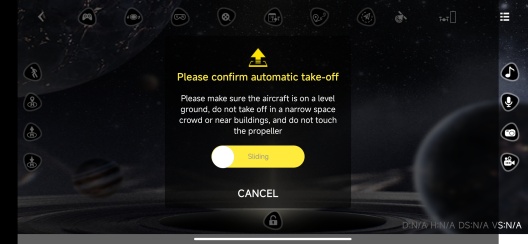
2. Connect your quadcopter to the app via WiFi.
3. Launch the app and select your desired resolution (VGA, 720P, or 1080P).
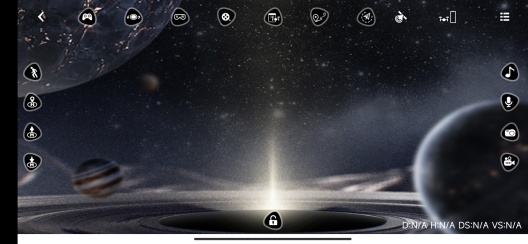
4. Tap the camera icon to take photos or the video icon to start recording.
5. Explore the 3D function and immerse yourself in a whole new world of aerial photography.
Don't miss out on this incredible opportunity to elevate your photography skills and explore the world from a unique perspective. Download the VS GPS app today and unleash your creativity!
#VS_GPS #QuadcopterApp #AerialPhotography #WiFiCameraModule #FlyHigh #CaptureTheMoment #ExploreFromAbove #DownloadNow
PGYERConseil : 1. Cette application provient d'un produit tiers et son contenu n'est pas contrôlé par PGYER. Veuillez l'évaluer attentivement et l'installer avec prudence. La plateforme de services de test interne de PGYER fournit des services tels que l'hébergement de tests d'applications et la détection de plantages pour les applications tierces. PGYER ne fait que fournir un support de test interne pour les applications tierces, sans implication dans l'édition manuelle ou l'organisation de contenu, et sans participation au développement de contenu ou à l'exploitation externe d'applications tierces. Il n'y a aucun lien entre PGYER et les applications tierces, aucune garantie ou engagement n'est fourni.
2. S'il vous plaît soigneusement filtrer la qualité de l'application, ne jamais installer des applications avec des sources peu fiables à cause des messages texte indésirables, des messages, des instructions textuelles, etc., s'il vous plaît juger par vous - même et installer des applications fiables en fonction de la source du lien d'installation de L'application. En ce qui concerne les liens vers des applications publiées par pgyer ou d'autres sites affichés sur pgyer, pgyer n'est pas responsable des règles, politiques ou contenus spécifiques de ces programmes ou sites. Pgyer décline toute responsabilité pour tout investissement, acte d'achat qui pourrait en découler, < a href = '% s' target =' - blank '> Cliquez ici pour en savoir plus < / a >.
Conseil : 1. Cette application provient d'un produit tiers et son contenu n'est pas contrôlé par PGYER. Veuillez l'évaluer attentivement et l'installer avec prudence. La plateforme de services de test interne de PGYER fournit des services tels que l'hébergement de tests d'applications et la détection de plantages pour les applications tierces. PGYER ne fait que fournir un support de test interne pour les applications tierces, sans implication dans l'édition manuelle ou l'organisation de contenu, et sans participation au développement de contenu ou à l'exploitation externe d'applications tierces. Il n'y a aucun lien entre PGYER et les applications tierces, aucune garantie ou engagement n'est fourni.
2. S'il vous plaît soigneusement filtrer la qualité de l'application, ne jamais installer des applications avec des sources peu fiables à cause des messages texte indésirables, des messages, des instructions textuelles, etc., s'il vous plaît juger par vous - même et installer des applications fiables en fonction de la source du lien d'installation de L'application. En ce qui concerne les liens vers des applications publiées par pgyer ou d'autres sites affichés sur pgyer, pgyer n'est pas responsable des règles, politiques ou contenus spécifiques de ces programmes ou sites. Pgyer décline toute responsabilité pour tout investissement, acte d'achat qui pourrait en découler, < a href = 'https://www.pgyer.com/about/disclaimer' target =' - blank '> Cliquez ici pour en savoir plus < / a >.