Android Studio Plugin
Install the Pgyer Android Studio plugin and upload apk files from inside the IDE.
With the Pgyer Android Studio plugin installed, you can upload apk files to Pgyer from inside the IDE — no need to switch tools.
To upload automatically after each build, use the Gradle plugin instead. One Gradle task builds and uploads the APK, on your machine or in CI/CD.
Prerequisites
- Your Pgyer API Key: sign in to Pgyer, then open API info from the top-right menu.
Installation
Open Android Studio → Preference → Plugin, search for Pgyer Upload Tool, click Install on the right, and restart Android Studio.
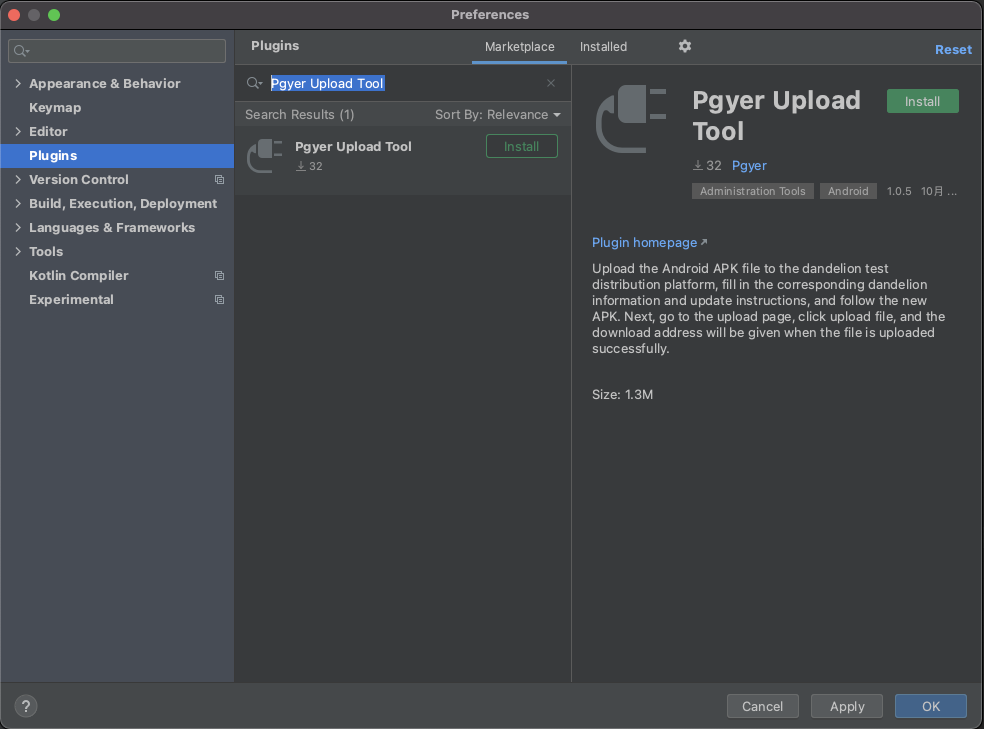
Once installed, the Pgyer logo appears in the Android Studio ToolBar.

Usage
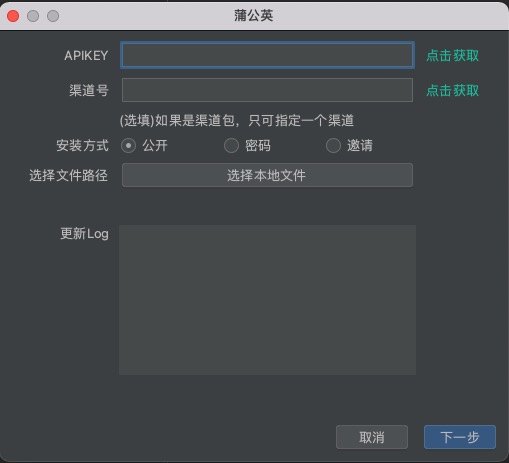
- Fill in the APIKEY.
- If you're using Pgyer's channel feature, fill in the Channel number (each channel apk can only target one channel).
- Choose an install method: Public, Password, or Invite. Password mode requires entering an install password.
- Pick a local
.apkfile. Once selected, the plugin displays the apk path. - Optionally fill in release notes — they'll appear under Release Notes on the Pgyer download page.
- Click Next to go to the next screen. An empty apk field triggers an error.
- Click Upload to send the apk to Pgyer.
- On success, the page shows an Upload successful message.
Upload via Gradle
Install and configure Pgyer's official Gradle plugin to upload Android APKs, and iOS and HarmonyOS builds, to Pgyer from your Gradle build.
Pgyer CLI
An overview of @pgyer/cli, Pgyer's official command-line tool for uploads, app and historical build management, authentication, and automation.