Travis CI (iOS)
Use Travis CI for an iOS project — encrypt certificates, sign and package, then auto-publish the app to Pgyer.
This page walks through setting up Travis CI for an iOS project and auto-publishing the signed app to Pgyer.
Travis CI Service
Travis CI is a continuous integration service for hosted source repositories. Public and private repositories now use travis-ci.com; travis-ci.org has been disabled and should not be used for new builds.
This demo was created during the travis-ci.org and Xcode 9 era. Its screenshots and build settings such as osx_image: xcode9 and osx_image: xcode9.2 are historical references only. Use travis-ci.com for new projects, follow the official Travis CI migration guide for old repositories, and adapt the configuration to a currently available macOS/Xcode build environment.
Prerequisites
Install the Travis CI command line tool locally.
-
Make sure your local Ruby is 2.3 or later (2.6 or later is recommended):
ruby -v -
Install the Travis CI command-line client (on macOS, install a recent Ruby first):
gem install travis --no-document -
Check the install:
travis version -
Sign in to Travis with your GitHub account:
travis login --comConfirm you're logged in:
travis accounts
Enable Travis CI
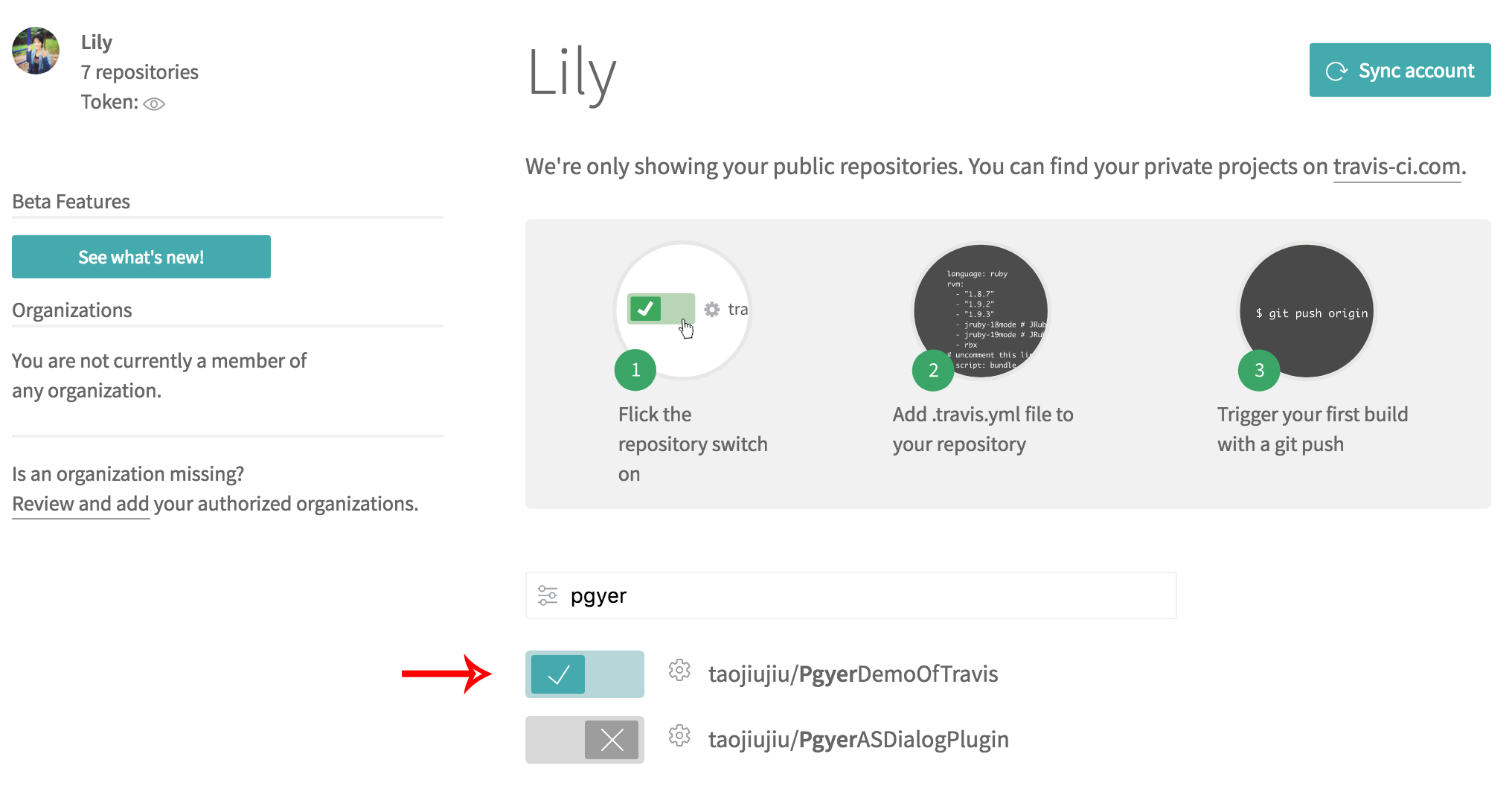
Sign in to travis-ci.com with GitHub, then install or configure the Travis CI GitHub App and authorize only the repositories you want to build. After authorization, select the repository in Travis CI and enable its builds.
Create the Travis CI Build
Add a .travis.yml at the project root to describe the build.
Travis CI provides basic build and language support; you can customize the build via .travis.yml within its build lifecycle — see the official docs.
Validate the file's syntax with:
travis lint [path to your .travis.yml]When the syntax is valid, you'll see a confirmation:

Basic iOS template:
language: objective-c
osx_image: xcode9
If you only need Travis CI's build feature, these two lines suffice. Push .travis.yml to GitHub and Travis CI will trigger a build automatically; the email tied to your GitHub account gets a build notification. To sign, package, and publish the app to Pgyer, continue reading.
Configure the Project
Two project settings must change to keep the build from failing.
-
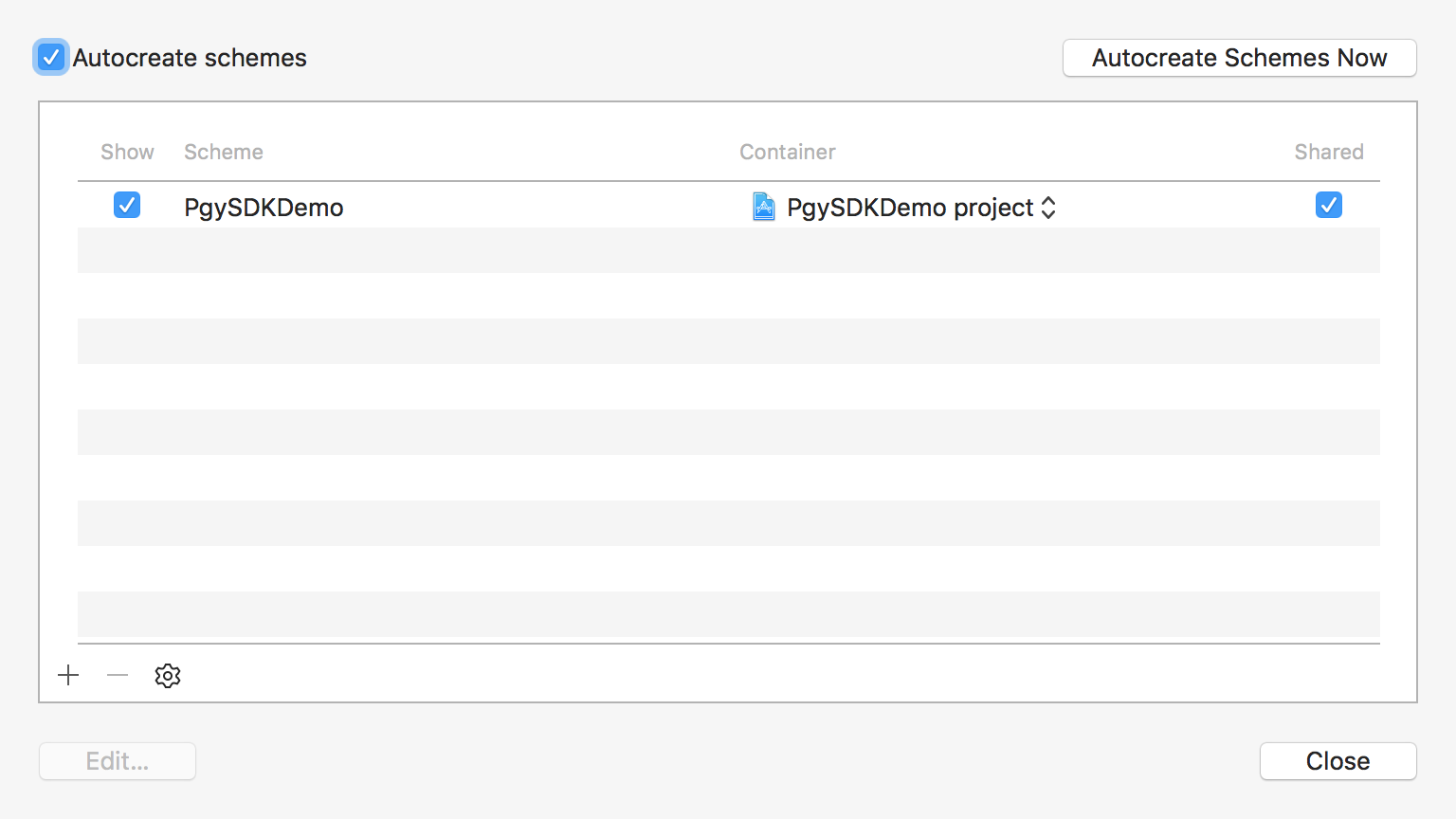
Switch the project scheme's management to shared:
-
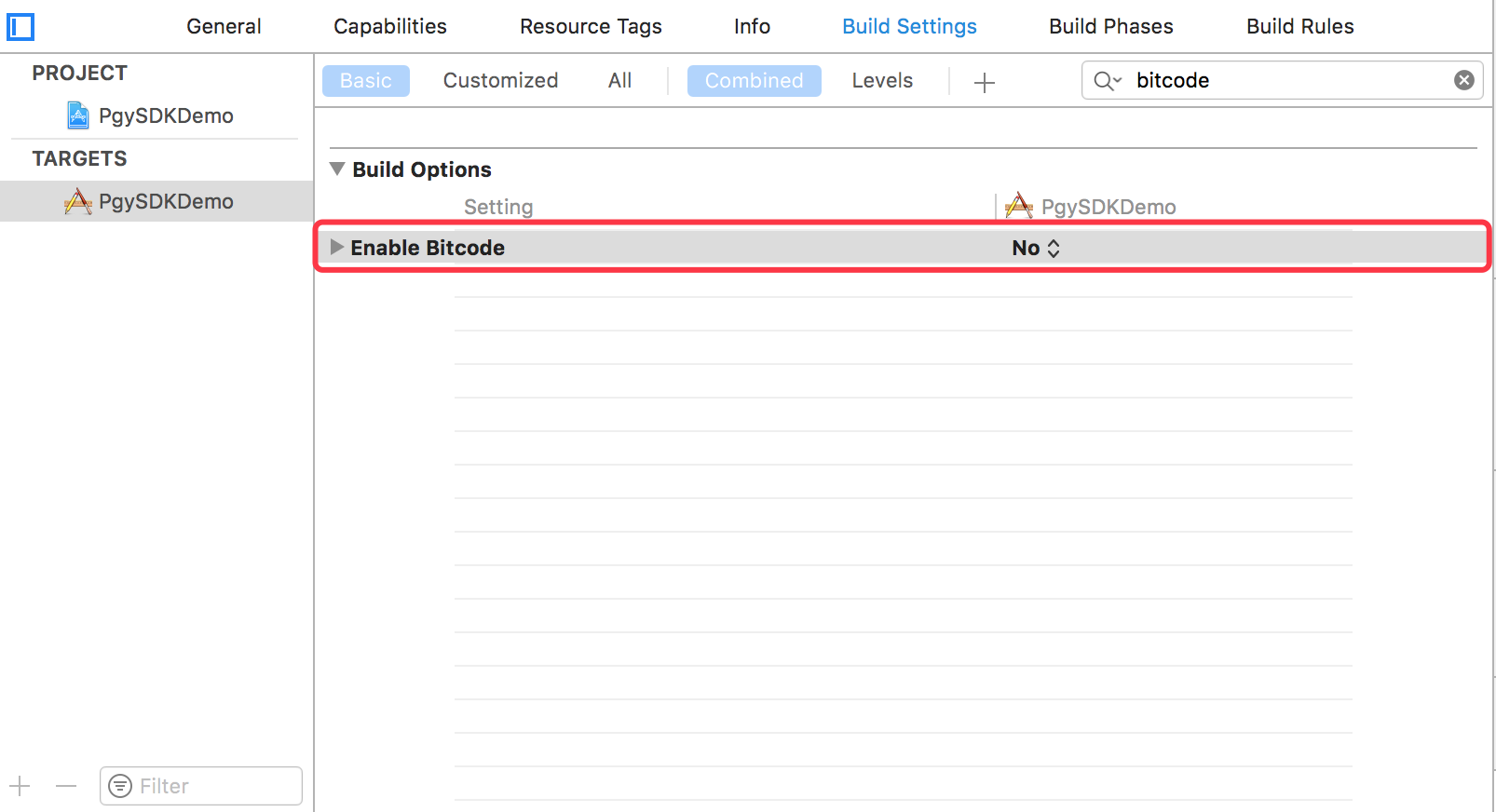
Disable bitcode:
Signing and Publishing
Signing requires a certificate and a provisioning profile.
Apple Worldwide Developer Relations Certificate
Download the certificate from Apple, or export it from Keychain, and save it to travis/certificates/AppleWWDRCA.cer in the project.
Export the Distribution Certificate and Private Key
In Keychain Access, select the certificate and export both the certificate and the private key.
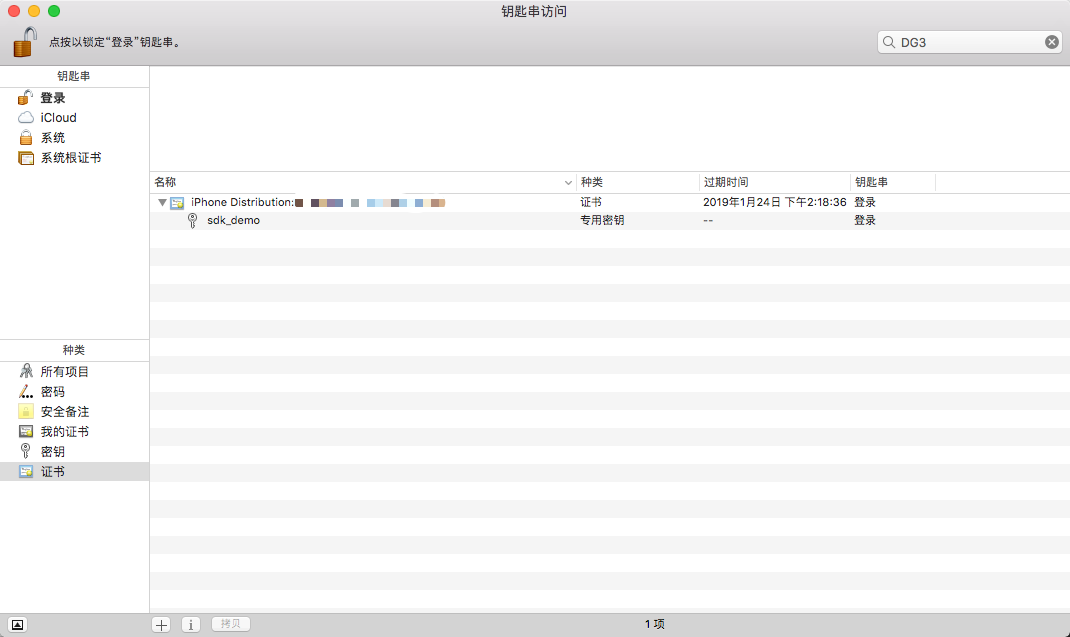
Never push unencrypted certificates or provisioning profiles to a public GitHub repo. The next section covers how to encrypt them.
Save the certificate and p12 as travis/certificates/sdk_demo.cer and travis/certificates/sdk_demo.p12. You'll set a password during the p12 export.
Travis CI needs that password to use the p12, but it can't be stored as plain text — use Travis CI's encryption keys feature.
Open Terminal, cd to the folder with .travis.yml, and store the p12 password:
travis encrypt "KEY_PASSWORD=123456" --addReplace 123456 with the password you set when exporting the p12. After it runs, .travis.yml has a new line:
- secure: xJz9E1EJdBDAIZcNaz86a7nrJpbdPHS3xiXU5L4Gj4rFR0TcxHsHuu2dcZR/yRJRHg6oum2zuMr0XBsSffMBYFHX5Kw2jb31Ci6uFbOTI/FGBrwdvfhQBL+h/7xe/j3l1bmbmfElYP02fiJvN5VSVyA0 3Iobp7u3vY0TW7yce+po23DmJCTYgnUdfuf4EBO3gpgbOTPdmIxqyhqqw5Ndwmvxpq9BqneqEc3pmNCC1FC6H4RmgjkWnMln5ffWIxNN+nwgPzSDqHDMUnQaYtVUU/CHLQCmNCgQmkrG/OWYvlo4RqpEX6VZv5BUa6gD 7d4lgcfXHONkmLKNbiWBGDRbbBQNNSbubTtGlyGtzCHwEe4KvHoM4n0yDZqtd9edgrxlOSuBgNlQK+/3C6BhZZi2rWNlnqBU7F/ZSmjBONWgRuFZJ2zJByHWLoTTOHvYbFdk4CTmT5qMQPQ7favMu1L9TUBpbX4qBX4D iXpEKNODtwOvdYjlfiZ+US6i637JeZF8OK9bBtUf4oKjvl1Oz5ly56snTBknF3V+if6VoHlG1Cfroqhy2F7ahS2K3Aq0u4O2gMIVqTRd1juBLo6QkzV/F+go4KvYDwOFpAX05AYrJNOQgAHae5a8Px2YIct1QcRTL++r Enqx1QzQWXIEXpezm8m1pR8TcB8d2WbLGtwTd/8=This line is the environment variable KEY_PASSWORD that the command injected. Later build steps reference KEY_PASSWORD to get the p12 password.
Provisioning Profile
Signing also needs a .mobileprovision provisioning profile. Create and download it on Apple's developer site (Provisioning Profiles → Distribution → Add → Ad Hoc or In House) and save it to travis/certificates/sdk_demo.mobileprovision.
Record the profile name, app name, and developer name in .travis.yml:
env:
  global:
  - APPNAME="PgySDKDemo"
  - 'DEVELOPER_NAME="iPhone Distribution: your developer name (your developer code)"'
  - PROFILE_NAME="sdk_demo"
Encrypt the Certificate and Profile
For public GitHub repos, encrypt the certificate, provisioning profile, and private key, and tell Travis CI how to decrypt them.
Encrypt
Travis decrypts one file at a time, so bundle the certificate and profile into a tarball first:
tar cvf certificates.tar sdk_demo.cer sdk_demo.p12 sdk_demo.mobileprovisionThat produces certificates.tar. Place it at the project root and run:
travis encrypt-file certificates.tar -aThe -a flag auto-adds the decryption command to .travis.yml. You'll get a certificates.tar.enc. Now you can delete the unencrypted certificates.tar and the sdk_demo.cer, sdk_demo.p12, sdk_demo.mobileprovision files under travis/certificates.
Decrypt
After encryption, .travis.yml gains a line:
- openssl aes-256-cbc -K $encrypted_2838d02a56a6_key -iv $encrypted_2838d02a56a6_iv
  -in certificates.tar.enc -out certificates.tar -d
That line decrypts the bundle. Since you get back a tarball, also untar it. Add this to before_install:
- tar xvf certificates.tar -C ./travis/certificatesImport Into Keychain
To sign, import the certificate into the Travis CI runner's keychain. Create add-key.sh under scripts:
#!/bin/sh
# Create a custom keychain
security create-keychain -p travis ios-build.keychain
security default-keychain -d user -s ios-build.keychain
security unlock-keychain -p travis ios-build.keychain
security set-keychain-settings -t 3600 -l ~/Library/Keychains/ios-build.keychain

security import ./scripts/travis/AppleWWDRCA.cer -k ~/Library/Keychains/ios-build.keychain -T /usr/bin/codesign
security import ./scripts/travis/sdk_demo.cer -k ~/Library/Keychains/ios-build.keychain -T /usr/bin/codesign
security import ./scripts/certs/sdk_demo.p12 -k ~/Library/Keychains/ios-build.keychain -P $KEY_PASSWORD -A

echo "list keychains: "
security list-keychains
echo " ****** "

echo "find indentities keychains: "
security find-identity -p codesigning  ~/Library/Keychains/ios-build.keychain
echo " ****** "

mkdir -p ~/Library/MobileDevice/Provisioning\ Profiles
cp "./scripts/profile/sdk_demo.mobileprovision" ~/Library/MobileDevice/Provisioning\ Profiles/
add-key.sh creates a temporary ios-build keychain that holds the certificate info; $KEY_PASSWORD references the p12 password. The temporary keychain needs to be removed after signing.
Make the script executable:
before_install:
 - chmod +x scripts/travis/add-key.sh
Build
xctool, the go-to build tool before Xcode 8.2, is no longer usable. The current option is xcodebuild — archive, then sign:
#!/bin/sh
xcrun xcodebuild -project PgySDKDemo.xcodeproj -scheme PgySDKDemo \
  -archivePath PgySDKDemo.xcarchive archive

xcrun xcodebuild -exportArchive -archivePath PgySDKDemo.xcarchive \
  -exportPath ./build -exportOptionsPlist ExportOptions.plist
The easiest way to get -exportOptionsPlist is to export an ipa from Xcode once — the export folder contains ExportOptions.plist. Copy it to the project root.
After the build script runs, the signed ipa lives under ./build.
Upload to Pgyer
Pgyer provides a ready-made shell script for uploading ipa files. Fetch it in before_install, mark it executable, and invoke it after the build:
- wget -c https://raw.githubusercontent.com/Pgyer/TravisFile/master/pgyer_upload.sh
  -O pgyer_upload.sh
#!/bin/sh
./pgyer_upload.sh "./build/$APPNAME.ipa" $PGYER_APIKEYUploads need a Pgyer API_KEY — find it on the API info page. Don't store it in plain text; use the same approach as the p12 password. From the project root:
travis encrypt "PGYER_APIKEY=YOUR_API_KEY" --addClean Up the Keychain
Once everything is done, remove the imported keychain. Add remove-key.sh under /scripts/travis:
#!/bin/sh
security delete-keychain ios-build.keychain
rm -f ~/Library/MobileDevice/Provisioning\ Profiles/$PROFILE_NAME.mobileprovision
rm -f ~/Library/MobileDevice/Provisioning\ Profiles/team.mobileprovision
After that, every push to GitHub triggers a Travis CI build that signs the app and publishes it to Pgyer.
Complete Example
A full .travis.yml:
language: objective-c
osx_image: xcode9.2
env:
  global:
  - APPNAME=PgySDKDemo
  - PROFILE_NAME=sdk_demo
  - 'DEVELOPER_NAME="iPhone Distribution: shengtao lei (DG37YK9PRK)"'
  - secure: iL2KhNdYKzWLTtvaXmmQ3/ci66b0Z5c8VCTmpaoMIotdtwyTOgMnpzH+Vyrof3QBH/nV2oF6puT/b5Y6S6lrCY5b4nZSfhy8xL6FEPDboVzpq2qIAS4gn6qCGUkIkAxpcnKG9sbcxDsI5aLVOqxoevuHKB2Rkw925TWrg6+bfagtWQzVvkByIHT2jm2+7bkmNUx7UiIggNYN+H2ACpfdf/d9g7lC7w2hLb6hO0Mt5pK5eGbzlh8kn/1CnX7jSWw3SyEABEJ3CQOZX5x/yNP4oIJLgdEGW3sy1ErAi2uO+i89VDu1SaRcDLbNuAmlxb95dLVBVU7uWILdWTh6+o6FVL2Eoj1YPrNBJdcRykTvaCSR1eXPs6uCoq9tcWz0zinamSBzemOjdK+G+lOC6IpT9lTimt5Ln0lGQoVYERXnvJMEhR/2rFLvsTIqd+Wt8Agfqr9EeU0ah8agWiTIE6EuA0xdTyC0EyKVYKzXBy4wI6R2fknfn6uHyeFeIN9zpWY8tcwz8pRLDD+xiyoHgSybS1DK+Xr21llOopXkC/aacnoeslciNN28In9QRDwsiDUSlAb6dQ3pRCS/cDoRJBm759xcZ7kdMnwVAcSX7aZ9p8HT0uGvyuJdYNDr4vp0r98RtPI/7JonPXqXuWzsAzZdq5AAzchwNFAbTCrASw6qqHY=
  - secure: KuD0JYZqJEtezCBkJ6Zkfw7I+0VGiv6E7GOa34KUzYsJWpLnzPYB08+NsYZYMh6Yjc8pkC8+MixgXLOHupWm5v3iRthWqD/tdmuF5bdQqIdrWkmQSl0cK9M+rMgc+vaPajguC0/yf+BoPWL6CJXouLLzj3D6IXUwZEVYhmPB4nBv/YHVk/FNwNS4aqP9SSp98VQoYrAGAvUSY3jm5L1qSNwCjPMBcX4QnlbX5mjl0mEf0pEbJ3ZZAz9AzpALfCYR4pPsS7/eSHxVAPNboD5JVQAK6NhaFCTUw0/UlGHW9m9eY3AezMpZo1M8kHXZXsC0BWoP8R4H6WYTybILxz6Aramb8N12R+ntLfAawnFnG5kV4mtUHFY7BqNu+tyBkba4axkclaY90fETekHUcCIqTlVmMjlKq6dzWkq4hGmDtEajajZHqMPBUMy5o8n8lXKww/ZkpvgEhrJjbxbmFcoP4oS2u9Vxi/Q18t+mRoQhGfan2cVQXdpQhk0S8scisVVnUSFHSglt79KjgKwNuVKtIpW89bG8HHQaqIgPFycvIbDRxSM6Xd+I7AIzz25XFdE/ao03ULrnDaIZLbgUa+IGjDknkRJmG9hFQKO2grkZ/JqNXQDSMEIXZrH46CocD1+j39k6wvYler5fdcIStf+wAW4hXmiO0en2hl2+qEFtJds=
  - secure: YecGZLdjxnbJuIyJOywDan2lJ4sToYx2iq8ficMEzODXUxEGHRL6s6XFOPltsm6CnyUZKfT9bzAEWuGWnnES8fcPvMUAKvyNhcRW/D9JtMm/fboIdSjb2Ht8f/dY1IfgB241pMU7SkPifVIL08yxeMYZfwgFxbDQn60aXCiUKWuEcqMgxX2yLX9uHR+T/xuY6E+NX6UEB/6imx3rQ047nVfefMgh9YMGGl0ZH/N9beZgMrwlZn1lAfKMrkbJ3vw1go2RzxnDwa/Noy+6eKfbC8R4RgCvwQ6oXBEXG1IUjHbiNhR5pXajz/5jbum9T64fHUrx8e2aPKrYRWWjooQ5Q7+AER7PnAhTgFymHhDwUm7wEXoMuh5Ltp7jCNZiaKDxUoONw4Hz+oEXKbm4nYJCMFczjW4bQKH0gqNytPhl/y/08u0fuQxTP3wu6Zi0q0qo6e3eqCTGv3Q9YzEm7JWAb6RSO09aRRVvz7HwdZFwbHy07T9//YMUsX/chhw7fziso1wkutWOsVCfBVjMGO6Nve/B8xdCVV4sqiex/Wk3c/cNHB7dTVe9SC6nelrkuyvEqKtxk87/IDBo0sAHxounw9phwtXg+RM8fN+rvBqd9rY4H8hrRaZKdFqikMt3yexoFKcrAqbQuHEDVlz2dxDxZhgjOPyVaejsOHI2jt1bB58=
before_install:
- openssl aes-256-cbc -K $encrypted_2838d02a56a6_key -iv $encrypted_2838d02a56a6_iv
  -in certificates.tar.enc -out certificates.tar -d
- cd $TRAVIS_BUILD_DIR
- wget -c https://raw.githubusercontent.com/Pgyer/TravisFile/master/pgyer_upload.sh
  -O pgyer_upload.sh
- tar xvf certificates.tar -C ./travis/certificates
- chmod +x pgyer_upload.sh
- chmod +x travis/scripts/add-key.sh
- chmod +x travis/scripts/build.sh
- chmod +x travis/scripts/upload.sh
- chmod +x travis/scripts/remove-key.sh
before_script:
- "./travis/scripts/add-key.sh"
script:
- "./travis/scripts/build.sh"
after_success:
- "./travis/scripts/upload.sh"
after_script:
- "./travis/scripts/remove-key.sh"
The matching demo project is on GitHub.