Android SDK 3.0.0 Integration Guide
Integration steps for Pgyer Android SDK 3.0.0, covering App Key setup, SDK import, user feedback, and update checking.
The Pgyer SDK is no longer maintained. For new integrations, use the Pgyer API directly. This page is kept for projects that already integrated the SDK.
This page explains how to integrate Pgyer Android SDK 3.0.0 into your Android project and enable user feedback and update checking.
Prerequisites
- Android API 16 or above.
- An app registered on Pgyer with an App Key.
- An Android Studio or Eclipse project.
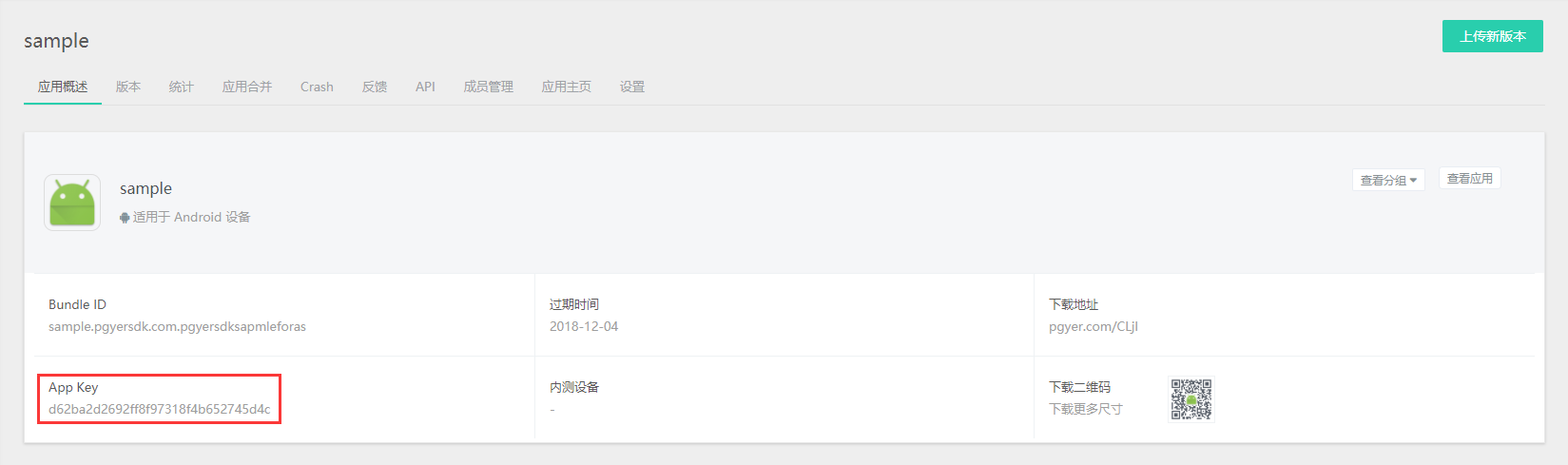
You can find the App Key on the App management page:
Import the SDK
Android Studio
Add the repository in the project-level build.gradle:
allprojects {
    repositories {
        jcenter()
        maven { url "https://raw.githubusercontent.com/Pgyer/mvn_repo_pgyer/master" }
    }
}
Add the dependency in the module-level build.gradle:
dependencies {
    compile 'com.pgyersdk:sdk:3.0.10'
}
Sample project: PgyerSdkDemoForAndroidStudio.
Android Studio users can also integrate via the same jar approach as Eclipse.
Eclipse
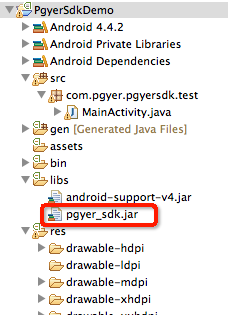
Copy the jar into the project's libs directory.
Configure AndroidManifest
aar
Only the App Key is required:
<manifest xmlns:android="http://schemas.android.com/apk/res/android">
    <application>

        <activity android:name="com.pgyersdk.feedback.FeedbackActivity"/>

        <meta-data
            android:name="PGYER_APPID"
            android:value="4b6e8877dfcc2462bedb37dcf66b6d87" >
        </meta-data>
    </application>
</manifest>
PGYER_APPID is the App Key.jar
With the jar you need to declare all permissions, the provider, and the App Key:
<uses-permission android:name="android.permission.ACCESS_NETWORK_STATE" />
<uses-permission android:name="android.permission.INTERNET" />
<uses-permission android:name="android.permission.READ_PHONE_STATE" />
<uses-permission android:name="android.permission.ACCESS_WIFI_STATE" />
<uses-permission android:name="android.permission.WRITE_EXTERNAL_STORAGE" />
<uses-permission android:name="android.permission.RECORD_AUDIO" />
<uses-permission android:name="android.permission.GET_TASKS"/>

<uses-permission android:name="android.permission.READ_LOGS" />

<application
    android:allowBackup="true"
    android:icon="@drawable/ic_launcher"
    android:label="@string/app_name"
    android:theme="@style/AppTheme">

    <activity android:name="com.pgyersdk.feedback.FeedbackActivity"/>

    <provider
        android:name="com.pgyersdk.PgyerProvider"
        android:authorities="${applicationId}.com.pgyer.provider"
        android:exported="false"/>

    <meta-data
        android:name="PGYER_APPID"
        android:value="4b6e8877dfcc2462bedb37dcf66b6d87" >
    </meta-data>
</application>
Android 8.0 requires an extra permission to install apk files:
<uses-permission android:name="android.permission.REQUEST_INSTALL_PACKAGES" />Android 9.0 requires allowing the SDK's HTTP requests. Add network_security_config.xml:
<?xml version="1.0" encoding="utf-8"?>
<network-security-config>
    <domain-config cleartextTrafficPermitted="true">
        <domain includeSubdomains="true">www.pgyer.com</domain>
        <domain includeSubdomains="true">app-global.pgyer.com</domain>
    </domain-config>
</network-security-config>
User Feedback
Enable Shake-to-Feedback
Default dialog presentation:
new PgyerFeedbackManager.PgyerFeedbackBuilder().builder().register();Switch to an Activity presentation:
new PgyerFeedbackManager.PgyerFeedbackBuilder()
    .setDisplayType(PgyerFeedbackManager.TYPE.DIALOG_TYPE)
    .builder()
    .register();
Options
| Method | Description | Default |
|---|---|---|
setShakeInvoke(boolean) | Whether to trigger by shake. When false, call invoke() to display directly | true |
setDisplayType(TYPE) | Presentation style, DIALOG_TYPE or ACTIVITY_TYPE | DIALOG_TYPE |
setColorDialogTitle(String) | Dialog title text color | #ffffff |
setColorTitleBg(String) | Dialog title bar background color | #2E2D2D |
setBarBackgroundColor(String) | Top/bottom bar background color | #2E2D2D |
setBarButtonPressedColor(String) | Button pressed color | #383737 |
setColorPickerBackgroundColor(String) | Color picker background color | #272828 |
setBarImmersive(boolean) | Whether to use immersive mode in Activity presentation | false |
setMoreParam(String, String) | Attach custom feedback data; can be called multiple times | — |
Trigger Feedback Manually
Dialog presentation:
new PgyerFeedbackManager.PgyerFeedbackBuilder()
    .setShakeInvoke(false)
    .setDisplayType(PgyerFeedbackManager.TYPE.DIALOG_TYPE)
    .setColorDialogTitle("#FF0000")
    .setColorTitleBg("#FF0000")
    .setBarBackgroundColor("#FF0000")
    .setBarButtonPressedColor("#FF0000")
    .setColorPickerBackgroundColor("#FF0000")
    .setMoreParam("KEY1", "VALUE1")
    .setMoreParam("KEY2", "VALUE2")
    .builder()
    .invoke();
Activity presentation:
new PgyerFeedbackManager.PgyerFeedbackBuilder()
    .setShakeInvoke(false)
    .setBarBackgroundColor("#FF0000")
    .setBarButtonPressedColor("#FF0000")
    .setColorPickerBackgroundColor("#FF0000")
    .setBarImmersive(true)
    .setDisplayType(PgyerFeedbackManager.TYPE.ACTIVITY_TYPE)
    .setMoreParam("KEY1", "VALUE1")
    .setMoreParam("KEY2", "VALUE2")
    .builder()
    .invoke();
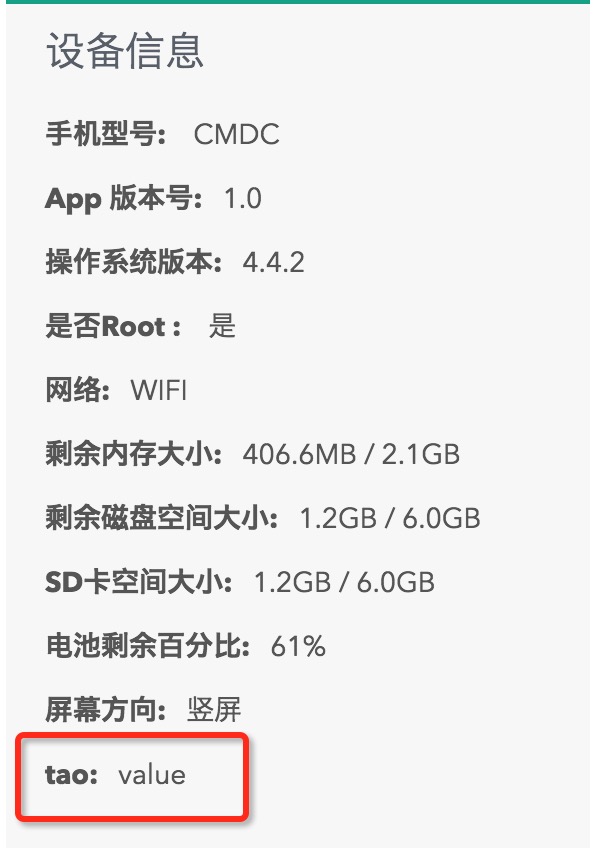
Custom feedback data shows up on the feedback detail page:
Check for Updates
Default Dialog
/** Deprecated */
PgyUpdateManager.register();

/** Recommended */
new PgyUpdateManager.Builder().register();

/** With configuration */
new PgyUpdateManager.Builder()
    .setForced(true)              // Force update. v3.0.4+ can also set this in the web console; either side enabling it triggers the prompt
    .setUserCanRetry(false)       // Allow retry on failure
    .setDeleteHistroyApk(false)   // Delete local historical APKs before checking; default true
    .register();
Update Check With Callback
Old signature:
/** Deprecated */
PgyUpdateManager.register(new UpdateManagerListener() {
    @Override
    public void onNoUpdateAvailable() {
        // No update
    }

    @Override
    public void onUpdateAvailable(AppBean appBean) {
        Log.d("pgyer", "there is new version can update"
                + "new versionCode is " + appBean.getVersionCode());
        // DownloadFileListener only fires when this method is called
        // If you handle downloads yourself, DownloadFileListener is not needed
        PgyUpdateManager.downLoadApk(appBean.getDownloadURL());
    }

    @Override
    public void checkUpdateFailed(Exception e) {
        // Called when the update is rejected (removed, expired, outside install window, download count exhausted) or there is no network
    }
});
The new signature adds a callback for the built-in Pgyer download flow:
new PgyUpdateManager.Builder()
    .setForced(true)
    .setUserCanRetry(false)
    .setDeleteHistroyApk(false)
    .setUpdateManagerListener(new UpdateManagerListener() {
        @Override
        public void onNoUpdateAvailable() {
            Log.d("pgyer", "there is no new version");
        }

        @Override
        public void onUpdateAvailable(AppBean appBean) {
            Log.d("pgyer", "there is new version can update"
                + "new versionCode is " + appBean.getVersionCode());
            PgyUpdateManager.downLoadApk(appBean.getDownloadURL());
        }

        @Override
        public void checkUpdateFailed(Exception e) {
            Log.e("pgyer", "check update failed ", e);
        }
    })
    // This callback only fires after PgyUpdateManager.downLoadApk() is called
    // Use it to implement your own download progress UI; omit it when using the default UI
    .setDownloadFileListener(new DownloadFileListener() {
        @Override
        public void downloadFailed() {
            Log.e("pgyer", "download apk failed");
        }

        @Override
        public void downloadSuccessful(File file) {
            Log.e("pgyer", "download apk success");
            // Call the SDK's built-in install method
            PgyUpdateManager.installApk(file);
        }

        @Override
        public void onProgressUpdate(Integer... integers) {
            Log.e("pgyer", "update download apk progress" + integers);
        }
    })
    .register();
ProGuard
No extra configuration is usually required. If you need to keep the classes:
-libraryjars libs/pgyer_sdk_x.x.jar
-dontwarn com.pgyersdk.**
-keep class com.pgyersdk.** { *; }
-keep class com.pgyersdk.**$* { *; }
Debugging
The SDK emits runtime logs that you can filter in Logcat using the PgyerSDK tag.