Android SDK Eclipse Plugin
Retirement status of the Pgyer Android SDK Eclipse plugin and integration notes for legacy projects.
The Pgyer SDK and Eclipse plugin are no longer maintained, and the original online update site is unavailable. For new integrations, use the Pgyer API directly. This page is only for legacy environments where the plugin is already installed.
The PgyerSDK Eclipse plugin lets you integrate the Pgyer Android SDK into an Android project in Eclipse / ADT with a single click.
Plugin Status
The original Eclipse update site has been retired, so the plugin can no longer be installed through Help → Install New Software.... If your environment does not already have the plugin, do not start a new integration with it. Use the Pgyer API for upload, version lookup, and other automation instead.
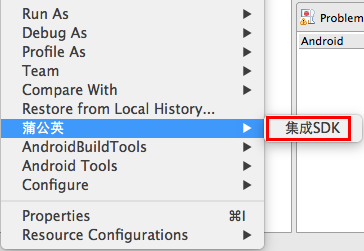
In a legacy environment where the plugin is already installed, select an Android project in the workspace. A Pgyer entry in the context menu confirms that the plugin is present. The steps below document its historical behavior; they do not indicate ongoing support.
Integrate the SDK
Right-click the Android project and choose Pgyer → Integrate SDK. The plugin will automatically:
- Add the Pgyer SDK to the project's
libsdirectory. - Verify that
AndroidManifest.xmlcontains the permissions required by the SDK.
Once you see the "Configuration validated" prompt, you can start calling the SDK's APIs.