Xiaomi / Redmi Installation Notes
Common issues when installing non-Mi-Store APKs on Xiaomi and Redmi devices — Security Center blocking, risk warnings, unreviewed prompts, and store recommendations — with fixes for each.
When installing an APK from outside Mi Store on a Xiaomi or Redmi device, MIUI's security policies and browser download dialogs can produce a variety of prompts. This page covers the common cases; read it alongside Android installation steps.
Security Center Blocking the Install
MIUI Security Center may block apps from unknown sources or apps that have not been reviewed. You can grant install permission in system settings:
- Open the Settings app;
- Go to Passwords & security or Additional settings > Other advanced settings;
- Open Install unknown apps and grant permission to your browser or file manager;
- You can also disable the relevant scan in Security Center.
"This App May Be Risky" Warning
If a safety warning appears during install, tap Install anyway — or tap I understand the risk and confirm — to continue.
"APK Not Reviewed by Xiaomi" Prompt
When the browser's download dialog says the app has not been reviewed by Xiaomi, tap Download next to the file and ignore the review notice.
"Not Security-Scanned" Prompt
If the system says the APK has not been security-scanned during install, tap Install anyway to dismiss the prompt.
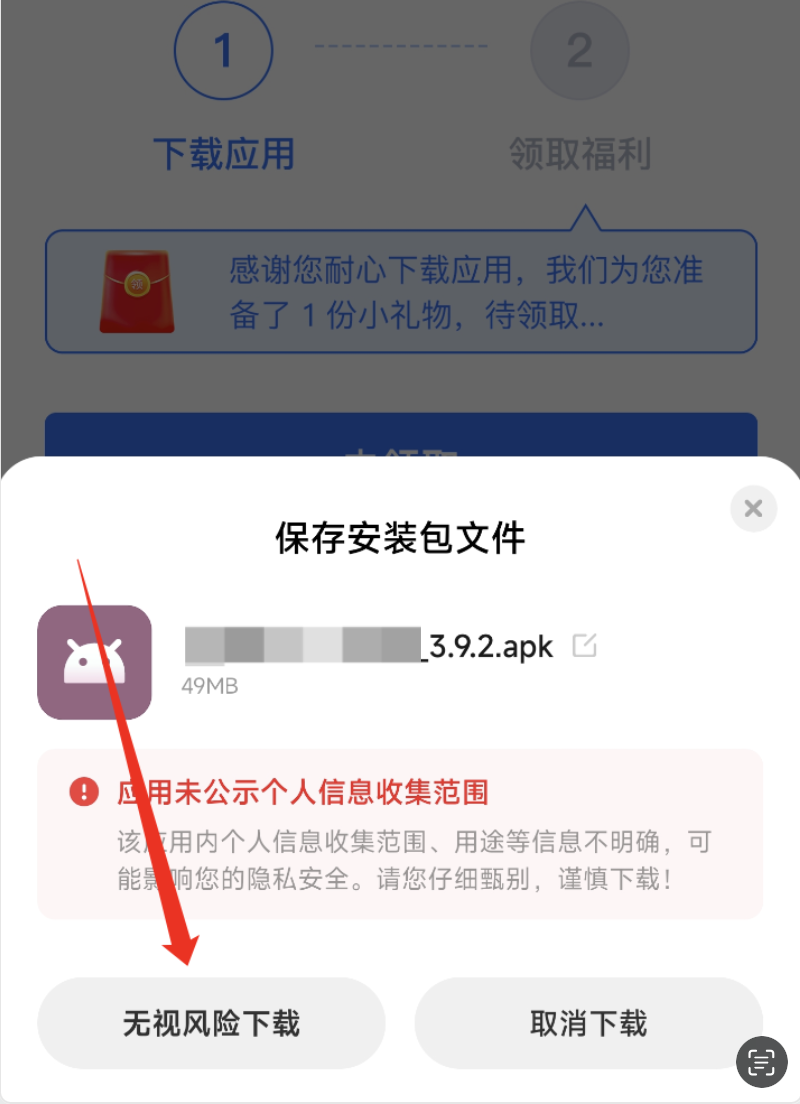
"Personal Information Collection Scope Not Disclosed" Prompt
If the system says the app has not disclosed the scope of personal information it collects, look for Download anyway in the dialog (the label may be small) and tap it.
Recommendation to Install via Mi Store
If the system suggests downloading the same app from Mi Store, choose Cancel or Ignore recommendation and continue installing the APK you already downloaded.
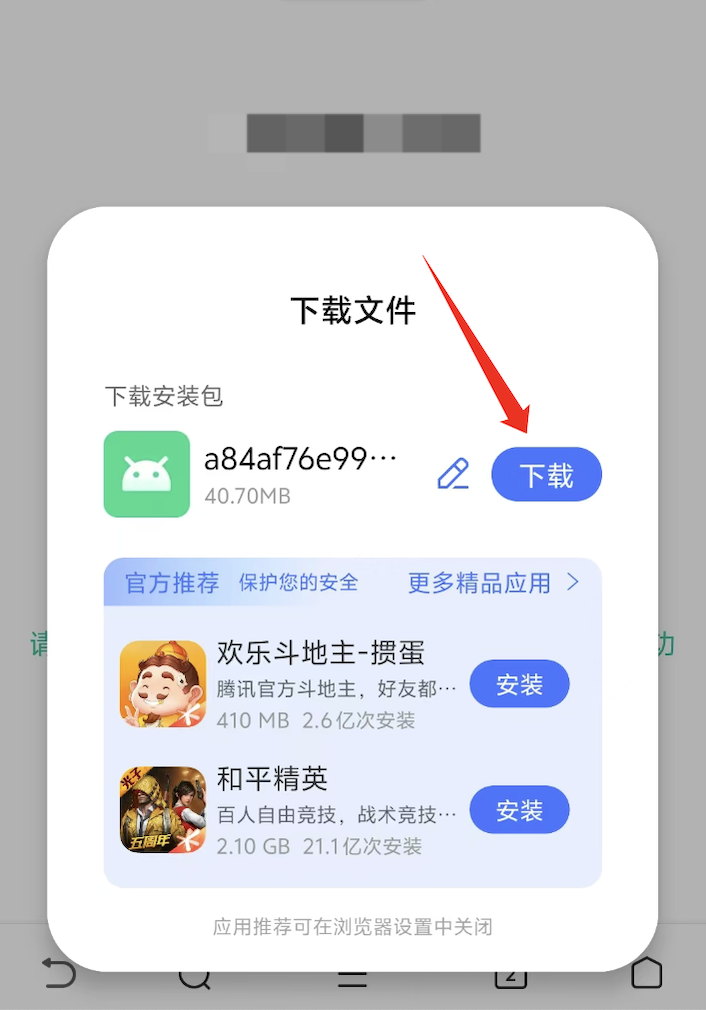
Promoted Apps in the Browser Download Dialog
The browser sometimes bundles recommended apps at the bottom of the download dialog. Tap Download next to the target APK only; you can disable these recommendations in the browser settings.
Huawei / Honor Installation Notes
Common issues when installing non-AppGallery APKs on Huawei and Honor devices — Pure Mode blocking, missing browser download prompts, and unknown-sources permission — with fixes for each.
OPPO Installation Notes
Common prompts when installing non-app-store APKs on OPPO devices — not security-reviewed, not-filed-with-regulator warnings — and how to handle them.